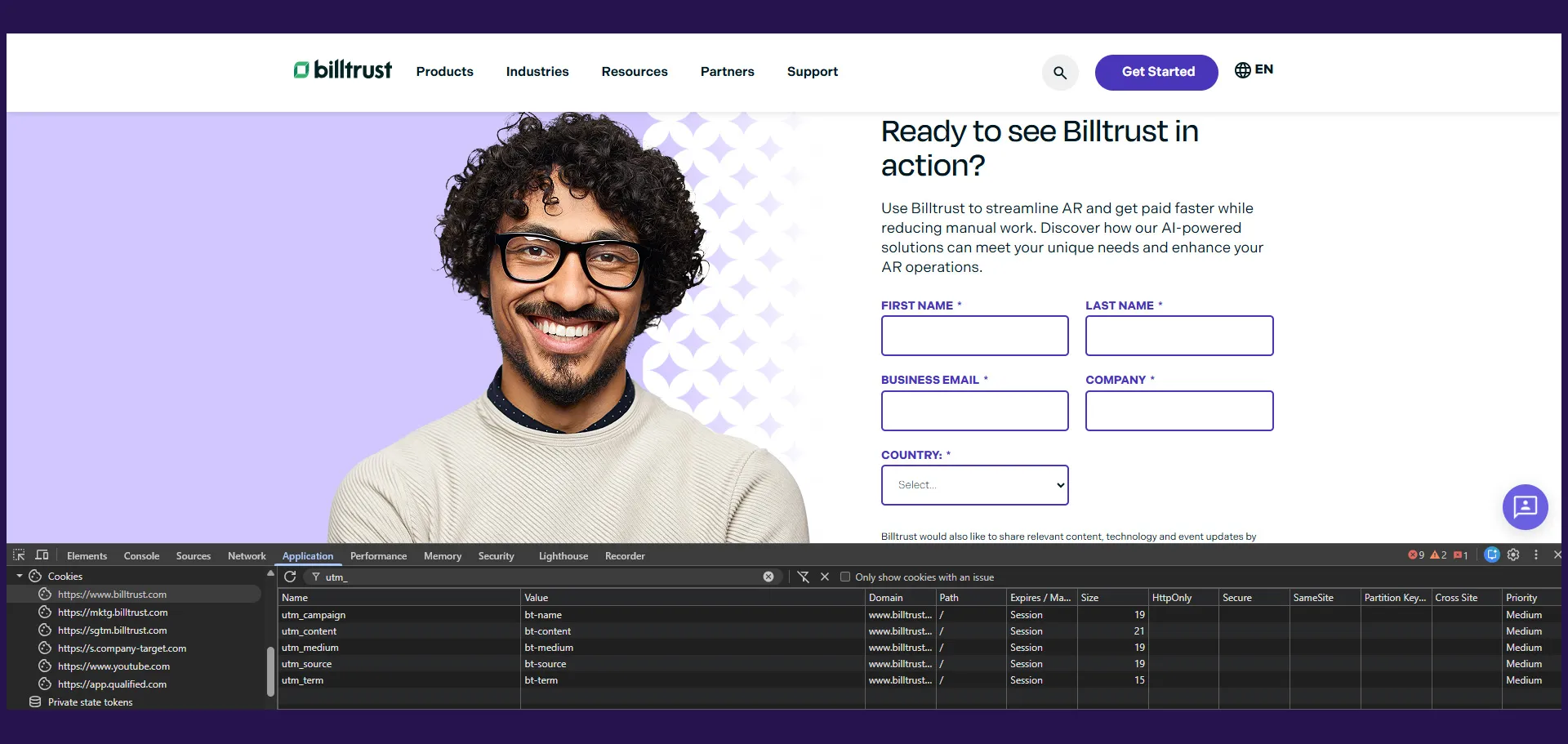
While working at Billtrust, one of the recurring friction points we observed in the digital marketing funnel was gated content fatigue.
Returning visitors who had already filled out forms in the past were repeatedly asked to complete the same lead-gen forms every time they wanted to access a new white paper, webinar, or downloadable resource.
From a user experience standpoint, this created unnecessary friction.
From a marketing standpoint, however, form fills were still a critical KPI tied directly to campaign attribution, engagement reporting, and downstream pipeline analytics.
The challenge became:
How do we reduce friction for known users while still preserving measurable conversion activity inside Marketo?
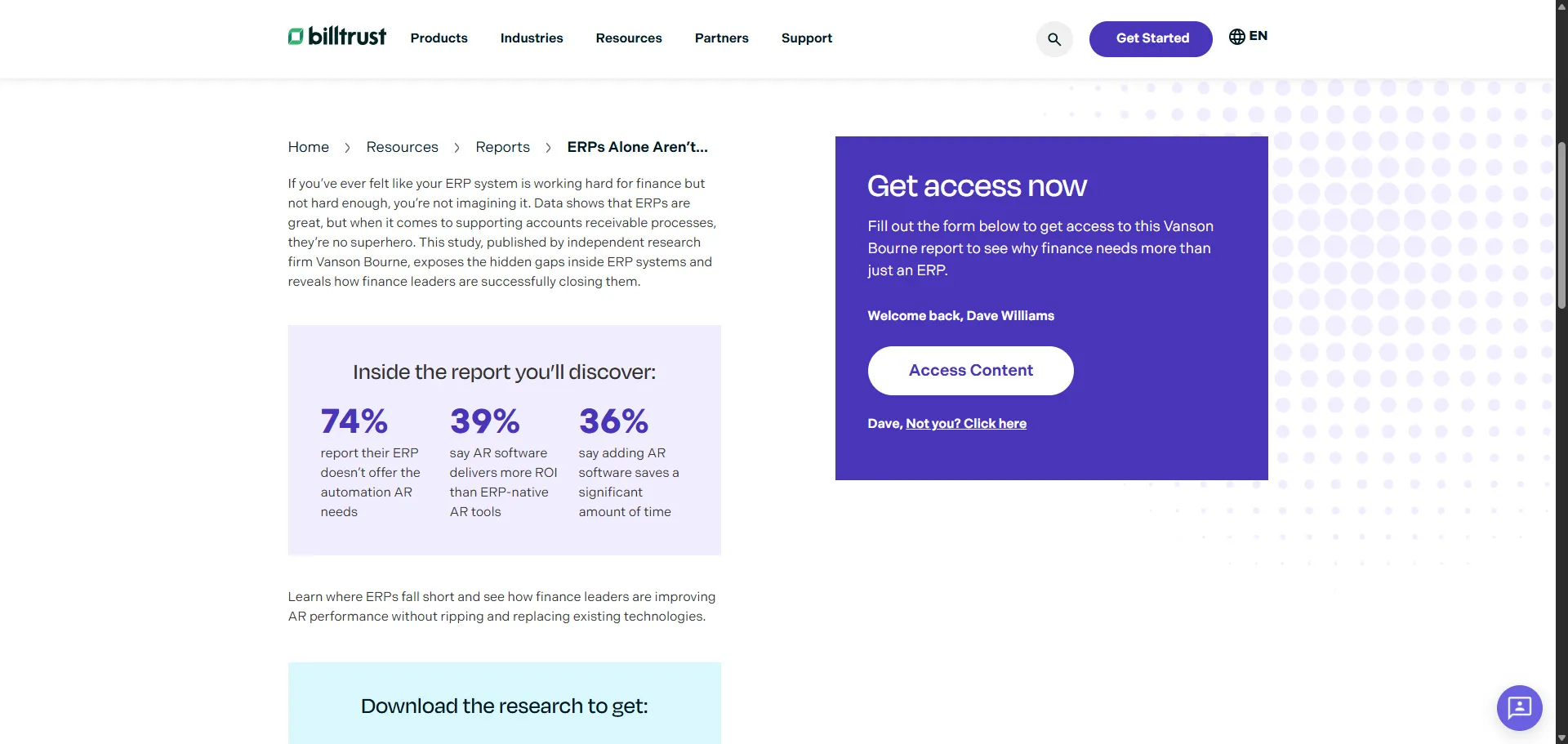
To solve this, I developed a Marketo-powered known visitor personalization experience inside WordPress that dynamically detected returning users and replaced traditional gated forms with a streamlined “Welcome Back” experience.
The result was a significantly smoother user journey while still generating valid Filled Out Form activities inside Marketo for attribution and reporting.
The Business Problem
Traditional gated content workflows often optimize for lead capture, but not necessarily for user experience.
For first-time visitors, forms are valuable because they help marketing teams collect critical lead information like:
- Name
- Company
- Industry
- Persona
- Buying stage
However, for returning users already known in the CRM and Marketo database, forcing them to repeatedly complete forms creates several problems:
- Increased friction
- Lower engagement rates
- Reduced content consumption
- Higher abandonment rates
- Poor overall digital experience
At the same time, marketing operations teams still rely heavily on:
- Form-fill attribution
- Campaign engagement tracking
- Program membership
- Lead scoring
- MQL reporting
- Pipeline influence analytics
Simply removing the form entirely for known users would improve UX, but it would also break critical marketing KPIs.
The solution needed to balance both goals:
- Reduce friction for returning users
- Preserve Marketo conversion tracking and attribution
Project Goals
The implementation had several technical and business objectives.
Technical Goals
- Detect known Marketo visitors using Munchkin session data
- Dynamically personalize the gated content experience
- Maintain compatibility with existing Marketo forms
- Preserve Marketo
Filled Out Formactivities - Auto-populate hidden attribution fields
- Reduce frontend complexity for returning visitors
- Maintain WordPress integration flexibility
Marketing Goals
- Increase gated content engagement
- Improve return visitor experience
- Preserve campaign attribution data
- Maintain accurate form-fill KPIs
- Improve conversion rates
- Reduce form abandonment
What the Application Does
The implementation introduced a dual-state gated content experience.
Unknown Visitors
If the visitor was unknown to Marketo:
- The standard Marketo form appeared
- Users manually entered their information
- The form submission generated a normal Marketo conversion
This was the traditional gated content flow.
Known Visitors
If the current pageview or Munchkin session was already associated with a known person in Marketo, the experience changed dynamically.
Instead of showing a long form, users saw a streamlined personalized message:
<div class="mktoTemplateBox">
  <p>Welcome back, Dave Williams</p>
  <button type="submit" class="mktoButton">Access Content</button>
  <p>Dave, <a class="mktoNotYou">Not you? Click here to reset</a></p>
</div>
When the user clicked the download button:
- The asset downloaded immediately
- A Marketo
Filled Out Formactivity was still generated - Marketing attribution remained intact
- The user avoided repetitive form entry
This dramatically reduced friction while preserving analytics integrity.
Frontend Architecture
The implementation combined:
- Marketo Forms 2.0
- WordPress
- JavaScript personalization logic
- Hidden field enrichment
- Cookie/session-based attribution
- Marketo Known Visitor functionality
High-Level Flow
The frontend experience followed this sequence:
- Marketo form initializes
- Munchkin identifies known visitor status
- JavaScript determines visitor state
- Form behavior changes dynamically
- Hidden attribution fields populate automatically
- User downloads content with minimal friction
- Marketo still logs a valid form-fill activity
Hidden Attribution Enrichment
One of the most important parts of the implementation was preserving attribution metadata.
The application automatically enriched Marketo forms with:
- UTM parameters
- Referrer information
- Program IDs
- Persona data
- Industry data
- Product interest
- Buying stage
- CTA metadata
This data was sourced from:
- Cookies
- Session storage
- Query parameters
- Page-level data attributes
Example configuration:
var fieldFillRules = [
  {
    name: 'UTM_Source__c',
    channel: 'cookie',
    selector: 'utm_source',
  },
  {
    name: 'UTM_Campaign__c',
    channel: 'cookie',
    selector: 'utm_campaign',
  },
  {
    name: 'Form_Product__c',
    channel: 'sessionStorage',
    selector: 'Use this value if field is still empty.',
  },
];
This ensured that every gated content interaction still carried meaningful campaign attribution data into Marketo and Salesforce.
Session & Cookie-Based Personalization
The implementation leveraged:
- Marketo Munchkin tracking
- Cookies
- Session storage
- URL parameter parsing
to determine whether a visitor was already known.
Using the FormsPlus utility library and Marketo session data, the frontend could intelligently personalize the experience without requiring backend API calls.
This allowed the experience to remain:
- Fast
- Lightweight
- Scalable
- CMS-friendly
Dynamic Form Metadata Injection
Another key feature was dynamically injecting contextual metadata into hidden Marketo fields.
The WordPress wrapper component stored metadata directly in HTML data-* attributes:
<div
  class="marketo-form__wrapper"
  data-program-id='{"fieldName":"formprogramID","value":"1234"}'
  data-industry='{"fieldName":"Form_Industry__c","value":"Finance"}'
></div>
JavaScript then parsed and injected these values into the Marketo form dynamically.
Example:
var industryIdData = formWrapper.dataset.industry;
var industryIdValue = JSON.parse(industryIdData);

document.querySelector('input[name="Form_Industry__c"]').value = industryIdValue.value;
This architecture allowed marketers to configure campaign metadata directly from WordPress without requiring engineering changes for every new asset.
Preserving Marketo Form Fill Activities
One of the biggest technical challenges was ensuring that known visitors still generated valid Marketo activities.
Without this, reporting dashboards and attribution models would break.
The implementation leveraged Marketo’s known visitor HTML functionality while still preserving:
Filled Out Form- Campaign triggers
- Smart campaign logic
- Lead scoring
- Program success metrics
This was critical because the marketing organization still relied heavily on form-fill metrics as a success KPI.
The streamlined UX improved engagement while maintaining operational continuity for the marketing team.
Why This Approach Worked
This implementation succeeded because it balanced two competing priorities:
| User Experience | Marketing Attribution |
|---|---|
| Reduced friction | Preserved form fills |
| Faster access to content | Maintained campaign tracking |
| Personalized experience | Continued lead scoring |
| Lower abandonment | Accurate reporting |
Instead of optimizing exclusively for lead capture or exclusively for UX, the solution supported both.
Business Impact
The project produced measurable improvements across several areas.
Increased Gated Content Engagement
Returning users were significantly more likely to consume additional content because they no longer needed to repeatedly fill out forms.
This reduced:
- User frustration
- Form abandonment
- Drop-off before asset access
Improved User Experience
The “Welcome Back” personalization created a much smoother digital experience.
Instead of treating every visitor like a brand-new lead, the site acknowledged returning users and respected their previous interactions.
That small UX improvement had a major impact on perceived product and brand quality.
Preserved Marketing KPIs
Most importantly, the implementation preserved the metrics the marketing organization depended on:
- Form fills
- Attribution tracking
- Campaign reporting
- Engagement scoring
- Program success metrics
This meant the business gained UX improvements without sacrificing operational reporting requirements.
Lessons Learned
This project reinforced several important lessons about marketing technology architecture.
1. UX and Attribution Can Coexist
Many organizations assume they must choose between:
- Better user experience
- Better analytics
In reality, thoughtful engineering can support both simultaneously.
2. Returning Users Should Be Treated Differently
Not every visitor should experience the same funnel.
Known users already demonstrated intent and engagement.
Reducing friction for those users creates a more modern digital experience.
3. Hidden Metadata Is Extremely Valuable
Capturing contextual metadata automatically provides much richer analytics downstream.
UTM enrichment, persona mapping, and campaign metadata dramatically improved reporting quality.
4. Marketing Technology Requires Frontend Engineering
Modern MarTech implementations increasingly rely on frontend architecture patterns:
- State management
- Personalization logic
- Event orchestration
- Browser storage
- Analytics pipelines
This project sat directly at the intersection of engineering and marketing operations.
Technical Resources
A few resources heavily influenced the implementation.
Adobe Marketo Documentation
Custom HTML forms for known people:
Sanford Whiteman (TEKNKL)
Re-enabling the onSubmit event when Known Visitor HTML is enabled:
These resources were instrumental in understanding Marketo’s known visitor behavior and extending it safely.
Conclusion
This project became one of my favorite examples of solving both technical and business problems simultaneously.
By combining:
- Marketo Forms 2.0
- WordPress
- Frontend personalization
- Session-aware UX
- Hidden field enrichment
- Attribution preservation
I was able to create a gated content experience that:
- Reduced friction
- Improved engagement
- Preserved marketing KPIs
- Enhanced personalization
- Maintained reporting integrity
It was a strong example of how frontend engineering and marketing operations can work together to create smarter digital experiences.
As marketing technology stacks continue evolving, I believe this type of personalization-first architecture will become increasingly standard across modern B2B websites.