Modern marketing analytics has changed dramatically over the past few years.
Between GDPR, browser privacy restrictions, ad blockers, Safari ITP, and increasing limitations around third-party cookies, traditional client-side tracking has become less reliable and more difficult to govern at scale.
While working at Billtrust, I helped implement a server-side Google Tag Manager (sGTM) architecture designed to improve:
- GDPR compliance
- Data governance
- Marketing attribution accuracy
- Performance optimization
- First-party data collection
- Platform scalability
This implementation supported Billtrust’s global digital marketing ecosystem and created a stronger foundation for analytics, advertising, and demand generation measurement across regions.
Why We Moved to Server-Side GTM
Billtrust operates globally, meaning we needed to account for:
- GDPR compliance
- Consent-based tracking
- Cross-region privacy requirements
- Browser tracking limitations
- Ad platform signal degradation
- Increasing restrictions on client-side JavaScript tracking
Traditional browser-based tagging created several challenges:
Problems with Client-Side Tracking
Browser Privacy Restrictions
Safari, Firefox, and Brave increasingly limit:
- Third-party cookies
- Script execution
- Tracking persistence
- Attribution windows
This negatively impacts:
- Campaign attribution
- Conversion tracking
- Retargeting audiences
- Lead source accuracy
Ad Blockers & Script Blocking
Many users block:
- Analytics scripts
- Advertising pixels
- Tracking libraries
This creates gaps in:
- GA4 reporting
- Google Ads conversions
- LinkedIn attribution
- Funnel reporting
Governance Complexity
Over time, large GTM containers become difficult to manage:
- Hundreds of tags
- Multiple vendors
- Inconsistent data collection
- Duplicate firing risks
- Compliance challenges
We needed a more centralized and controlled architecture.
The Architecture We Implemented
The solution centered around:
- Web GTM Container
- Server-Side GTM Container
- GA4
- Google Ads
- Consent Mode
- OneTrust CMP
- First-party endpoints
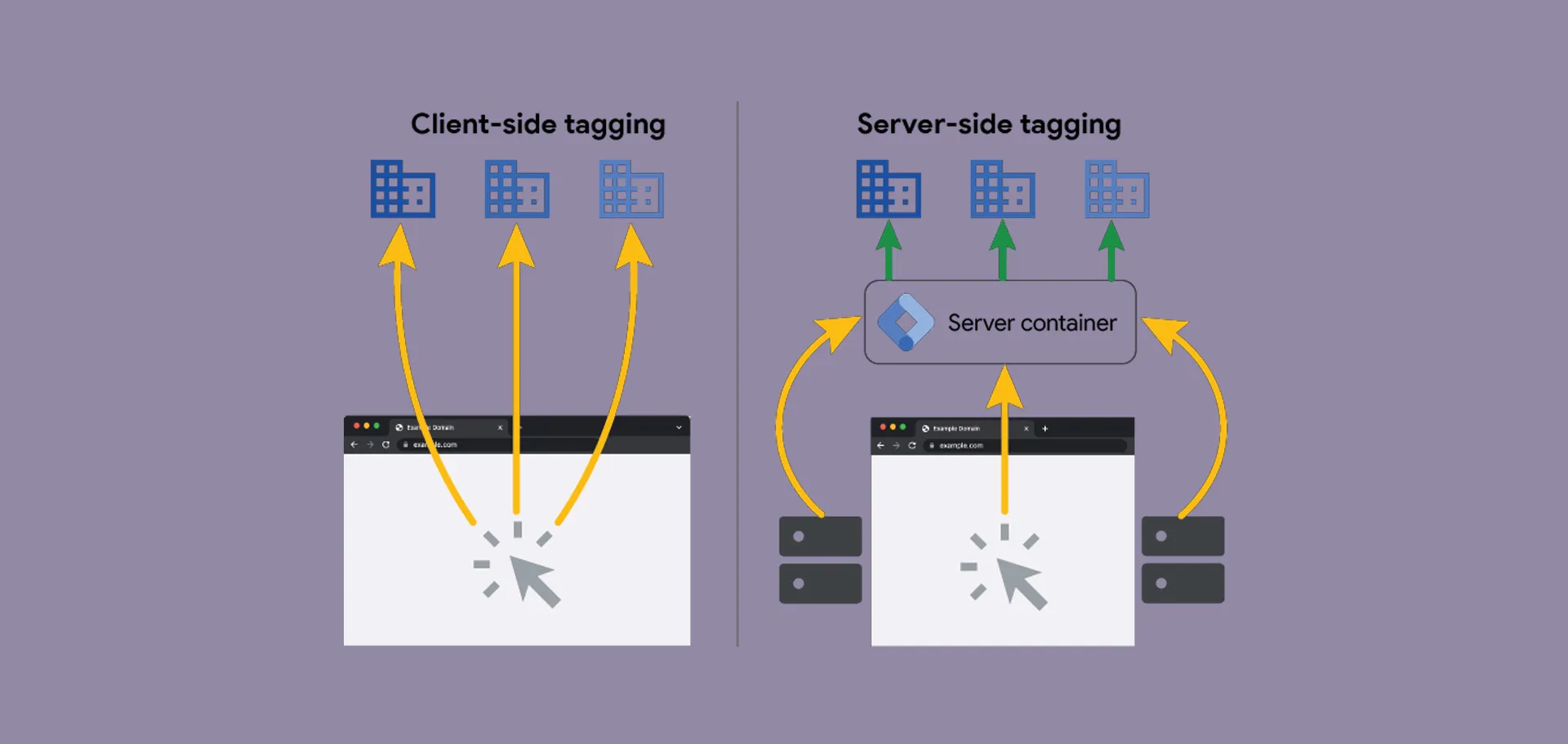
The overall flow looked like this:
Website Visitor
      ↓
Web GTM Container
      ↓
GA4 Event Request
      ↓
Server-Side GTM Endpoint
      ↓
Vendor Destinations
(GA4, Ads, LinkedIn, etc.)
Instead of sending marketing and analytics requests directly from the browser to vendors, requests were routed through a first-party server container.
This dramatically improved control over data collection and consent enforcement.
Server Container Configuration
The exported GTM configuration showed several important architectural decisions.
Dedicated Server-Side Container
The implementation used a dedicated server-side GTM container configured to process:
- GA4 requests
- Event forwarding
- Consent-aware event handling
- Vendor integrations
- Request transformation
This created a centralized event-processing layer between the website and third-party vendors.
First-Party Tracking Endpoint
One of the biggest advantages of server-side tagging is the ability to use a first-party subdomain for event collection.
Example:
https://metrics.billtrust.comInstead of:
https://google-analytics.comBenefits included:
- Better cookie persistence
- Reduced ad blocker interference
- Improved attribution continuity
- More reliable session tracking
- Stronger first-party identity handling
Integrating Consent Mode + OneTrust
A critical requirement was ensuring all tracking respected user consent choices.
The architecture integrated:
- OneTrust CMP
- Google Consent Mode
- GTM consent signals
- Conditional event forwarding
How Consent Was Managed
The workflow looked like this:
Visitor Arrives
      ↓
OneTrust Banner Loads
      ↓
User Provides Consent
      ↓
Consent State Updated in GTM
      ↓
Server Container Receives Consent Signals
      ↓
Tags Fire Conditionally
This ensured that:
- Advertising tags only fired with consent
- Analytics respected regional requirements
- Vendor requests were controlled centrally
- Tracking behavior aligned with GDPR requirements
Benefits of Server-Side GTM
1. Improved Attribution Accuracy
By routing requests server-side, we reduced tracking loss caused by:
- Browser restrictions
- JavaScript blocking
- Cookie limitations
- Client-side failures
This improved:
- Campaign attribution
- Lead source tracking
- Multi-touch reporting
- Conversion reliability
2. Better Website Performance
Reducing vendor scripts in the browser improved:
- Page speed
- Script execution overhead
- Render performance
- Core Web Vitals
Instead of dozens of direct vendor requests, the browser primarily communicated with a single first-party endpoint.
3. Stronger Privacy Governance
Server-side tagging created centralized governance around:
- Data collection
- PII handling
- Consent enforcement
- Vendor routing
- Request filtering
This was especially important for a global B2B organization operating across multiple regulatory regions.
4. Cleaner Vendor Integrations
Instead of embedding vendor logic everywhere on the frontend, integrations became easier to standardize.
Examples included:
- Google Ads
- GA4
- LinkedIn Insight Tag
- Floodlight
- Marketing automation systems
This reduced implementation inconsistencies across teams.
Event Forwarding Strategy
The architecture primarily used GA4 as the event transport layer.
Typical flow:
Browser → GA4 Event → Server Container → VendorsThis provided several advantages:
- Unified event schema
- Cleaner data governance
- Simplified debugging
- Easier platform onboarding
- Reduced frontend complexity
Instead of each vendor requiring its own frontend implementation, vendors could subscribe to normalized events server-side.
Key Technical Considerations
Consent Synchronization
One challenge with server-side tagging is ensuring consent states remain synchronized between:
- Browser
- GTM web container
- Server container
- Vendors
This required carefully mapping consent categories and passing consent states with events.
First-Party Cookie Strategy
Server-side tagging improves cookie durability, but implementation still requires careful planning around:
- Cookie expiration
- Domain scoping
- SameSite policies
- Regional compliance
This was especially important for attribution continuity.
Debugging Complexity
Server-side GTM introduces additional debugging layers.
Instead of only validating browser requests, troubleshooting often requires checking:
- Browser requests
- Server requests
- Event payloads
- Vendor forwarding
- Consent state propagation
However, the improved governance and reliability were well worth the added complexity.
Marketing Impact
From a marketing operations perspective, server-side GTM created measurable improvements in:
Attribution Confidence
Marketing teams gained more reliable reporting for:
- Paid media
- Organic acquisition
- Demand generation campaigns
- Conversion tracking
Cleaner Analytics
Data quality improved due to:
- Reduced duplicate firing
- Better event standardization
- Centralized governance
- More consistent session handling
Future-Proofing Measurement
As privacy regulations and browser restrictions continue evolving, server-side tagging provides a more durable analytics architecture than traditional client-side implementations alone.
This positioned Billtrust to adapt more effectively to future privacy changes.
Final Thoughts
Implementing server-side GTM at Billtrust was not simply a technical upgrade.
It was a foundational shift in how marketing data was collected, governed, and activated.
By combining:
- Server-side Google Tag Manager
- Consent Mode
- OneTrust CMP
- First-party tracking
- Centralized event routing
we built a more scalable, privacy-conscious, and future-ready analytics ecosystem.
For organizations operating globally, especially in B2B SaaS environments, server-side tagging is increasingly becoming less of an optimization and more of a necessity.
As browser privacy controls continue tightening, the ability to maintain compliant, accurate, and resilient measurement infrastructure will become a major competitive advantage for modern marketing teams.