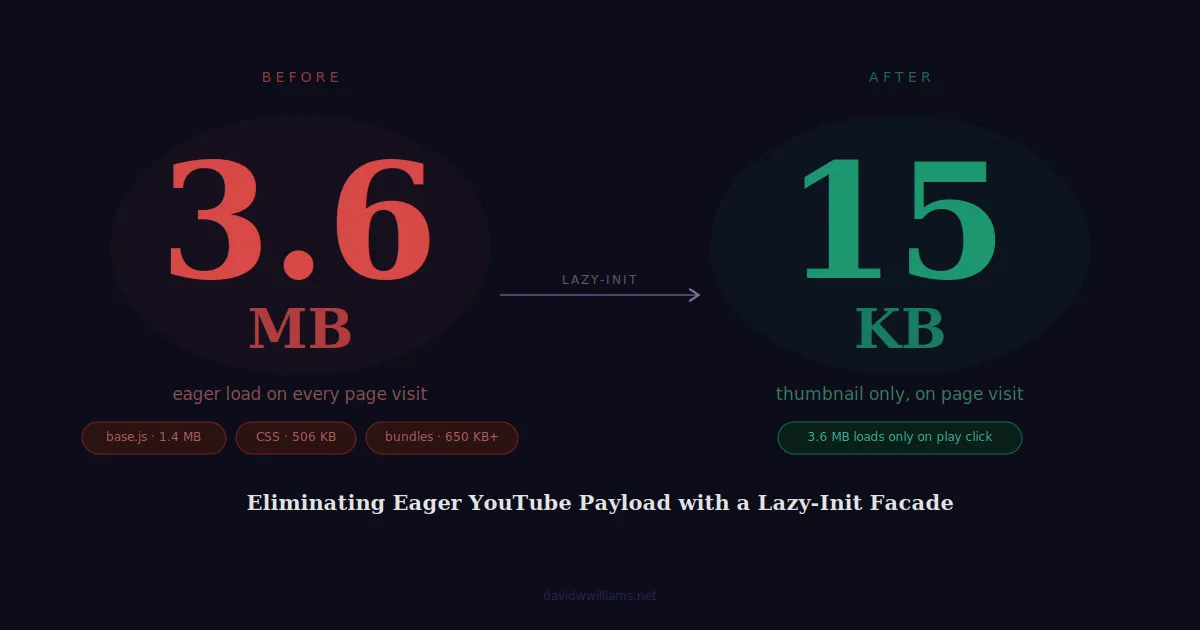
During a recent performance optimization initiative for Billtrust, I was auditing network payloads across pages with YouTube video embeds. The number I landed on was hard to ignore: every page with a video was loading approximately 3.6 MB of YouTube resources on page load, regardless of whether a visitor ever clicked play.
The embed system powering those videos was one I built in 2022, a custom JavaScript tracking layer that connected the YouTube IFrame API with Marketo and Piwik PRO to capture play events, pause events, completions, and playback milestones at 25%, 50%, and 75%. If you want the full context on that implementation, I covered it in detail in Building a Video Engagement Tracking System with YouTube API, Marketo, and Piwik PRO. That tracking layer was working correctly and had survived a full CMS migration from Sitecore to WordPress/Elementor. The goal of this project was not to replace it, it was to make it faster without touching any of its behavior.
That payload consists of base.js (~1.4 MB), www-player.css (~506 KB), and additional ytembeds bundles (~650 KB+). Every single page visit was absorbing that cost, before any user intent was expressed.
This is a known issue with the YouTube IFrame API’s standard embed pattern. The browser has no way to know the user won’t interact with the video, so it loads everything immediately. The fix is equally well-known in principle, defer all YouTube resources until a user clicks play, but the implementation details matter quite a bit, especially on a production WordPress site with an existing analytics tracking layer, multiple video layouts, and Elementor off-canvas popups in the mix.
The Starting Point
The existing setup used a custom vanilla JavaScript file that detected <div id="ytplayer"> placeholder elements on page load, injected the YouTube IFrame API script immediately, and initialized YT.Player instances for each video found. Engagement events play, pause, completion, and playback milestones at 25%, 50%, and 75% were tracked in real time and sent to both Marketo via the Munchkin API and Piwik PRO via custom analytics events.
The WordPress shortcode powering each embed outputted a simple placeholder div:
<div id="ytplayer" data-youtube-id="VIDEO_ID" data-youtube-title="Video Title"></div>The tracking layer was working correctly and had to survive the refactor intact. The goal was to eliminate the eager YouTube payload without touching analytics behavior.
Why I Didn’t Use lite-youtube-embed
Before writing any code I evaluated lite-youtube-embed, Paul Irish’s well-regarded Web Component approach to this exact problem. It’s the right choice for many setups, but not this one, for three reasons:
The PHP shortcode output is a <div> placeholder, not a <lite-youtube> custom element. Adopting lite-youtube-embed would require refactoring both the shortcode and the JS tracking layer to hook into its custom element lifecycle and getYTPlayer() promise API.
The tracking layer is tightly coupled to the YT IFrame API event model. onStateChange, onReady, and the 500ms milestone polling loop all depend on direct YT.Player instances. lite-youtube-embed wraps those behind a Web Component abstraction that would complicate the existing implementation significantly.
Elementor off-canvas popups need special handling. lite-youtube-embed doesn’t have first-class support for videos inside dynamically-revealed containers, which is a real use case here.
The lazy-init approach delivers approximately the same payload savings with zero architectural change. That’s the right tradeoff.
The Approach: Lazy-Init Facade
The core idea is simple: replace each <div> placeholder with a lightweight thumbnail image and play button on page load, then initialize the real YT.Player, and load the IFrame API, only when a user clicks play.
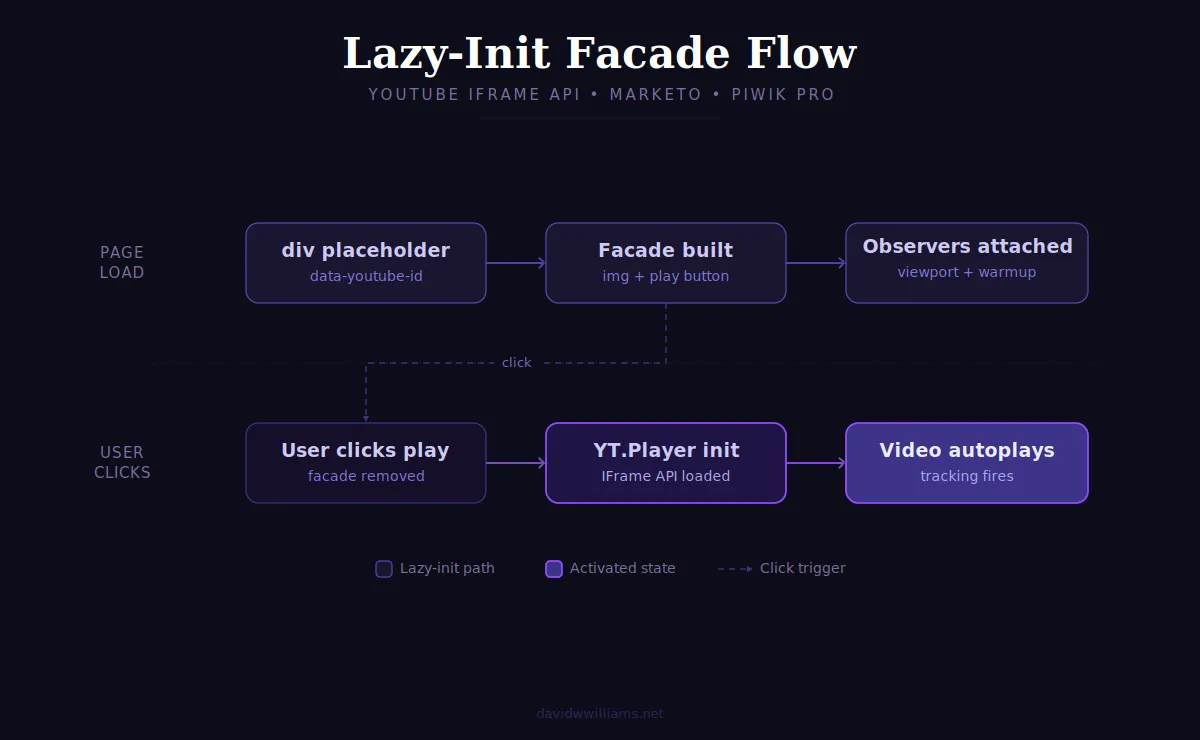
The YouTube IFrame API script is injected once, on the first play click, regardless of how many videos are on the page. Subsequent play clicks on other videos reuse the already-loaded API.
Building the Facade
Each facade is a <div> wrapper using aspect-ratio: 16/9 (replacing the older padding-top: 56.25% hack) containing an <img> thumbnail and an absolutely-positioned play button.
var wrapper = document.createElement('div');
wrapper.style.cssText = [
  'position:relative',
  'display:block',
  'aspect-ratio:16/9',
  'background:#000',
  'overflow:hidden',
  'width:100%',
].join(';');
Using <img> rather than background-image is deliberate:
<img>participates in LCP scoring; background images do notloading="lazy"is native on<img>, with no JS required for below-fold videosfetchpriority="high"can be applied to the first in-viewport thumbnail, giving the browser an explicit LCP candidate signalonerrorandonloadare first-class handlers for fallback logic- Search engines can index
<img>thumbnails; background images are invisible to crawlers
Thumbnail Priority via IntersectionObserver
Rather than assuming the first video in DOM order is above the fold, two IntersectionObserver instances are attached to each facade:
Viewport observer (rootMargin: "0px") fires immediately on observation if the facade is already in the visible viewport. When it is, the thumbnail is upgraded to loading="eager" and fetchpriority="high", making it the browser’s LCP candidate for that page.
Warmup observer (rootMargin: "200px 0px") fires when a facade scrolls within 200px of the viewport and calls warmConnections(), which injects a preconnect to www.youtube.com and dns-prefetch hints for supporting origins. By the time the user clicks, TCP and TLS are already negotiated.
var viewportObserver = new IntersectionObserver(
  function (entries, obs) {
    entries.forEach(function (entry) {
      if (entry.isIntersecting) {
        thumb.loading = 'eager';
        thumb.fetchPriority = 'high';
        obs.unobserve(entry.target);
      }
    });
  },
  { rootMargin: '0px' }
);
viewportObserver.observe(facade);
Thumbnail Fallback: A YouTube Quirk Worth Knowing
YouTube offers multiple thumbnail resolutions for every video. The implementation attempts maxresdefault.jpg (1280×720) first, falling back to hqdefault.jpg (480×360), which is guaranteed to exist for every video.
The native approach, setting src to maxresdefault.jpg and relying on onerror to catch failures, doesn’t work reliably. YouTube doesn’t return a 404 for missing high-res thumbnails in all cases. For older or lower-resolution videos, it sometimes returns a blank 120×90 placeholder image with HTTP 200. The browser sees a successful response, onerror never fires, and a blank gray image renders in the facade.
The fix is to validate the loaded image in onload using naturalHeight:
thumb.onload = function () {
  if (thumb.naturalHeight <= 90) {
    // Blank 200 placeholder: swap to guaranteed hqdefault
    thumb.onload = null;
    thumb.onerror = null;
    thumb.src = 'https://i.ytimg.com/vi/' + videoId + '/hqdefault.jpg';
  } else {
    thumb.onload = null;
    // Real thumbnail confirmed: already visible, nothing to do
  }
};
thumb.onerror = function () {
  // True 404 fallback
  thumb.onerror = null;
  thumb.onload = null;
  thumb.src = 'https://i.ytimg.com/vi/' + videoId + '/hqdefault.jpg';
};
// Handlers must be set BEFORE src to avoid race conditions with cached responses
thumb.src = 'https://i.ytimg.com/vi/' + videoId + '/maxresdefault.jpg';
One additional note: onload and onerror are set before src is assigned. If the browser has the image cached, the event can fire synchronously during src assignment setting the handlers after src creates a race condition that drops the event entirely.
The Off-Canvas Popup: A Different Code Path
This is where the implementation diverges from the standard lazy-init pattern.
Hero section videos on product and landing pages are embedded inside Elementor off-canvas panels. Inspecting the page source reveals something important: the placeholder div is present in the initial DOM on page load, not dynamically injected when the panel opens:
<div id="off-canvas-c55b766" class="e-off-canvas" role="dialog" aria-hidden="true" inert>
  <!-- ... -->
  <div id="ytplayer" data-youtube-id="VIDEO_ID" data-youtube-title="Billtrust Overview"></div>
</div>
aria-hidden="true" and inert mark the panel as hidden, but the placeholder is still in the DOM and scanForPlayers() finds it at page load. The native approach, building a facade thumbnail here, has a critical flaw: loading="lazy" does not reliably suppress image fetches for elements hidden via CSS. The browser may still fetch the thumbnail for a video the user has never seen.
The off-canvas path skips facade creation entirely:
function isInsideOffCanvas(element) {
  return element.closest('.e-off-canvas') !== null;
}

if (isInsideOffCanvas(element)) {
  // No facade, no thumbnail fetch
  // Warm YouTube connections immediately: hero click is likely imminent
  warmConnections();

  // Watch for the panel opening via aria-hidden attribute change
  var panelObserver = new MutationObserver(function (mutations) {
    mutations.forEach(function (mutation) {
      if (
        mutation.attributeName === 'aria-hidden' &&
        offCanvasPanel.getAttribute('aria-hidden') === 'false'
      ) {
        panelObserver.disconnect();
        activateOffCanvasPlayer(playerIndex, element);
      }
    });
  });
  panelObserver.observe(offCanvasPanel, { attributes: true });

  return; // Skip facade build
}
When the off-canvas panel opens, Elementor flips aria-hidden from "true" to "false". The MutationObserver catches that attribute change and calls activateOffCanvasPlayer(), which initializes YT.Player immediately with autoplay: 1, matching the user’s intent of clicking the hero play button.
A secondary listener on Elementor’s elementor/off-canvas/open custom event is also registered as a forward-compatibility fallback. Both triggers are guarded by an activated flag to prevent double-initialization.
The result: zero thumbnail requests on page load, no facade built for a video the user hasn’t asked to see, and the real player initializes the moment the panel opens.
Resource Hints: Staying Under Google’s Threshold
After the initial implementation, Google flagged a warning: more than 4 preconnect connections were found. The combination of existing hints in functions.php and the newly added YouTube origins in warmConnections() was producing up to 7 preconnects on pages with video, well over the recommended limit.
The fix was to audit every hint and apply the right type for each origin:
| Origin | Type | Reasoning |
|---|---|---|
mktg.billtrust.com | preconnect | Marketo, needed early on every page |
cookie-cdn.cookiepro.com | preconnect | OneTrust consent, render-blocking |
www.youtube.com | preconnect | IFrame API loads from here |
cdn.jsdelivr.net | dns-prefetch | GSAP, loads late: full preconnect not justified |
munchkin.marketo.net | dns-prefetch | Fires late via GTM |
i.ytimg.com | dns-prefetch | Thumbnail CDN: full preconnect handled by JS if needed |
www.youtube-nocookie.com | dns-prefetch | Supporting origin, loads after player init |
s.ytimg.com | dns-prefetch | Static assets, loads after player init |
Maximum preconnects on any page: 3. warmConnections() fires at most once per page load, only on pages with a video facade.
SVG Play Button: Avoiding Path String Corruption
The play button icon is built using document.createElementNS with <rect> and <polygon> primitives rather than SVG <path> elements with d attribute strings.
This solves a real production problem. SVG path data contains characters like C, S, s, M, and z these are curve and move commands. When the JavaScript file passes through certain editors, content delivery pipelines, or copy/paste workflows, smart-quote substitution can silently corrupt those characters. The browser’s SVG parser then throws an error and the icon fails to render.
Building the icon from DOM primitives eliminates the problem entirely. No path strings, no corruption risk:
function createPlayIcon() {
  var NS = 'http://www.w3.org/2000/svg';

  var svg = document.createElementNS(NS, 'svg');
  svg.setAttribute('viewBox', '0 0 68 48');
  svg.setAttribute('aria-hidden', 'true');
  svg.setAttribute('focusable', 'false');

  var badge = document.createElementNS(NS, 'rect');
  badge.setAttribute('width', '68');
  badge.setAttribute('height', '48');
  badge.setAttribute('rx', '14');
  badge.setAttribute('fill', '#f00');

  var triangle = document.createElementNS(NS, 'polygon');
  triangle.setAttribute('points', '27,14 27,34 45,24');
  triangle.setAttribute('fill', '#fff');

  svg.appendChild(badge);
  svg.appendChild(triangle);
  return svg;
}
Analytics: Fully Preserved
One of the constraints going in was that the Marketo Munchkin and Piwik PRO tracking layer had to survive the refactor without any behavioral changes. It did.
| Event | Marketo Munchkin | Piwik PRO |
|---|---|---|
| Play | pressed-play | Play |
| Pause | paused | Pause |
| Watched to end | played-to-end | Watched |
| 25% milestone | achieved-milestone | Progress - 25% |
| 50% milestone | achieved-milestone | Progress - 50% |
| 75% milestone | achieved-milestone | Progress - 75% |
Milestone detection runs on a 500ms polling loop while a video is in the PLAYING state, the same approach as the original implementation. The activated flag prevents any player slot from initializing more than once, regardless of how many times activation triggers fire.
Performance Impact
| Metric | Before | After |
|---|---|---|
| YouTube payload on page load | ~3.6 MB | ~15–30 KB (thumbnail only) |
| YouTube requests before interaction | Multiple (API + CSS + bundles) | 0 |
| Thumbnail requests (off-canvas videos) | 0–1 (race-dependent) | 0 |
| Preconnects on pages with video | Up to 7 | Max 3 |
The ~3.6 MB YouTube payload now loads only after a user explicitly clicks play and only for the video they clicked. Other videos on the same page remain facades until individually activated.
Lessons Learned
The right abstraction isn’t always the newest one. lite-youtube-embed is a well-engineered solution for its intended use case. But adopting it here would have meant rearchitecting a working analytics layer to fit a different component model. The lazy-init facade delivered equivalent performance savings with a fraction of the risk.
Browser behavior is worth verifying, not assuming. The naturalHeight check for YouTube’s blank 200 placeholder was discovered through actual testing, not documentation. YouTube’s behavior varies by video age, upload resolution, and CDN edge the implementation needed to handle the full range of what actually happens in production, not what the API contract implies.
Hidden elements in the DOM are not the same as absent elements. The Elementor off-canvas placeholder being present in the initial DOM, but hidden via aria-hidden and inert, was a meaningful distinction. Treating it like an inline video and building a facade would have produced wasteful thumbnail fetches. Detecting its context and taking a separate code path was the right call.
Preconnects have a cost too. Adding YouTube origins to the resource hints without auditing the existing set resulted in 7 preconnects on video pages. Google’s guidance of 4 or fewer exists because speculative connections consume real resources. Every hint should be justified.
Conclusion
A 3.6 MB YouTube payload loading on every page visit, before any user interaction, is a solvable problem. The lazy-init facade pattern defers that cost to the moment a user actually wants to watch a video, which is both the right performance decision and the right user experience decision.
The implementation handles inline videos, above-fold LCP optimization, below-fold lazy loading, Elementor off-canvas popups, multi-video pages, YouTube’s inconsistent thumbnail behavior, SVG rendering across environments, and a full analytics tracking layer, all in a single vanilla JavaScript file with no external dependencies.
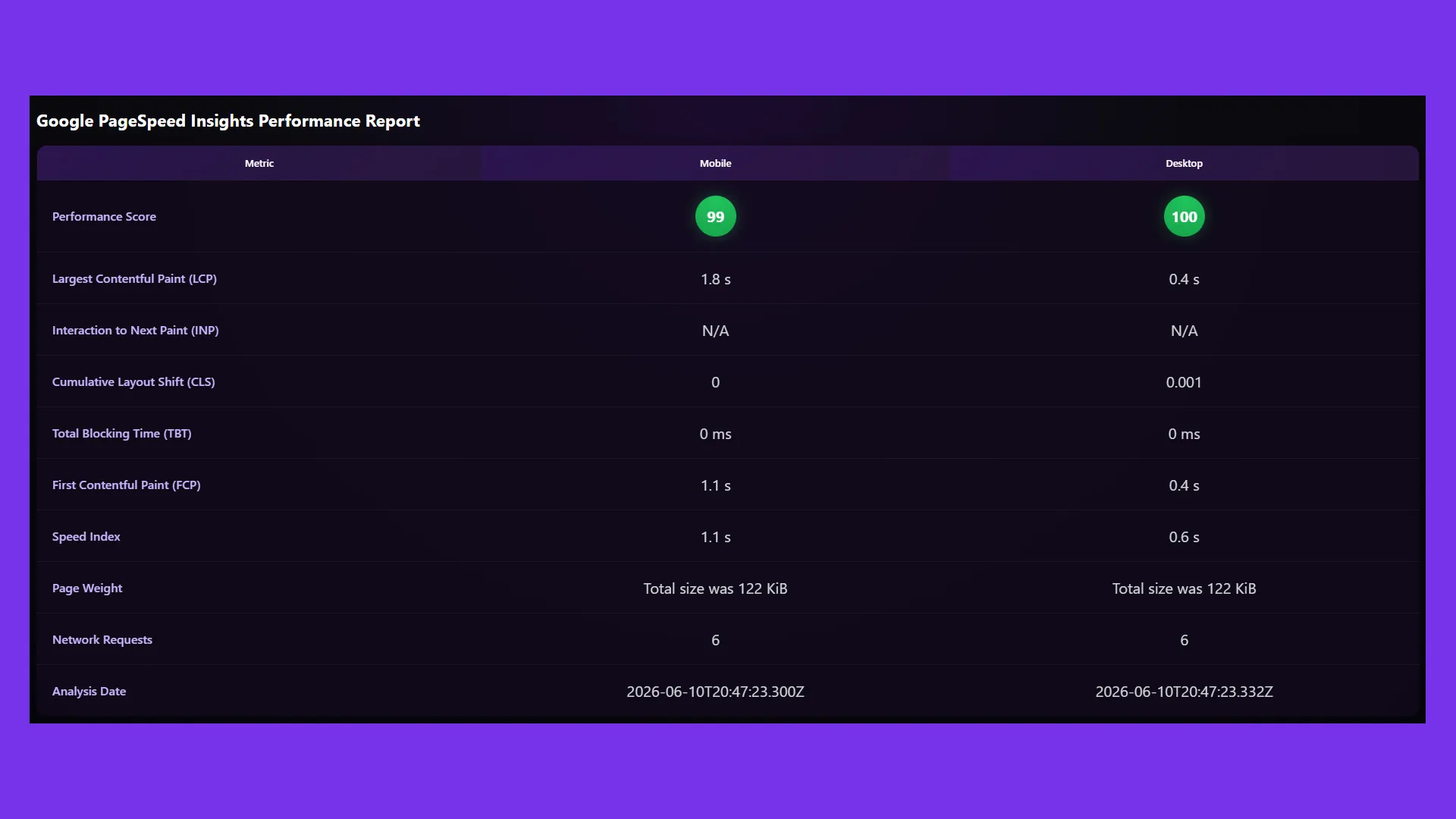
This is part of an ongoing performance optimization series for the Billtrust enterprise marketing website. The PageSpeed Insights dashboard I built earlier in this project made the before/after payload difference measurable across deployments, which is how I confirmed this change delivered exactly what it was designed to.
The original tracking system from 2022 is still running: same events, same milestone logic, same analytics destinations. It just no longer costs 3.6 MB to load the page it lives on.