Most developers joining an established enterprise website inherit the same problem: the website works, but understanding why it works can take weeks.
Documentation is usually incomplete. Architecture decisions live in code, plugins, old tickets, and the memories of people who built the platform. A seemingly simple request like changing an archive page or adding a field can uncover years of customizations, migration-era code, rewrite rules, template conditions, and dependencies nobody mentioned during onboarding.
I recently started examining a different approach.
I connected Claude directly to one of our WordPress staging environments using Novamira, a WordPress MCP integration that allows an AI client to securely interact with the actual WordPress installation.
Instead of explaining our architecture to Claude, I could ask Claude to inspect the architecture itself.
That distinction turned out to be much more significant than I expected.
This implementation also fits into a broader workflow I’ve been exploring with Claude.
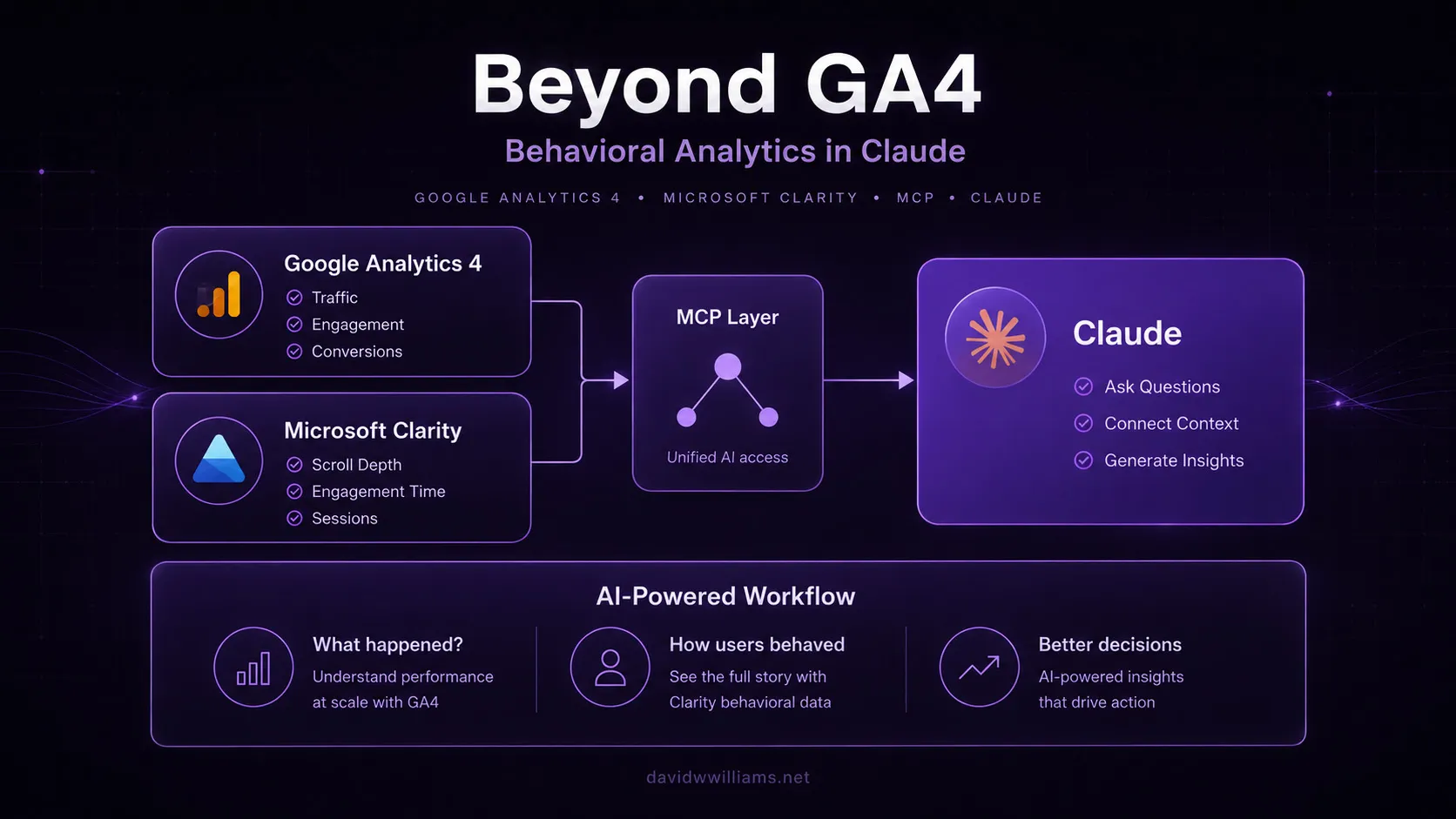
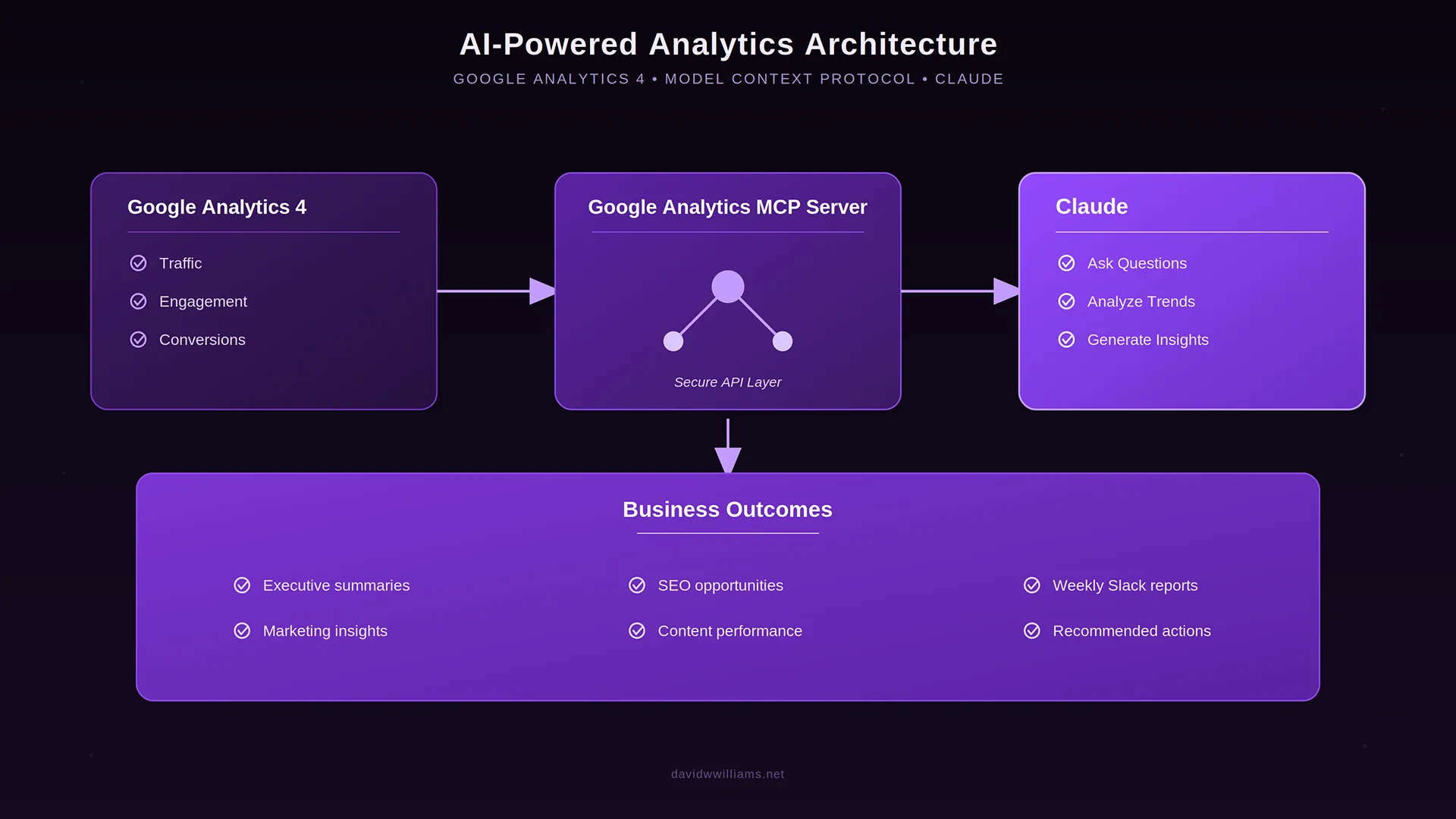
Earlier this year, I connected Google Analytics 4 to Claude using Google’s official MCP server so I could investigate website performance conversationally rather than constantly building reports.
I then added Microsoft Clarity behavioral analytics, giving Claude another source of context around how visitors actually interact with the experience.
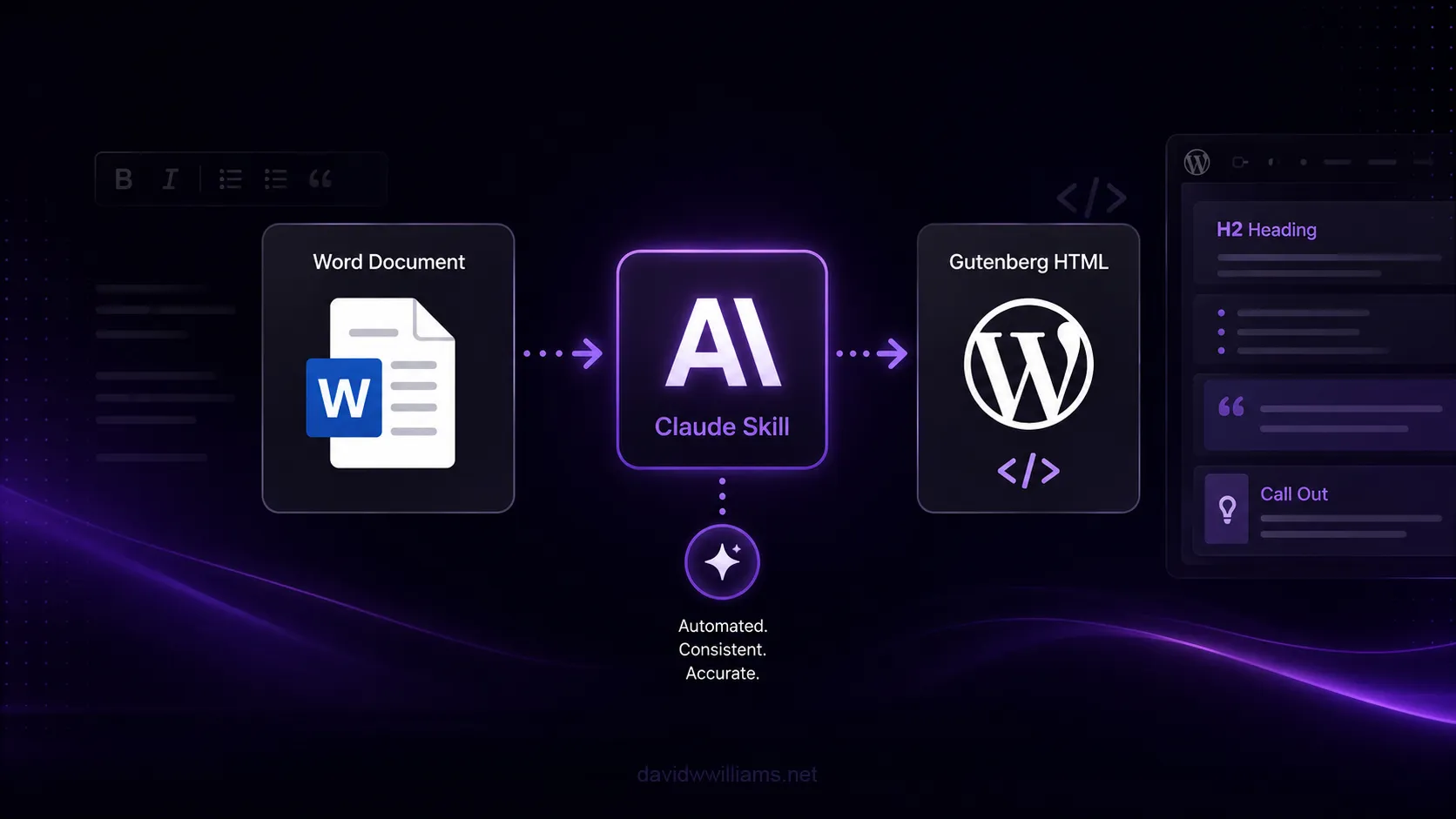
And separately, I built a Claude Skill for our WordPress publishing workflow, encoding our Gutenberg, accessibility, SEO, and formatting standards into a repeatable process that cut publishing build time roughly in half.
Those implementations were all useful on their own.
But they also led me to a larger question:
What happens when Claude can understand not only how a website is performing, but how the website itself is actually built?
Connecting Claude directly to WordPress
Novamira uses the Model Context Protocol to expose WordPress capabilities to compatible AI clients.
For my initial setup, I connected Claude Desktop to our staging environment using a WordPress application password and the @automattic/mcp-wordpress-remote connector.
Once authenticated, Claude could work with information directly from the WordPress environment rather than relying on screenshots, exported reports, copied code snippets, or whatever context I happened to include in a prompt.
Depending on the permissions available, that can include things like:
- WordPress configuration
- Active and inactive plugins
- Theme files and custom PHP
- Custom post types and taxonomies
- ACF field groups
- Elementor templates
- Database information
- Filesystem structure
- Gutenberg content
- SEO configuration
- WordPress options and metadata
It is an extremely powerful level of access, which is also why I only enabled it in a controlled staging environment.
The interesting part for me wasn’t giving AI the ability to modify WordPress.
It was giving AI enough context to understand WordPress.
My first test: onboard yourself to the website
After confirming the MCP connection was working, I started with a deliberately broad prompt:
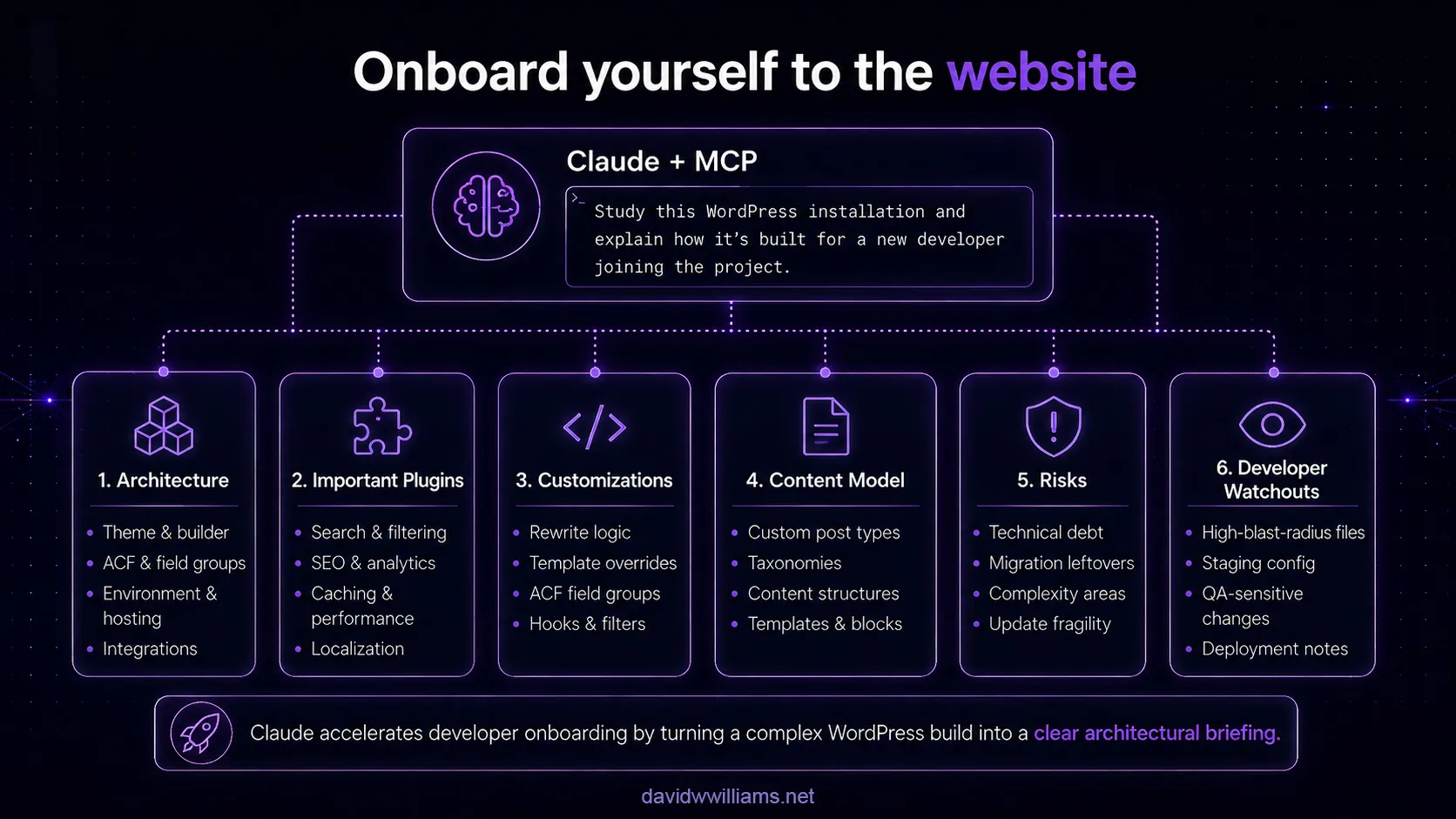
“Study this WordPress installation until you understand how it’s built. Then explain it to me as if I’m a new developer joining the project. Include architecture, important plugins, customizations, risks, and areas where future developers should be careful.”
Normally, answering that question thoroughly would require manually reviewing:
functions.php- theme includes
- plugin configuration
- custom post types
- taxonomies
- ACF definitions
- rewrite rules
- Elementor templates
- caching
- search configuration
- localization logic
- cron jobs
- hosting configuration
- existing technical debt
Claude effectively performed that discovery process itself.
Within the analysis, it identified the overall WordPress architecture, the role of Elementor and ACF, the site’s custom content model, localization functionality, search architecture, caching layers, SEO customization, and several pieces of custom code that represented higher-than-normal risk.
That was useful.
What impressed me more was that it started recognizing relationships between those systems.
For example, it didn’t simply report that custom URL rewriting existed. It identified that the rewriting logic interacted with resource archives, pagination, canonical URLs, Open Graph URLs, taxonomy filtering, and Elementor output.
That turns a basic inventory into architectural understanding.
Finding the things documentation usually misses
This type of analysis also surfaced the kinds of details that rarely make it into formal documentation.
Claude identified examples such as:
- ACF field groups being registered programmatically rather than managed exclusively through the WordPress interface
- Custom search behavior dependent on environment configuration
- Older migration-related code that was still present
- Duplicate or backup files that could confuse future developers
- Complex SEO rewrite logic with a relatively large potential blast radius
- Multiple caching layers that need to be considered when debugging frontend changes
- Template conditions that determine which design renders for different types of content
None of those issues necessarily mean the website is poorly built.
They are simply the kinds of implementation details a developer needs to know before touching the wrong thing.
Traditional onboarding often communicates what components exist.
This approach starts exposing where the sharp edges are.
Going beyond the codebase
My next question moved from technical architecture into information architecture.
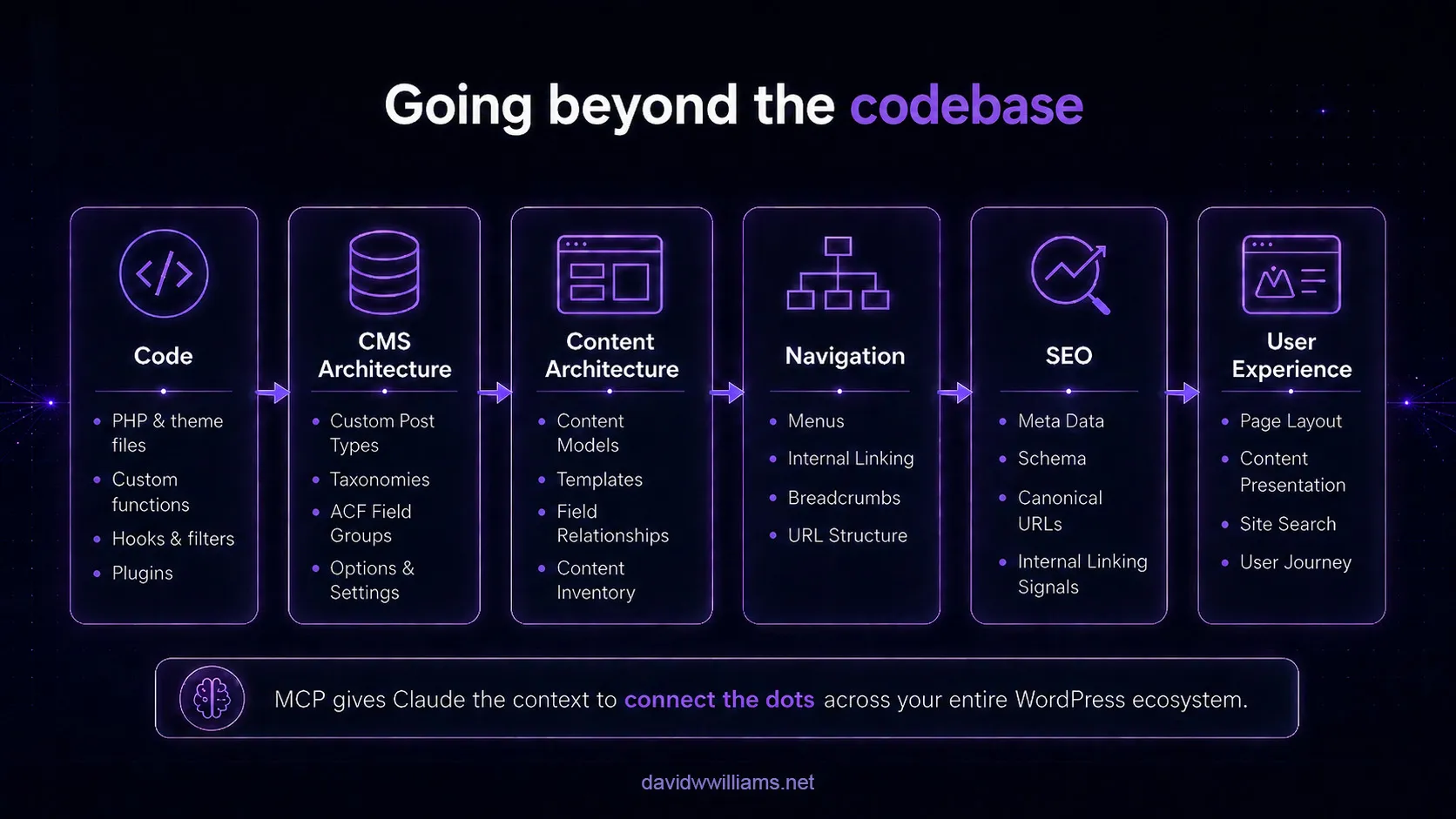
I asked Claude to perform a read-only analysis of the site’s:
- Pages
- Custom post types
- Taxonomies
- Menus
- Elementor templates
- ACF field groups
- Internal linking
- Navigation
- URL structure
The goal wasn’t simply to understand how WordPress was configured.
I wanted to understand how the technical architecture translated into the way users actually experience the website.
That produced another useful layer of analysis.
Claude recognized the major information architecture surrounding the platform, industries, resources, and company content while also identifying inconsistencies that had accumulated over time.
Among the findings were different approaches being used to build resource archives, content types that were not directly represented in primary navigation, inconsistencies in URL conventions, overlapping templates, legacy test content, and opportunities to consolidate similar template patterns.
That is where this workflow became especially interesting to me.
It wasn’t just code analysis anymore.
It was connecting:
code → CMS architecture → content architecture → navigation → SEO → user experience
Those are normally separate audit exercises.
With enough access and the right prompts, Claude could reason across all of them in the same conversation.
A new kind of website audit
I’ve performed a lot of website audits throughout my career.
They typically involve some combination of:
- Crawling the public website
- Reviewing Google Analytics
- Inspecting Search Console
- Running Lighthouse
- Auditing accessibility
- Reviewing CMS configuration
- Inspecting code
- Interviewing developers
- Looking through documentation
- Mapping content models
- Reviewing third-party services
All of those methods are still valuable.
The difference here is that MCP gives the AI access to the implementation behind what a traditional crawler can see.
A crawler can tell me that a URL exists.
The WordPress environment can tell me:
- which custom post type created it
- which taxonomy controls it
- which template renders it
- which ACF fields populate it
- which rewrite logic modifies it
- which plugin influences its metadata
- and which custom PHP might break if its behavior changes
That creates a much deeper level of context.
This also adds another layer to the analytics workflow I’ve been building.
When I connected GA4 to Claude, Claude gained access to quantitative performance data.
When I added Microsoft Clarity, it gained behavioral context around how visitors were interacting with those experiences.
Connecting WordPress adds something different: implementation context.
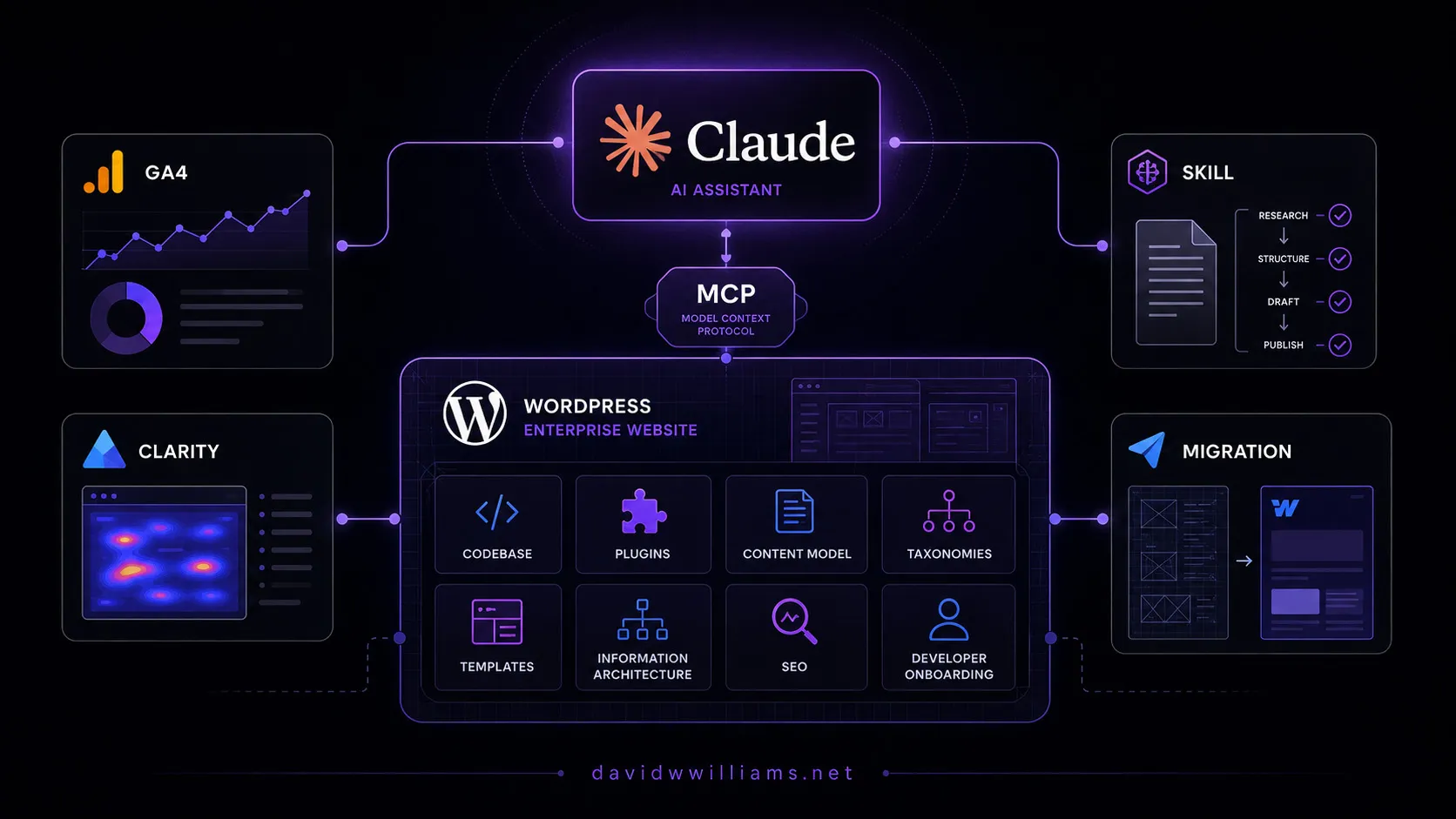
Now Claude can potentially understand not only that a page lost traffic or that mobile visitors are scrolling less, but also how that page is structured, which template renders it, what content model powers it, which plugins influence it, and what custom code sits behind the experience.
That begins connecting three traditionally separate areas of website analysis: performance data → user behavior → technical implementation
Why this matters for developer onboarding
One of the first use cases I see is developer onboarding.
Imagine joining an organization and, on your first day, being able to ask:
“Explain how this website is built.”
Then follow it with:
“What are the five areas most likely to cause problems if I modify them?”
Then:
“Show me how resource content is modeled.”
Then:
“Which plugins are essential to the site’s architecture versus simple utilities?”
Then:
“Which parts of the codebase appear to be legacy or migration-related?”
Instead of spending several weeks gradually assembling that mental model, a developer could establish a baseline understanding of the platform almost immediately.
That doesn’t replace experienced developers or institutional knowledge.
It gives the new developer a much better set of questions to ask them.
It also changes how I think about documentation
There is another implication here that I find even more interesting.
Traditional technical documentation is usually written manually and then starts becoming outdated almost immediately.
But if an AI agent can inspect the current system, documentation can become much more dynamic.
For example, I could ask Claude to produce:
- A current architecture overview
- A plugin dependency map
- A custom post type and taxonomy reference
- An ACF field inventory
- A developer onboarding guide
- A list of high-risk customizations
- A technical debt report
- A content architecture map
- An SEO architecture overview
- A pre-migration discovery document
Then repeat the analysis months later and compare what changed.
The website itself starts becoming the source of truth.
I’ve been thinking about this same problem from another direction as well.
When I built a Claude Skill for our WordPress publishing workflow, one of the unexpected benefits was governance. Instead of keeping publishing rules around accessibility, SEO, Gutenberg formatting, and linking conventions in someone’s head, those decisions became reusable instructions Claude could apply consistently.
MCP approaches the same knowledge problem from the opposite direction.
A Skill can teach Claude how we expect work to be done.
MCP can give Claude enough access to understand how the existing system actually works.
Put those together and the potential becomes much more interesting: an AI assistant that understands both the architecture of an enterprise website and the standards teams are expected to follow when working within it.
Where human judgment still matters
This level of access doesn’t mean I would blindly follow everything the AI recommends.
Quite the opposite.
The broader the access, the more important governance becomes.
For example, Claude may correctly identify that two URL patterns are inconsistent.
That doesn’t automatically mean they should be changed.
There could be years of backlinks, organic rankings, campaign URLs, integrations, redirects, analytics history, or business decisions behind them.
The AI can identify the inconsistency.
A web architect still needs to determine whether fixing it creates more value than risk.
The same applies to old plugins, legacy code, duplicate templates, or seemingly unnecessary functionality.
Discovery can be automated much more aggressively than decision-making.
That distinction is important.
Security matters even more with this kind of access
Giving an AI agent access to the codebase, database, and filesystem obviously introduces a different level of responsibility than connecting it to a read-only analytics API.
For this implementation, I used a staging environment and began with explicitly read-only analysis prompts.
That is the model I would recommend for this type of work:
- Use development or staging environments
- Maintain reliable backups
- Limit permissions wherever possible
- Start with read-only discovery
- Review proposed changes before execution
- Never expose application passwords or credentials in prompts, screenshots, or documentation
- Treat AI-driven server access with the same seriousness as developer access
The more capable these tools become, the more important disciplined web governance becomes alongside them.
The bigger opportunity
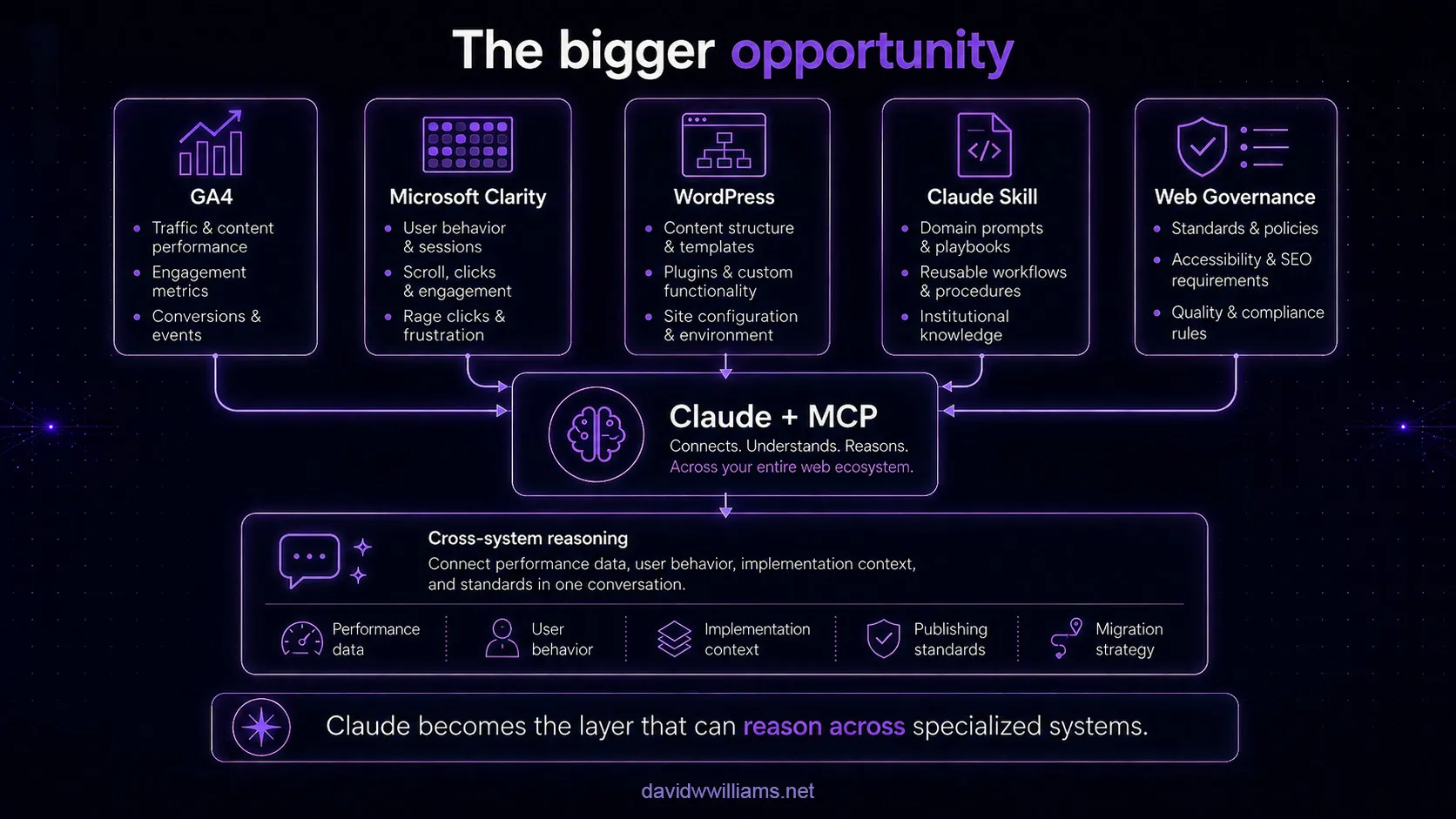
This is where several implementations I’ve been working on start to converge.
I’ve now explored using Claude to:
- Query Google Analytics 4 through MCP
- Add Microsoft Clarity behavioral analytics to the same conversational workflow
- Encode WordPress publishing standards into a reusable Claude Skill
- Inspect the architecture and information structure of the WordPress platform itself
Individually, each workflow solves a specific problem.
Together, they point toward something much larger.
Imagine Claude having controlled access to:
- CMS architecture
- Google Analytics
- Microsoft Clarity
- Google Search Console
- SEO data
- source control
- accessibility testing
- performance monitoring
- project documentation
- organizational standards and workflows
Now the conversation can move from:
“Why is this page underperforming?”
to:
“Organic traffic declined on this page after our last release. Compare the GA4 and behavioral data, inspect the page’s WordPress template and content structure, review its internal linking and metadata, determine whether anything changed in the implementation, and identify the highest-impact areas we should investigate first.”
That question spans analytics, user behavior, SEO, content architecture, and implementation.
Today, answering it typically means moving between several platforms and manually assembling the context.
The direction I’m exploring is different.
The systems remain specialized. Claude becomes the layer that can reason across them.
That’s increasingly how I see MCP fitting into enterprise digital experience architecture.
Where I see this going
My initial WordPress architecture and information architecture audits were really just the starting point.
I’ve already started taking the workflow further, and there are a number of areas I want to explore:
- Automated architecture documentation
- Technical debt discovery
- Pre-migration CMS analysis
- SEO architecture audits
- Accessibility analysis
- Content model documentation
- Plugin and dependency reviews
- Developer onboarding
- Regression analysis after releases
- Cross-platform analytics and CMS investigation
One area where I think this could be particularly valuable is platform migration.
As I’ve been preparing for Webflow at enterprise scale, one principle I’ve kept coming back to is that a migration shouldn’t simply ask:
“How do we recreate what we already have on the new platform?”
You first need to understand what you’re migrating.
That means identifying the content model, taxonomies, URL conventions, template logic, integrations, SEO dependencies, localization rules, legacy code, and even the technical debt that shouldn’t make the trip.
An MCP-driven architecture analysis could dramatically accelerate that discovery phase.
Instead of beginning a CMS migration with weeks of manual investigation, I can potentially use Claude to help document the existing platform, identify dependencies and inconsistencies, and create a much clearer picture of what should be preserved, redesigned, consolidated, or retired before implementation even begins.
What makes MCP interesting isn’t simply that it allows AI to call tools.
It allows the AI to build context across systems that previously had to be understood separately.
For enterprise web teams, that could become incredibly valuable.
Final thoughts
I’ve spent much of my career inheriting, rebuilding, migrating, and maintaining complex websites.
One of the hardest parts of that work has never been writing code.
It is understanding the system well enough to know what should be changed, what shouldn’t be changed, and what else might be affected when you do.
Connecting Claude directly to WordPress through MCP gave me a surprisingly effective way to accelerate that discovery process.
Instead of manually feeding an AI snippets of information and hoping I included enough context, I can give it controlled access to the actual environment and let it investigate the system itself.
That doesn’t replace architecture expertise.
It makes that expertise easier to apply because far less time is spent hunting for context.
And for me, that may end up being one of the most useful applications of AI in enterprise web development.