Assessment tools are a common pattern in marketing websites, especially for lead generation, segmentation, and personalized recommendations.
They work best when they feel effortless. A user who has to fight through clunky navigation, loses their place after reviewing a prior answer, or arrives at a generic result page learns nothing — and leaves. Getting the interaction right means more than picking the correct questions: it means designing a flow that feels responsive, preserves context at every step, and delivers a result that feels earned.
This is a case study of a six-question AR maturity assessment built for Billtrust, an enterprise B2B financial software provider. The quiz guides finance professionals through a structured self-evaluation and routes them to a personalized result page based on their responses. It is built with vanilla JavaScript, no framework, and a deliberate focus on predictable, maintainable UI state — because a guided assessment is only as good as the experience that delivers it.
What the Application Does
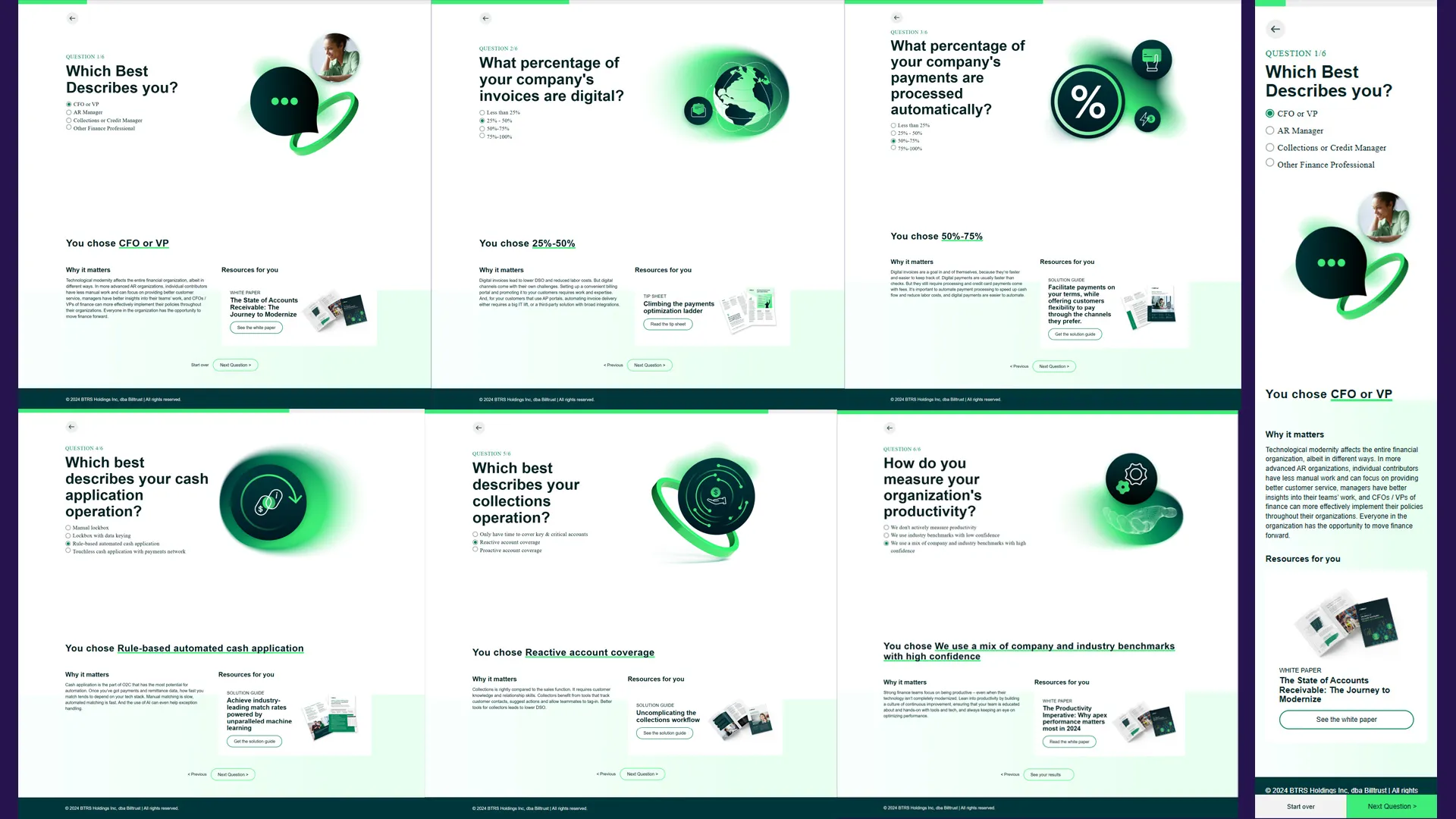
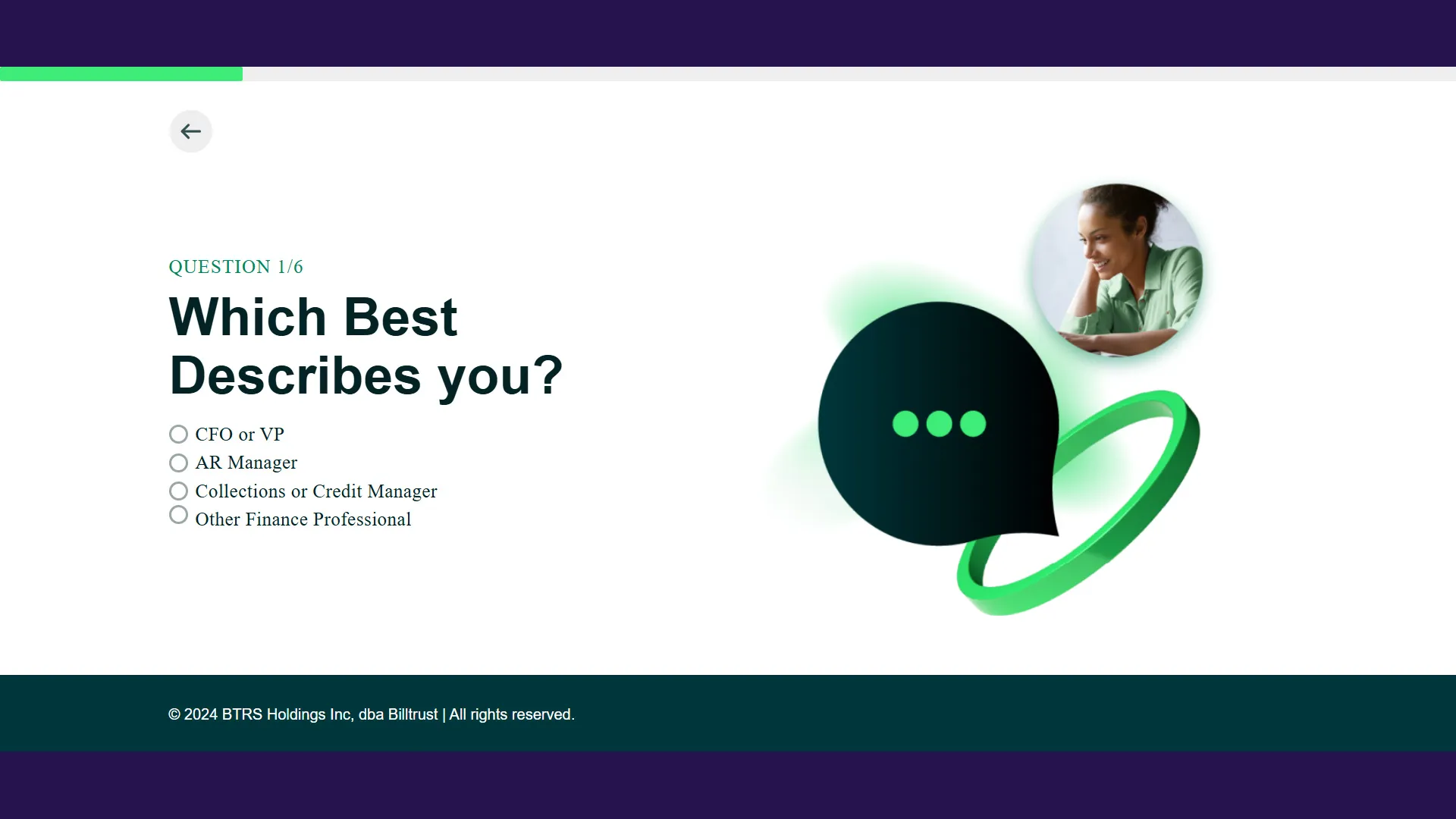
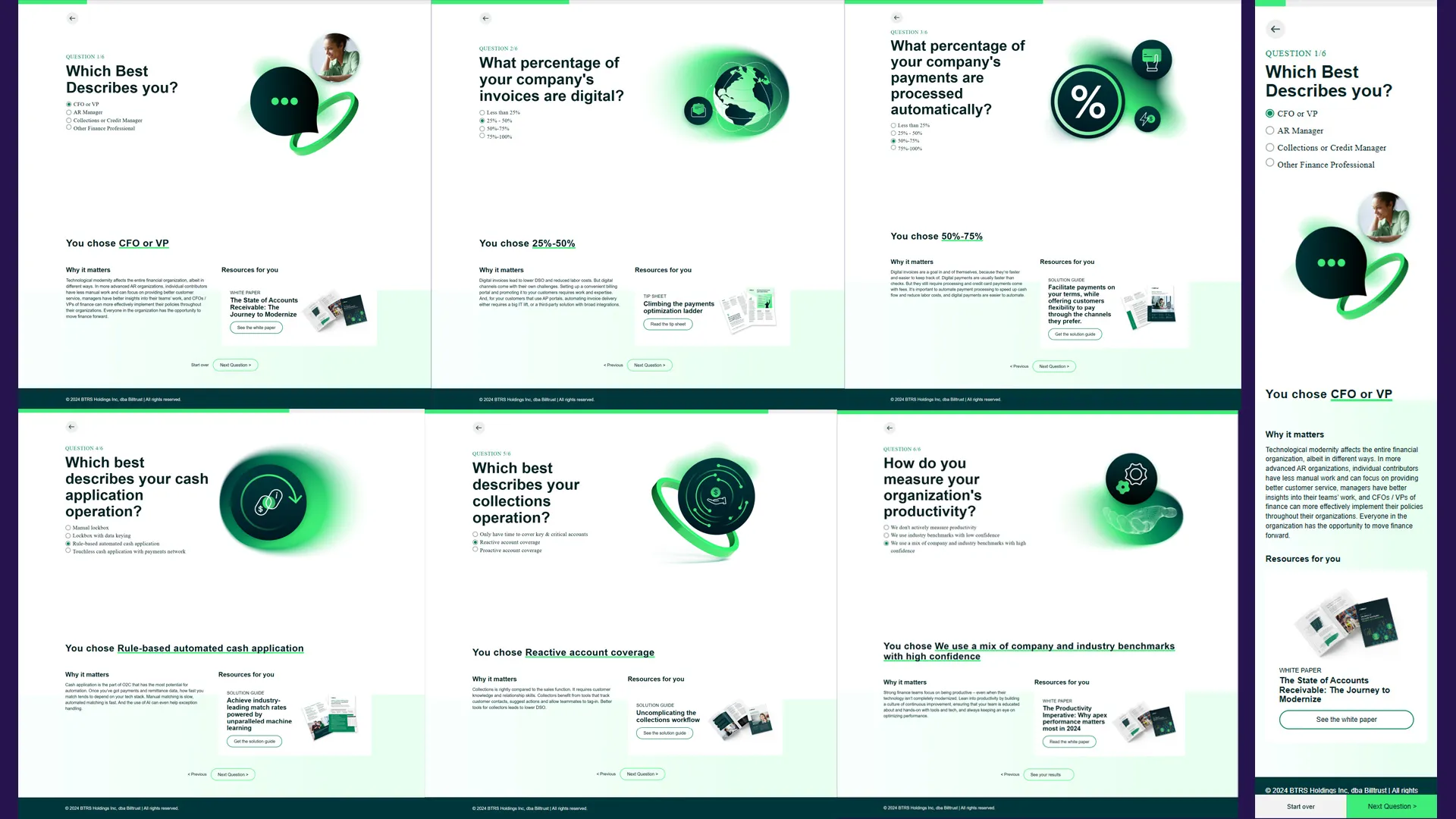
The quiz is a six-question self-assessment that helps finance professionals evaluate the maturity of their accounts receivable (AR) operations. Users select their role, answer questions about their current AR processes, and receive a personalized results page with relevant resources and next steps.
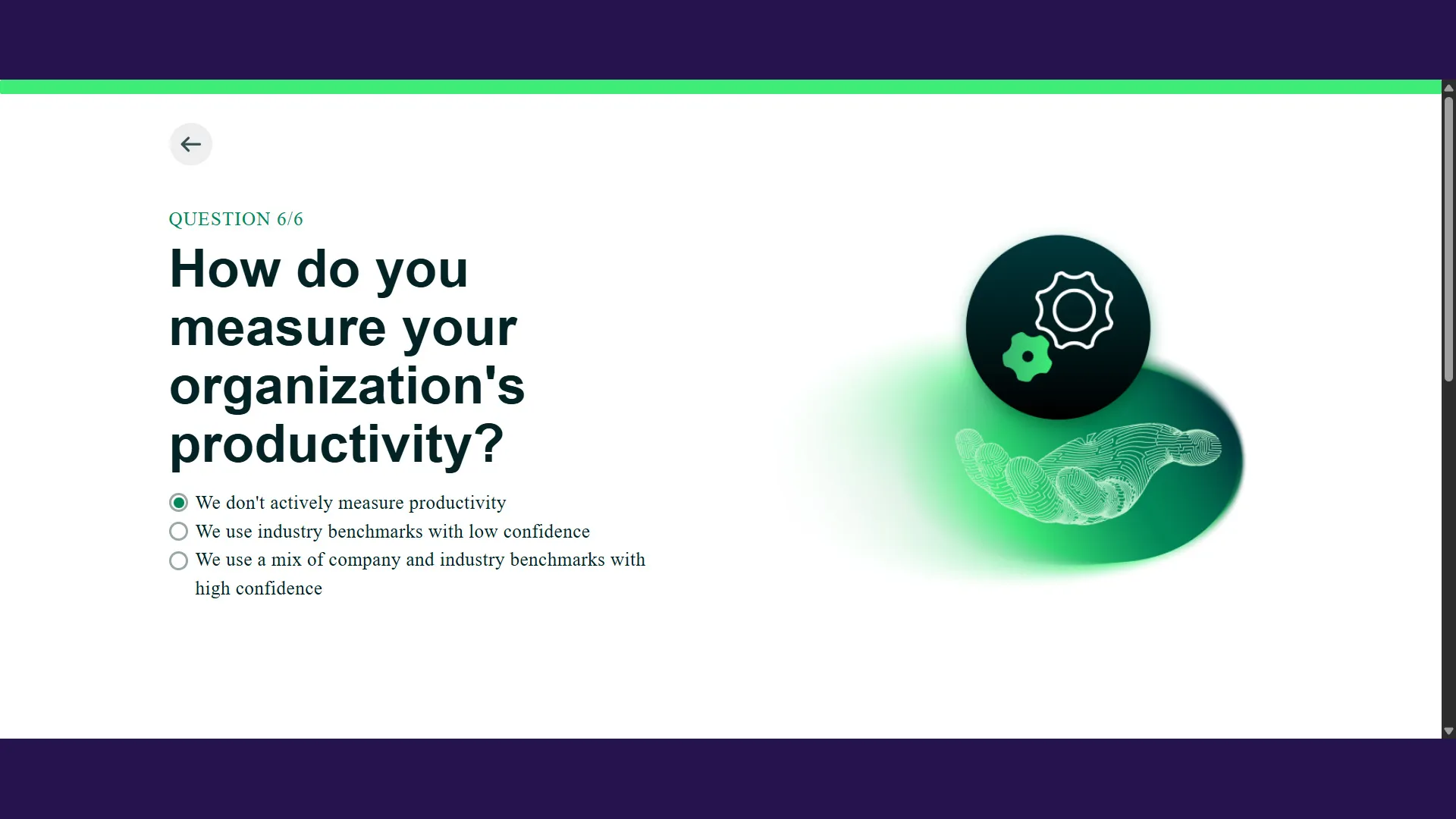
Each question is multiple choice. The first question collects role context — it does not contribute to a score. Questions two through six each carry a numeric weight, and the sum of those weights routes the user to one of three result tiers on completion.
The whole experience lives in a single HTML file with no build step, no bundler, and no JavaScript framework.


The User Problem It Solves
Finance teams often lack a clear way to benchmark where they sit on the spectrum from manual, paper-heavy AR processes to fully automated, data-driven operations. This quiz gives them a structured, five-minute self-assessment that surfaces actionable recommendations — and connects them with the right Billtrust resources based on where they actually are.
From a product perspective, it functions as a high-value gated content tool: users get a useful diagnosis, and the business gets qualified signal about what stage of AR maturity a prospect is in.
Frontend Architecture Overview
The architecture is deliberately simple:
- Single HTML file with all six question panels and six result panels rendered in the DOM simultaneously, controlled entirely by
display: none/display: block - Vanilla JavaScript — no React, no Vue, no build pipeline
- CSS from Billtrust’s design system plus a shared utilities file
- An inline
<style>block inside the HTML body that owns all initial visibility rules, preventing flash-of-content on load sessionStoragefor persisting answer data, written once at the end of the quiz flow- Hidden
<input>fields used as a synchronous in-memory scratchpad between individual question selections and the final storage write
All six question panels and six result panels exist in the DOM at all times. Navigation is achieved entirely by toggling display values — no routing, no page transitions, no virtual DOM.
Key Technical Decisions
Why keep all panels in the DOM?
Inserting and removing DOM nodes on each navigation step introduces timing risk and complicates backward navigation. Having everything in the DOM means navigation state is just a display toggle, and going back always returns to exactly what the user left.
Why a hidden input scratchpad?
sessionStorage is only written at the final question. Prior answers accumulate in hidden <input> fields throughout the quiz. This two-step approach means the browser’s native form model holds intermediate state, and sessionStorage only ever receives a complete, validated answer set. It also makes the final score calculation straightforward: one read pass over the fields.
Why inline the initial CSS?
The default visibility rules — hiding all but the first question panel, hiding all result panels, hiding all progress bars except the first — are embedded directly in a <style> block in the HTML body. This ensures those rules apply before the browser renders any content, avoiding a visible flash where hidden panels appear before JavaScript runs.
Interesting Implementation Details
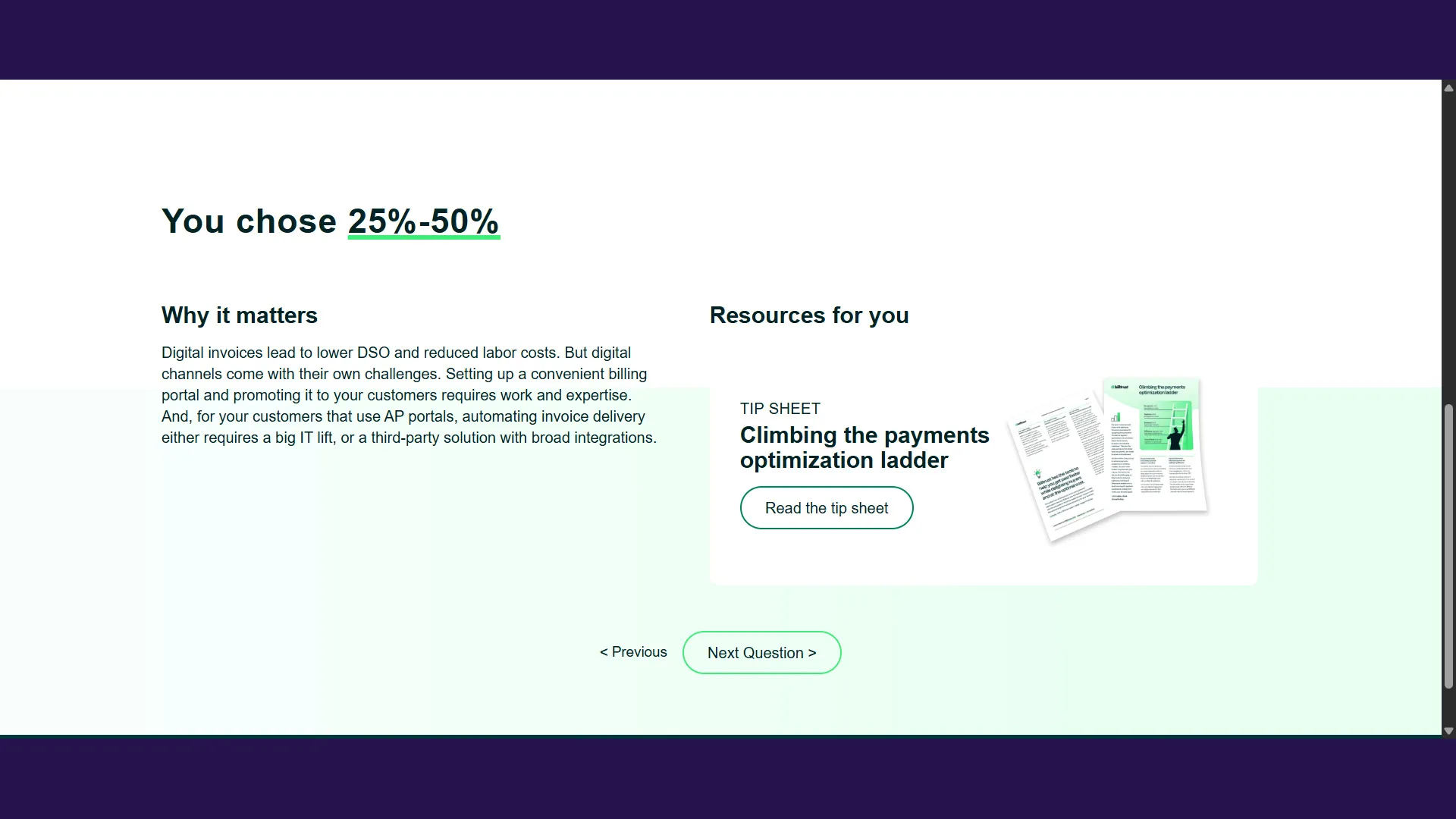
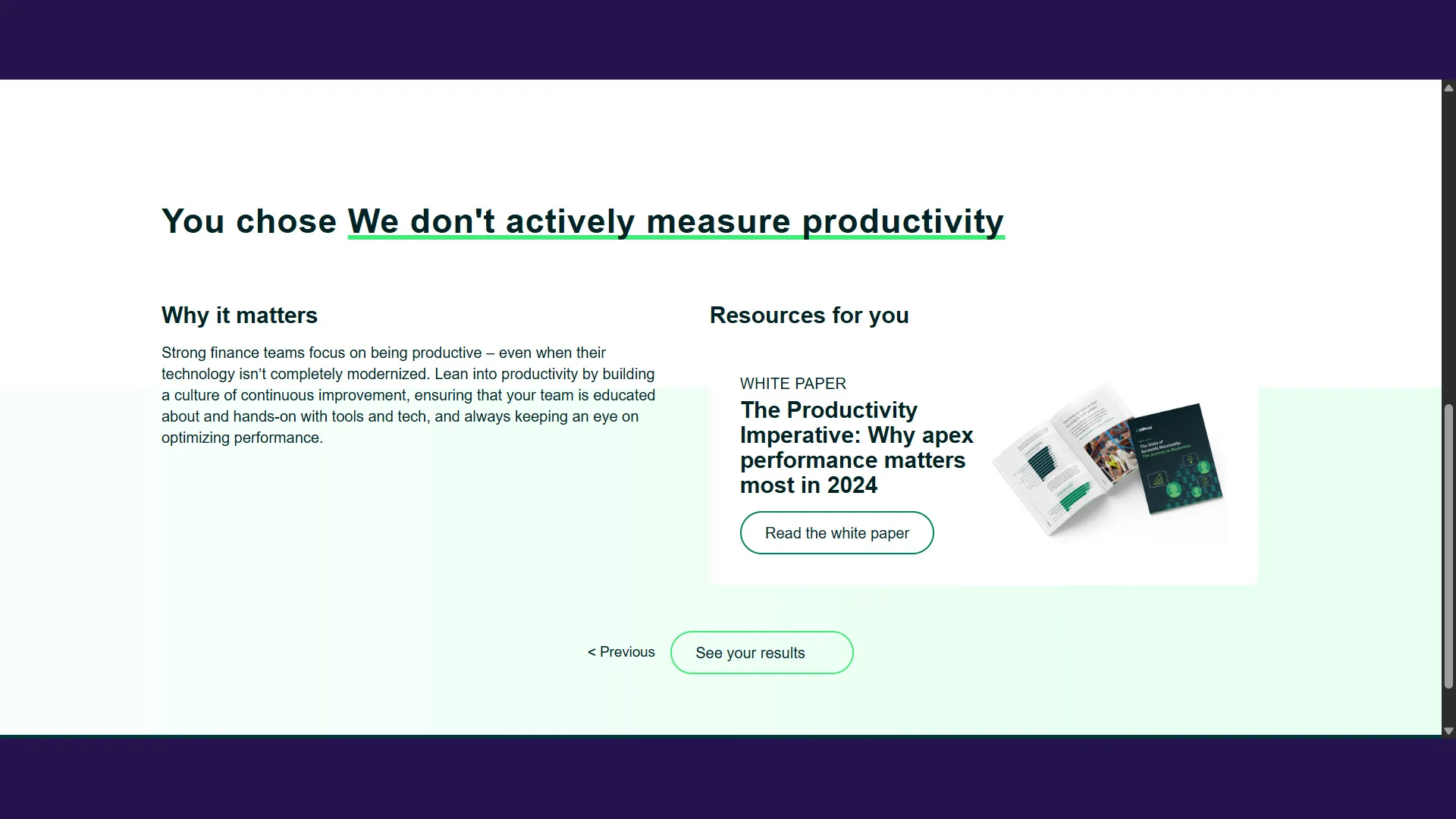
Two back-navigation mechanisms per step. Each question screen has two ways to go backward: a persistent SVG arrow button in the question panel itself, and a ”< Previous” text link in the result panel below. Both need to restore the previous step’s question and re-render the previous answer if one was already selected. Both are handled by the same underlying navigation function, so the behavior is guaranteed to be identical regardless of which path the user takes.
Pre-rendering on forward navigation. The “Next” buttons don’t just advance to the next question — they check whether the next question’s answer is already selected (from a previous forward-backward-forward trip) and immediately render the correct result panel. This means the result panel appears populated the moment you arrive, with no additional interaction required.
Scroll behavior after navigation. Every navigation action — forward, backward, or reset — ends with a smooth scroll to reposition the viewport at the question panel. On mobile, a fixed bottom navigation bar requires a specific scroll offset calculation. These are separate code paths, and the scroll call is intentionally positioned at the end of each navigation function to fire after all DOM state has been updated.
Managing visibility state cleanly. The quiz relies on a small set of DOM utility functions to handle the show/hide operations that navigation requires. A showOnly helper manages toggling within a group of answer-label elements — showing the selected answer, hiding the rest — used consistently on both initial selection and backward navigation to a previously answered step:
function showOnly(visibleEl, siblingEls) {
  if (visibleEl !== null) {
    visibleEl.style.display = 'block';
  }
  siblingEls.forEach(function (el) {
    el.style.display = 'none';
  });
}
A companion helper manages the structural navigation transitions — showing the destination question panel, hiding the origin panel and its results, and toggling the correct progress bar:
function setBackBaseState(showQuestion, hideQuestion, hideResults, showBar, hideBar) {
  showQuestion.style.display = 'block';
  hideQuestion.style.display = 'none';
  hideResults.style.display = 'none';
  resultsContainer.style.display = 'none';
  showBar.style.display = 'block';
  hideBar.style.display = 'none';
}
Separating structural navigation from answer-specific rendering keeps each concern isolated: the transition function never needs to know which answer was selected, and the answer-rendering logic never needs to know which panels to show or hide.
Business Benefits
Interactive assessments are a high-leverage content format for enterprise software companies. Where a static white paper asks users to self-select relevance, a guided assessment establishes relevance — it meets users where they are and returns something specific to them.
For Billtrust, the quiz creates a structured entry point into conversations about AR modernization. A user who completes the assessment has already articulated their current process, identified a gap, and received a curated recommendation. That context makes follow-on conversations — whether with sales, customer success, or through further content — meaningfully more productive than a cold introduction.
The format also scales well as an educational tool. Because each result tier maps to a distinct set of resources, the same assessment can serve multiple audience segments simultaneously without requiring separate landing pages or campaign branches. The personalization is baked into the interaction itself.
On the frontend, the architecture supports this directly: all question content and resource links live in the HTML, making it straightforward for non-engineering contributors to update questions, answers, or linked resources without touching the application logic. The separation of content from behavior is a practical maintainability advantage with real business impact — the quiz can evolve as AR topics and Billtrust’s product offering evolve, without engineering involvement for every content update.
Lessons Learned
Multi-step flows require explicit state ownership. In a quiz with six questions, multiple navigation paths, and persistent answers, state can fragment quickly across DOM values, form fields, and storage. Deciding upfront what holds state at each moment — and designing transitions that respect those boundaries — makes the experience feel reliable and predictable to users, not just technically correct.
Backward navigation is not optional. Users reviewing an earlier answer before submitting is not an edge case — it is a natural part of how people approach evaluations. Designing backward navigation as a first-class behavior, with the same care as forward navigation, significantly raises the perceived quality of the experience. An assessment that lets users change their mind feels trustworthy; one that doesn’t feels like a trap.
Progressive disclosure keeps complexity manageable. Presenting all six questions at once would be overwhelming. Revealing one question at a time — with a visible progress indicator — makes the same content feel approachable. Showing only what is needed, when it is needed, is one of the most reliable tools for reducing cognitive load in multi-step flows.
Separation of content and behavior pays dividends. Keeping question text, answer options, and resource links entirely in the HTML — rather than embedded in JavaScript logic — means the quiz can evolve without requiring engineering involvement for every content change. This kind of structural discipline compounds over time and keeps the application useful long after the initial build.
Accessibility considerations were also important throughout the implementation. Because the experience relied heavily on dynamic visibility changes and progressive disclosure patterns, maintaining predictable navigation and readable interaction states across devices was a key part of the frontend design process.
Conclusion
A well-designed assessment does two things at once: it helps users understand themselves, and it helps a business understand its users. When those goals are aligned, the result is a tool that earns engagement rather than demanding it.
The AR maturity quiz achieves this through a combination of product thinking and frontend engineering discipline — a structured question sequence that guides users to a meaningful result, delivered through a UI that stays out of the way. The interaction design keeps users oriented. The state management keeps the experience consistent. The architecture keeps the content easy to maintain as the product evolves.
Guided assessments are one of the most effective formats in the enterprise software toolkit. Building them well means treating every navigation step, every answer state, and every result mapping as a deliberate product decision — not just an implementation detail.