Customer support forms are often one of the most overlooked experiences on a website.
Yet they play a critical role in operational efficiency, customer satisfaction, lead routing, and issue resolution.
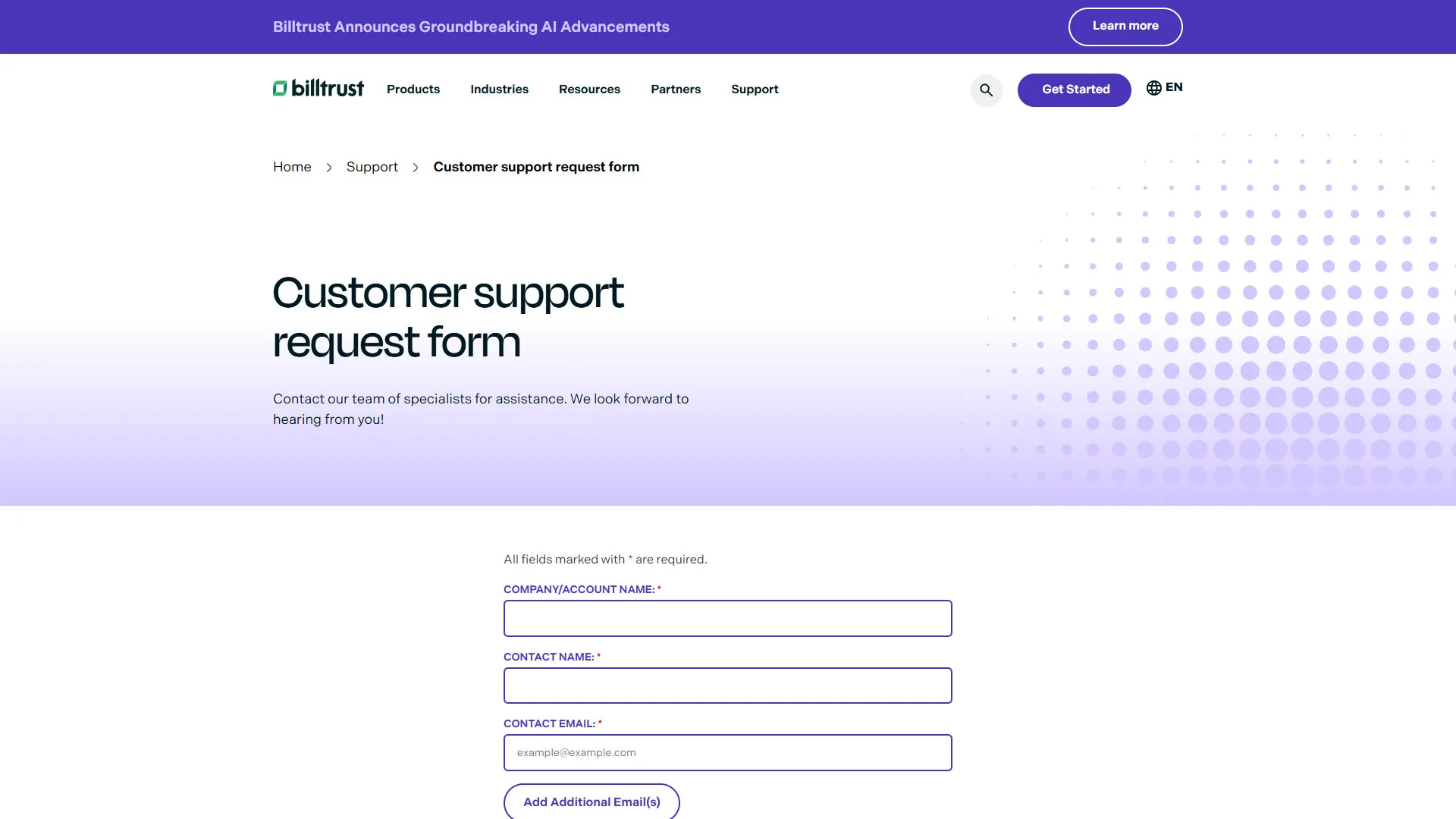
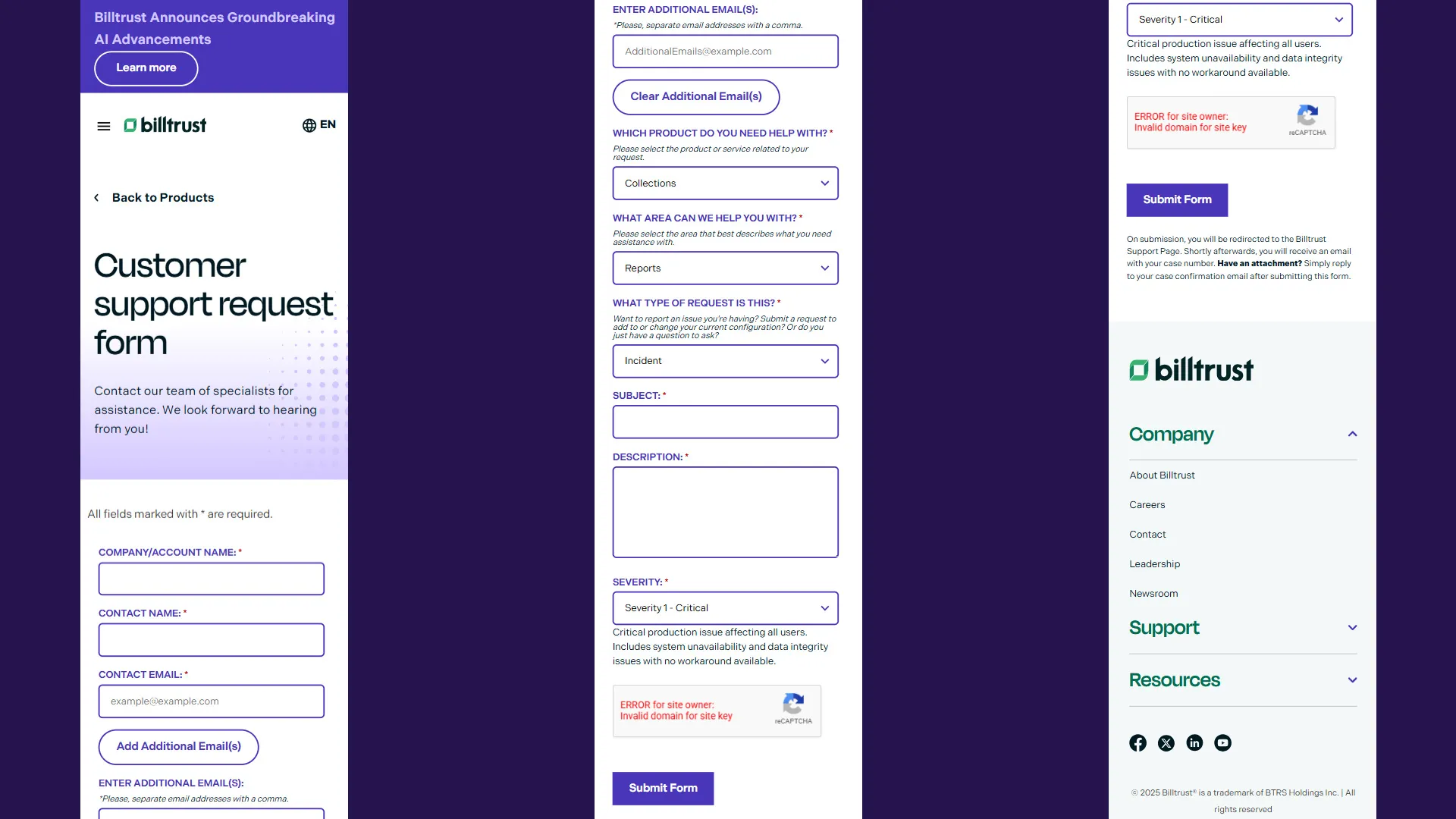
While working at Billtrust, I designed and developed a fully responsive Salesforce Web-to-Case support form that streamlined how customers contacted specialized support teams while improving the overall submission experience.
The project combined:
- Salesforce Web-to-Case integration
- Dynamic form personalization
- Custom JavaScript validation
- reCAPTCHA spam prevention
- Conditional field behavior
- Business email verification
- Dynamic support categorization
- Responsive mobile-first design
- Accessibility-focused interactions
The result was a significantly more intelligent and user-friendly support intake experience that improved ticket routing, reduced invalid submissions, and helped customers connect with the right support specialists faster.
The Business Problem
Billtrust supported multiple financial and payment-related software products, each with different workflows, support teams, and escalation paths.
Customers submitting support requests often struggled with:
- Selecting the correct product
- Choosing the appropriate support category
- Understanding severity levels
- Submitting complete information
- Providing the right contact details
- Navigating long, static forms on mobile devices
Internally, support teams also faced challenges caused by:
- Poorly categorized cases
- Incomplete submissions
- Invalid contact information
- Spam submissions
- Incorrect ticket routing
The goal was to create a smarter support form experience that improved both the customer experience and operational efficiency for internal support teams.
Project Goals
The form redesign focused on several primary objectives:
- Improve form usability
- Reduce friction during submission
- Improve case routing accuracy
- Dynamically personalize form options
- Prevent spam and low-quality submissions
- Support responsive mobile experiences
- Improve accessibility compliance
- Streamline Salesforce case creation
- Reduce manual support triage work
What the Application Does
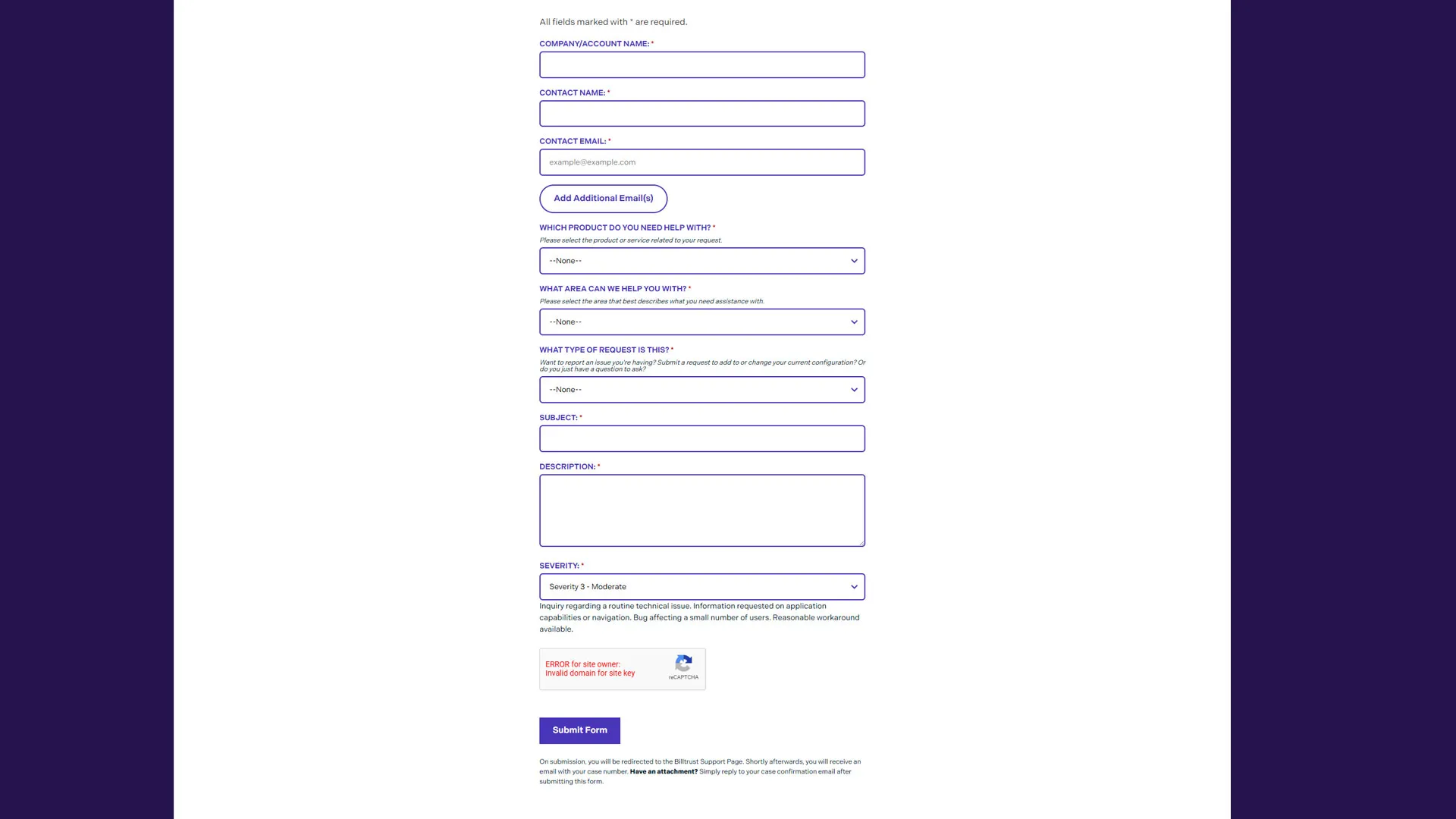
The application functions as a dynamic customer support intake system integrated directly into Salesforce using Web-to-Case functionality.
Users can:
- Submit support requests directly into Salesforce
- Select specific Billtrust products
- Dynamically load relevant support categories
- Choose severity levels
- Add multiple business email contacts
- Validate business email domains
- Complete reCAPTCHA verification
- Submit detailed support descriptions
- Automatically route cases to correct record types
The interface dynamically adapts based on user selections, helping guide customers through the submission process while reducing unnecessary complexity.
Building the Salesforce Web-to-Case Integration
The form was built using Salesforce’s Web-to-Case endpoint while extending the default implementation with custom frontend enhancements.
<form
  action="https://webto.salesforce.com/servlet/servlet.WebToCase?encoding=UTF-8"
  method="POST"
  class="cs-help-req-form"
  id="myForm"
></form>
Several hidden Salesforce fields were dynamically populated during the experience, including:
<input
  type="hidden"
  name="recordType"
  id="recordType"
  value="Populate recordType value based on users selected option"
/>
This allowed cases to automatically route to the correct internal support queues based on product selection.
From an operational standpoint, this significantly reduced manual ticket reassignment and improved response workflows.
Dynamic Product and Category Personalization
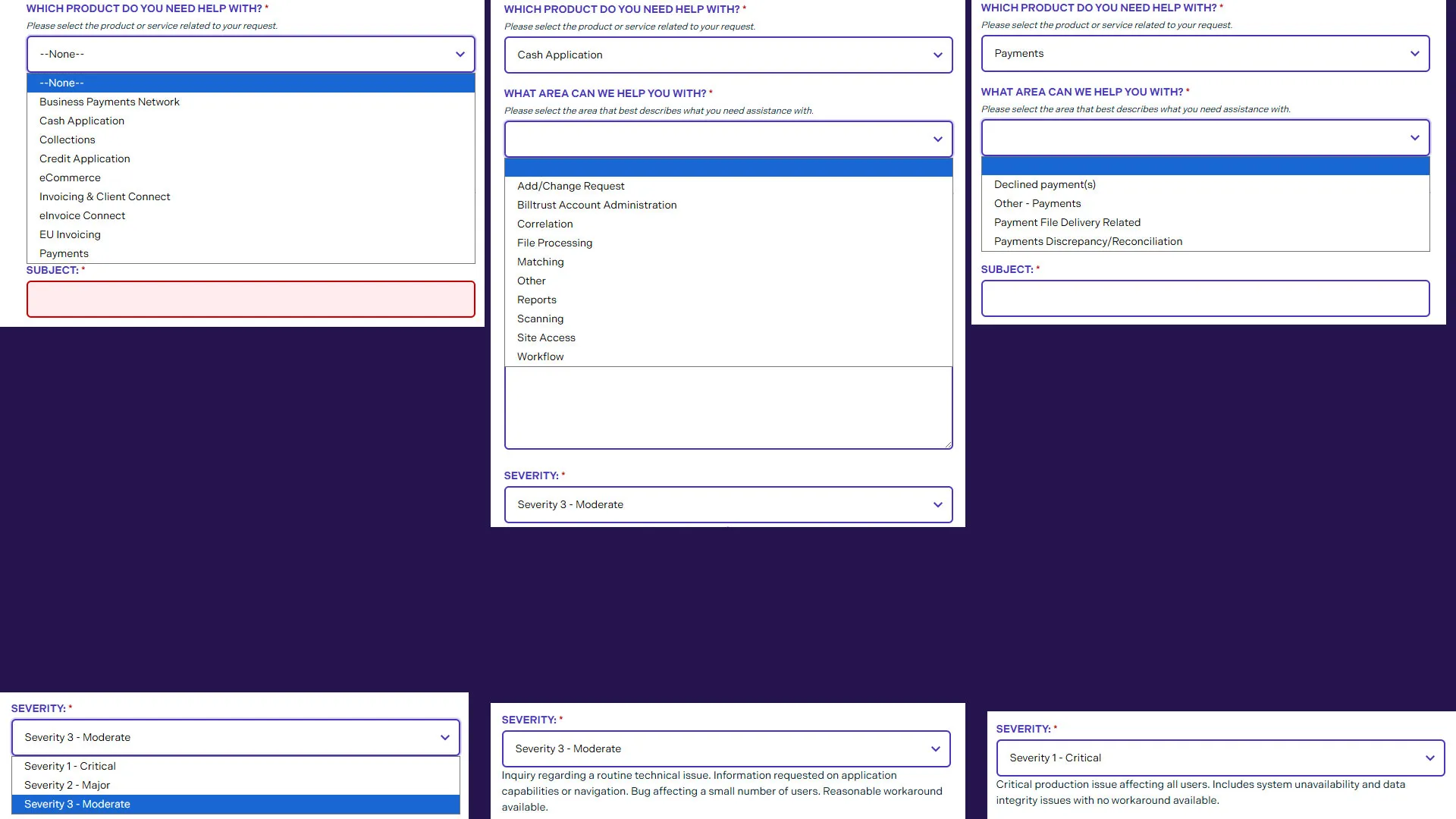
One of the most important UX improvements involved dynamically updating support categories based on the product selected by the user.
Instead of overwhelming users with a massive static category list, the form intelligently narrowed available options.
Example product mapping logic:
const categoryMap = {
  'Cash Application': ['', 'Add/Change Request', 'Correlation', 'Reports', 'Workflow'],

  Payments: [
    '',
    'Declined payment(s)',
    'Payment File Delivery Related',
    'Payments Discrepancy/Reconciliation',
  ],
};
When users selected a product, JavaScript dynamically generated the appropriate category options:
productField.addEventListener('change', function () {
  const selectedOption = this.options[this.selectedIndex].value;
  const categories = categoryMap[selectedOption];

  categoryField.innerHTML = '';

  categories.forEach((category) => {
    const option = document.createElement('option');
    option.text = category;
    option.value = category;
    categoryField.add(option);
  });
});
This approach improved:
- Form clarity
- Submission accuracy
- Support routing
- User confidence
- Overall usability
It also reduced cognitive overload by progressively narrowing user choices.
Severity-Based Dynamic Messaging
Another UX-focused enhancement involved dynamically updating contextual messaging based on the severity level selected.
Example:
switch (selectedOption) {
  case 'Severity 1 - Critical':
    messageElement.textContent = 'Critical production issue affecting all users.';
    break;
}
This provided users with immediate guidance about what each severity level actually meant.
Benefits included:
- Better severity selection accuracy
- Reduced misuse of critical escalation paths
- Improved customer understanding
- More consistent ticket prioritization
This was especially important in enterprise support environments where severity misuse can create operational bottlenecks.
Business Email Validation
To improve data quality and reduce spam or low-priority submissions, I implemented custom business email validation logic.
The form rejected free personal email providers such as:
- Gmail
- Yahoo
- Hotmail
- AOL
- ProtonMail
- Outlook.com
Example validation logic:
function isBusinessEmail(email) {
  const domain = email.substring(email.lastIndexOf('@'));

  for (let i = 0; i < invalidDomains.length; i++) {
    if (domain.toLowerCase().includes(invalidDomains[i])) {
      return false;
    }
  }

  return true;
}
This ensured support requests originated from verified business contacts while helping reduce abuse and improving case attribution.
Multiple Contact Email Support
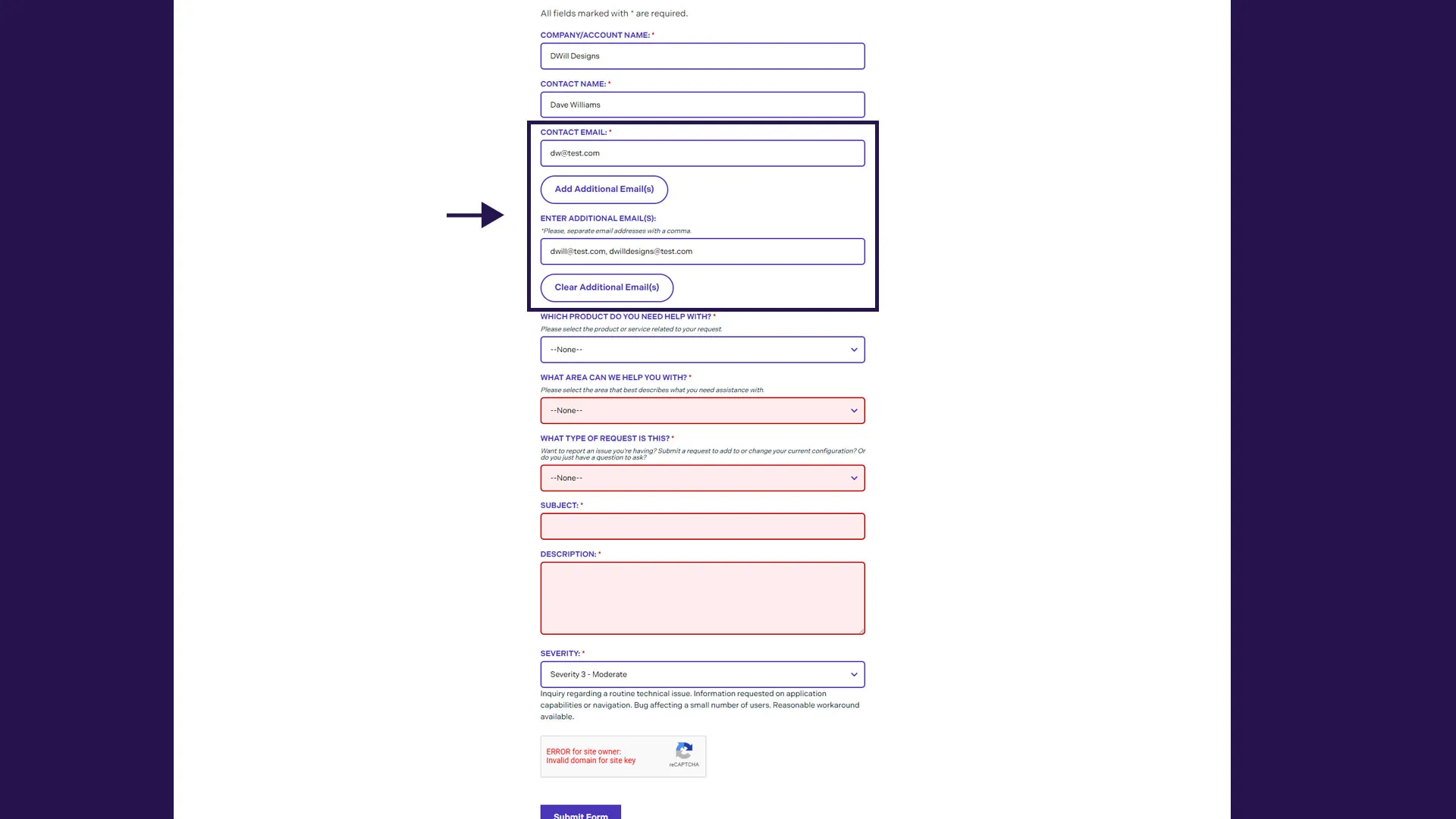
Another custom enhancement allowed users to add multiple additional contacts to a support case.
The interface included:
- Add email functionality
- Multi-email validation
- Comma-separated parsing
- Salesforce-compatible formatting
- Dynamic visibility toggling
Example:
hiddenadditionalEmailInput.value = hiddenadditionalEmailInput.value.replace(/,/g, ';');This improved collaboration for enterprise customers where multiple stakeholders often needed visibility into support communications.
reCAPTCHA and Spam Prevention
Spam prevention was another important consideration.
The form integrated Google reCAPTCHA validation:
<div class="g-recaptcha" data-sitekey="YOUR_SITE_KEY"></div>Submission logic verified captcha completion before allowing form submission:
if (response.length == 0) {
  alert('Please verify you are human.');
  evt.preventDefault();
}
This helped protect Salesforce case queues from spam submissions while maintaining a relatively frictionless user experience.
Responsive Mobile-First Design
The form was fully responsive and optimized for mobile users.
Key mobile-first considerations included:
- Large touch-friendly inputs
- Responsive spacing
- Readable typography
- Simplified layouts
- Mobile-friendly dropdowns
- Accessible focus states
- Reduced visual clutter
Example responsive styling:
@media (max-width: 640px) {
  .cs-help-req-form {
    padding: 16px;
  }
}
The experience was designed to remain highly usable across desktop, tablet, and mobile devices.
Accessibility Considerations
Accessibility played a major role throughout the implementation.
Accessibility improvements included:
- Semantic form labels
- Proper ARIA relationships
- Keyboard-friendly interactions
- Focus state visibility
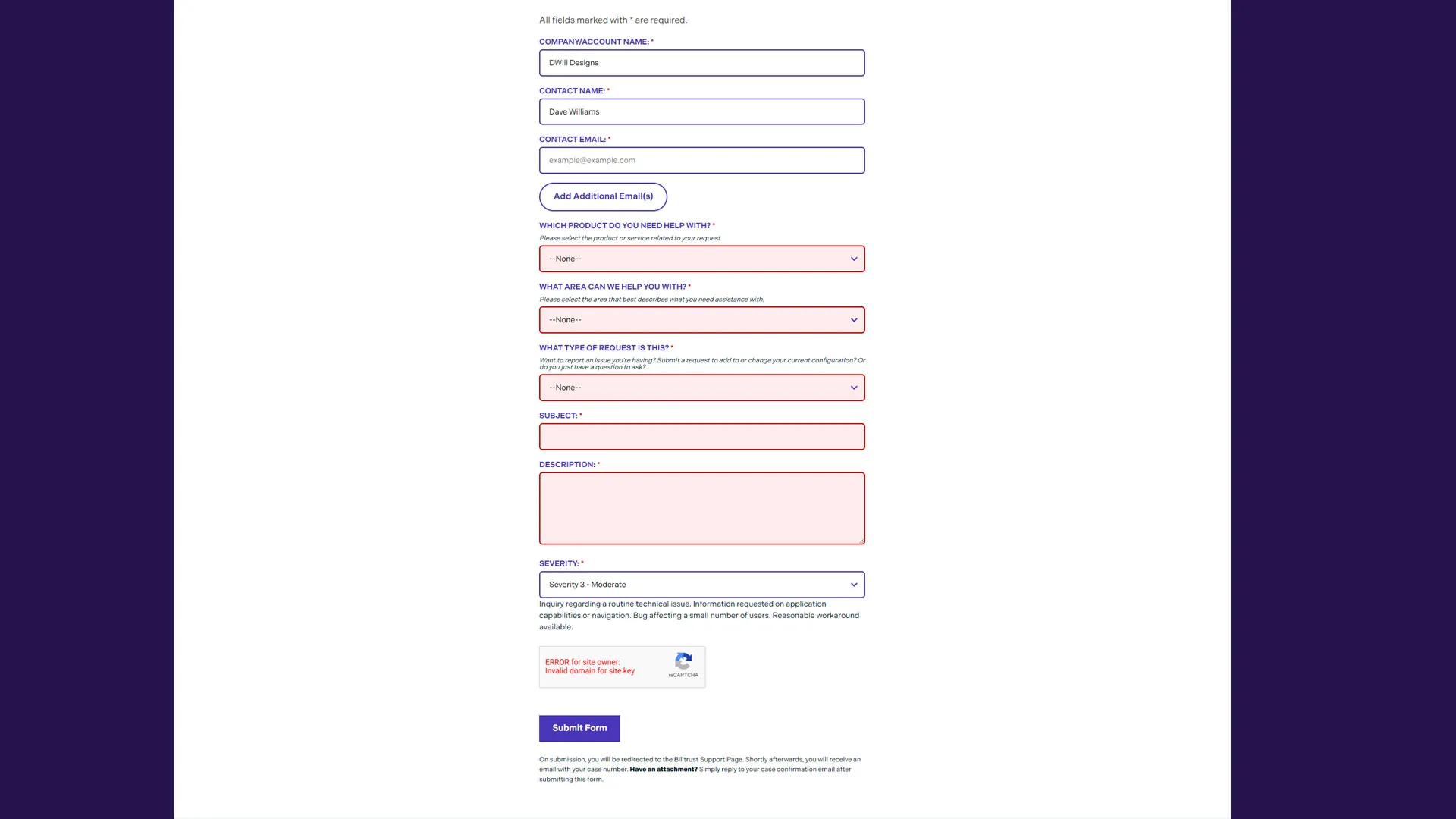
- Error highlighting
- Descriptive helper text
- Accessible validation messaging
Example:
<input id="00N1M00000FLSp5" type="email" aria-labelledby="contactEmail" required />These improvements helped ensure the form remained usable across a broad range of users and devices.
Frontend Architecture
The project intentionally used lightweight frontend technologies without requiring a large JavaScript framework.
Core technologies included:
- HTML
- CSS
- Vanilla JavaScript
- Salesforce Web-to-Case
- Google reCAPTCHA
This architecture improved:
- Maintainability
- Performance
- Deployment simplicity
- Reliability
- Cross-browser compatibility
The implementation focused on progressive enhancement while keeping the overall codebase easy for future teams to maintain.
UX and Business Impact
From both a customer experience and operational perspective, the project delivered several important benefits.
Improved Support Routing
Dynamic record type assignment helped ensure tickets reached the correct internal teams faster.
Reduced Submission Errors
Validation logic and guided workflows improved form completion quality.
Better Customer Experience
Users received a cleaner, more intuitive support submission experience.
Reduced Spam
Business email validation and reCAPTCHA significantly reduced low-quality submissions.
Improved Mobile Usability
The mobile-first interface better supported modern user behavior.
Increased Operational Efficiency
More accurate ticket categorization reduced manual support triage work.
Lessons Learned
Dynamic Forms Improve Usability
Breaking complex workflows into contextual interactions reduces cognitive load and improves completion quality.
Validation Should Guide, Not Punish
Helpful validation messaging improves user confidence while maintaining data integrity.
Lightweight Frontend Architecture Can Scale
Vanilla JavaScript remains highly effective for dynamic enterprise workflows when implemented thoughtfully.
Enterprise UX Matters
Support experiences directly influence customer perception of a company’s reliability and professionalism.
Operational Efficiency Starts at the Frontend
Small frontend improvements can create meaningful downstream operational gains for support teams.
Conclusion
The Salesforce support form became far more than a standard contact form.
By combining:
- Dynamic personalization
- Intelligent validation
- Responsive design
- Accessibility improvements
- Automated Salesforce routing
- Spam prevention
- Guided UX patterns
…the experience evolved into a smarter enterprise support intake system designed around both customer needs and internal operational efficiency.
The project reinforced an important principle across both frontend engineering and digital experience design:
The best enterprise tools simplify complexity without sacrificing functionality.
For Billtrust, that meant helping customers submit better support requests faster — while helping internal teams resolve issues more efficiently.