One of the most common friction points in construction and landscaping e-commerce is uncertainty around quantity estimation.
Customers often know what material they need — gravel, sand, rock, or soil — but struggle to calculate how much to purchase for a project. Ordering too little creates delays and additional delivery costs. Ordering too much wastes money and material.
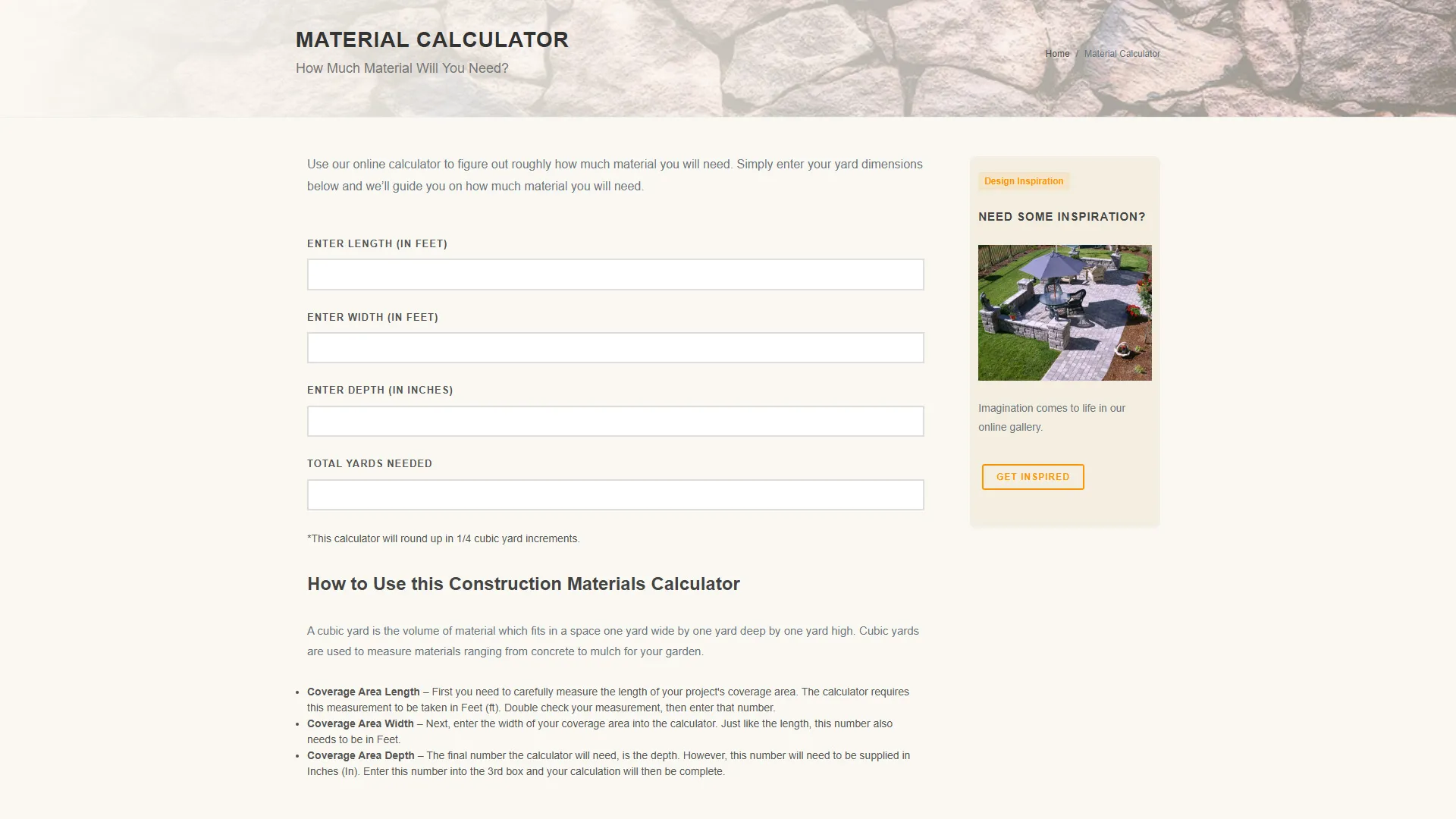
While working on the Tahoe Sand and Gravel website, I developed a custom materials calculator designed to simplify this process. Built entirely with semantic HTML, CSS, and vanilla JavaScript, the calculator helped customers quickly estimate how much material they needed based on project dimensions.
The goal was straightforward: reduce customer uncertainty, improve usability, and create a smoother path toward purchase.
The result was a lightweight interactive tool that improved customer experience without requiring third-party plugins or complex frameworks.
The User Problem
Construction material estimation is surprisingly difficult for many homeowners and first-time customers.
Most users are unfamiliar with:
- Cubic yard calculations
- Unit conversions
- Material depth requirements
- Volume estimation formulas
Without guidance, customers often leave the website to search for external calculators or attempt manual calculations themselves.
This introduces several problems:
- Increased purchasing hesitation
- Higher likelihood of incorrect orders
- Additional customer service inquiries
- Reduced conversion opportunities
The calculator solved this by embedding the estimation process directly into the purchasing experience.
Project Objectives
The calculator project focused on several key business and UX goals:
- Help customers estimate material quantities accurately
- Reduce friction during the purchasing process
- Improve usability for non-technical users
- Keep the experience lightweight and fast
- Avoid dependency on external libraries
- Support mobile and desktop users equally
- Encourage higher purchase confidence
Frontend Architecture Overview
The implementation intentionally remained simple and maintainable.
The calculator was built using:
- Semantic HTML form fields
- Lightweight CSS styling
- A single vanilla JavaScript calculation function
- Real-time input updates using
onkeyup - No frameworks or plugins
- No backend processing
The entire interaction occurs instantly in the browser without requiring page refreshes or API calls.
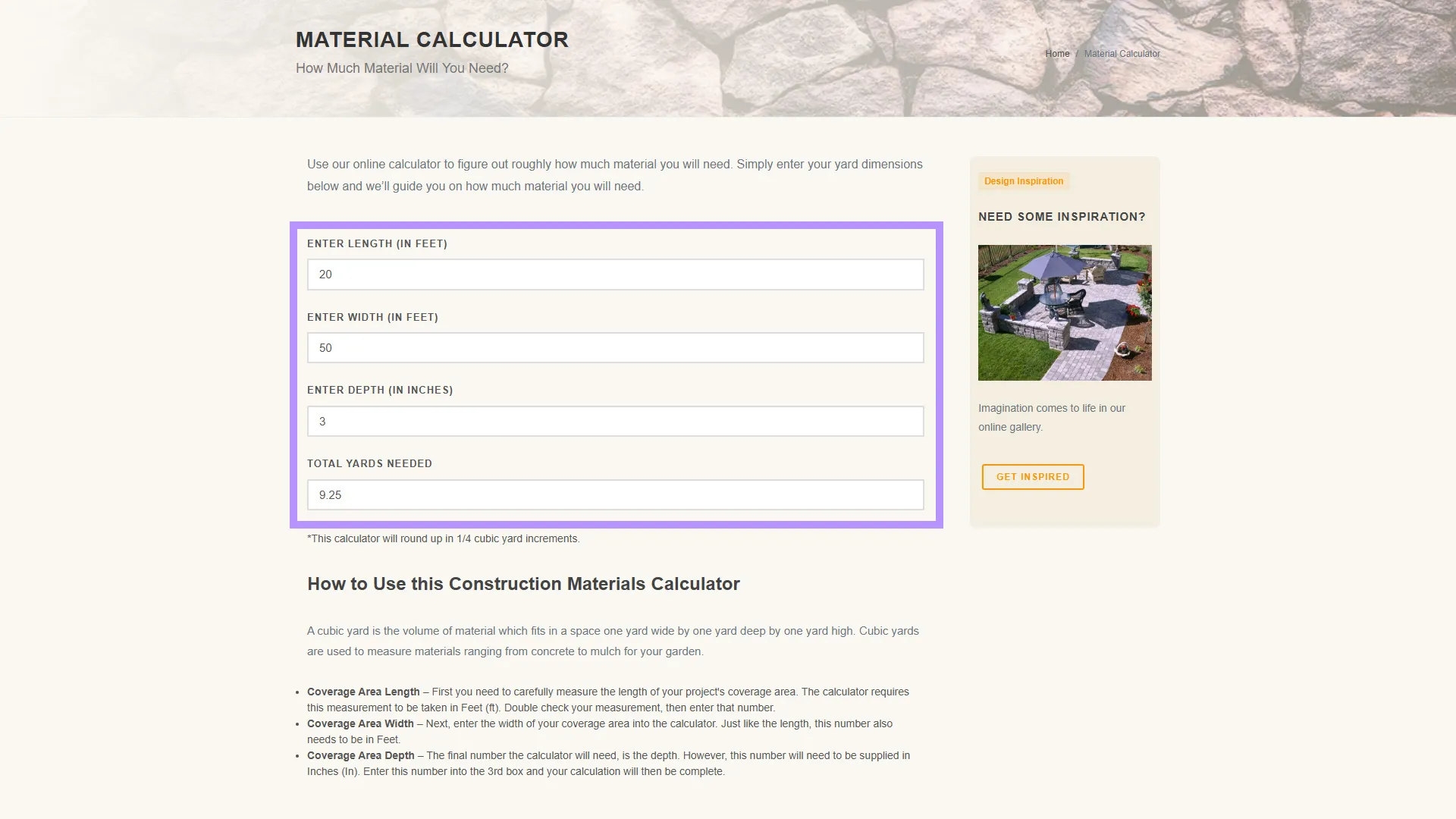
User Experience Design
The calculator was designed to feel approachable for users with little or no construction experience.
The interface focused on three simple inputs:
- Length (feet)
- Width (feet)
- Depth (inches)
As users entered values, the result updated automatically in real time.
<input name="length" class="field" onkeyup="calc();" type="text" />This immediate feedback removed the need for submit buttons or additional interaction steps.
The interface also included explanatory content below the calculator to help users understand cubic yard measurements and how to measure their project area correctly.
Core Calculation Logic
The calculator converts user inputs into cubic yards — the standard measurement used for bulk construction materials.
The conversion logic handled multiple unit types:
- Feet for length and width
- Inches for depth
- Cubic yards for final output
The calculation process:
// convert length feet to yards
l = l / 3;

// convert width feet to yards
w = w / 3;

// convert depth inches to yards
d = d / 36;

// calculate volume in yards
var v = l * w * d;
This created a straightforward and transparent calculation model that was easy to maintain and verify.
Rounding Logic for Real-World Ordering
One particularly important implementation detail was the rounding behavior.
Rather than returning long decimal values, the calculator rounded results to the nearest quarter-yard increment:
var v = Math.round(v * 4) / 4;This decision aligned the tool with how bulk materials are typically sold and delivered in practice.
For example:
2.18yards becomes2.253.62yards becomes3.54.87yards becomes5
This improved usability significantly because customers received results they could actually order.
The calculator effectively translated technical measurements into practical purchasing quantities.
Why Vanilla JavaScript Was the Right Choice
The calculator did not require a modern frontend framework.
Using vanilla JavaScript provided several advantages:
Lightweight Performance
The script executes instantly with virtually no overhead.
Easy Maintenance
The logic remains readable and accessible to future developers or content teams.
Faster Load Times
No framework bundles or dependencies were introduced.
Better Long-Term Stability
The calculator avoids dependency-related maintenance risks.
Progressive Enhancement
The form structure remains understandable even without JavaScript enabled.
For a utility-focused website experience, simplicity was a strength rather than a limitation.
Mobile and Responsive Considerations
Construction and landscaping customers frequently browse websites from mobile devices while physically measuring projects outdoors.
The calculator was designed to support this workflow:
- Large, readable form fields
- Minimal input complexity
- Immediate visual feedback
- Simple mobile-friendly layout
- No unnecessary interaction steps
The lightweight implementation also performed well on slower mobile connections.
Accessibility Considerations
Accessibility and usability were important considerations throughout the implementation.
Semantic Form Structure
The calculator used proper form fields and labels:
<label class="field_name">Enter Length (Ft)</label>
<input name="length" class="field" type="text" />
Clear Input Expectations
Units were clearly communicated to avoid user confusion.
Reduced Cognitive Load
The experience minimized required calculations and technical terminology.
Immediate Feedback
Real-time updates helped users validate their inputs quickly.
Business Benefits
The calculator created value for both customers and the business.
Reduced Purchase Friction
Customers could estimate quantities directly on the website without leaving to use external tools.
Increased Buyer Confidence
Providing immediate estimates helped users feel more certain about placing orders.
Lower Customer Support Burden
The calculator reduced common quantity estimation questions.
Better Conversion Opportunities
Interactive utility tools help keep users engaged longer and move them closer to purchase decisions.
Stronger Customer Experience
The tool positioned the company as helpful and customer-focused rather than purely transactional.
Technical Lessons Learned
Utility Tools Drive Engagement
Interactive calculators can provide meaningful value even with relatively simple implementations.
Real-Time Feedback Improves UX
Instant updates reduce friction and create a smoother interaction flow.
Domain Knowledge Matters
Understanding how materials are sold in practice informed the quarter-yard rounding logic, making the tool more useful in real-world scenarios.
Simplicity Scales Well
A lightweight architecture can often outperform more complex solutions when the interaction itself is straightforward.
Example Calculator Structure
The calculator form structure remained intentionally minimal:
<form name="volcalc">
  <label>Enter Length (Ft)</label>
  <input name="length" onkeyup="calc();" type="text" />

  <label>Enter Width (Ft)</label>
  <input name="width" onkeyup="calc();" type="text" />

  <label>Enter Depth (In)</label>
  <input name="depth" onkeyup="calc();" type="text" />

  <label>Total yards needed</label>
  <input name="vol" type="text" />
</form>
This simplicity made the experience approachable for users of all technical skill levels.
Conclusion
The construction materials calculator demonstrated how small interactive tools can create meaningful business impact when they solve real customer problems.
By combining semantic HTML, lightweight CSS, and straightforward JavaScript logic, the implementation delivered a fast and practical utility that improved usability, reduced purchasing friction, and helped customers make more informed decisions.
For Tahoe Sand and Gravel, the calculator became more than just a convenience feature — it supported the broader customer journey by turning uncertainty into confidence.
Sometimes the most valuable digital experiences are not the most visually complex. They are the tools that help users accomplish a task quickly, clearly, and without frustration.