Every content team has at least one workflow step nobody talks about because it’s tedious rather than technical. For us, it was the gap between “the blog post is approved” and “the blog post is live.”
An approved Word doc would land in my inbox, and then the real work started: opening it, copying the text into a code editor to strip out Word’s smart quotes and invisible styling, pasting the cleaned text into the Gutenberg editor, and then manually rebuilding every heading, list, link, and callout by hand, checking each internal link against our external-link rules, writing heading IDs by hand, and second-guessing whether a pull quote needed a special block or just bold text.
None of that is hard. It’s just slow, repetitive, and exactly the kind of task where a tired brain starts making small, inconsistent mistakes: a missed target="_blank", a heading ID that doesn’t quite match the visible text, a “Call Out” block styled one way this week and a different way next week.
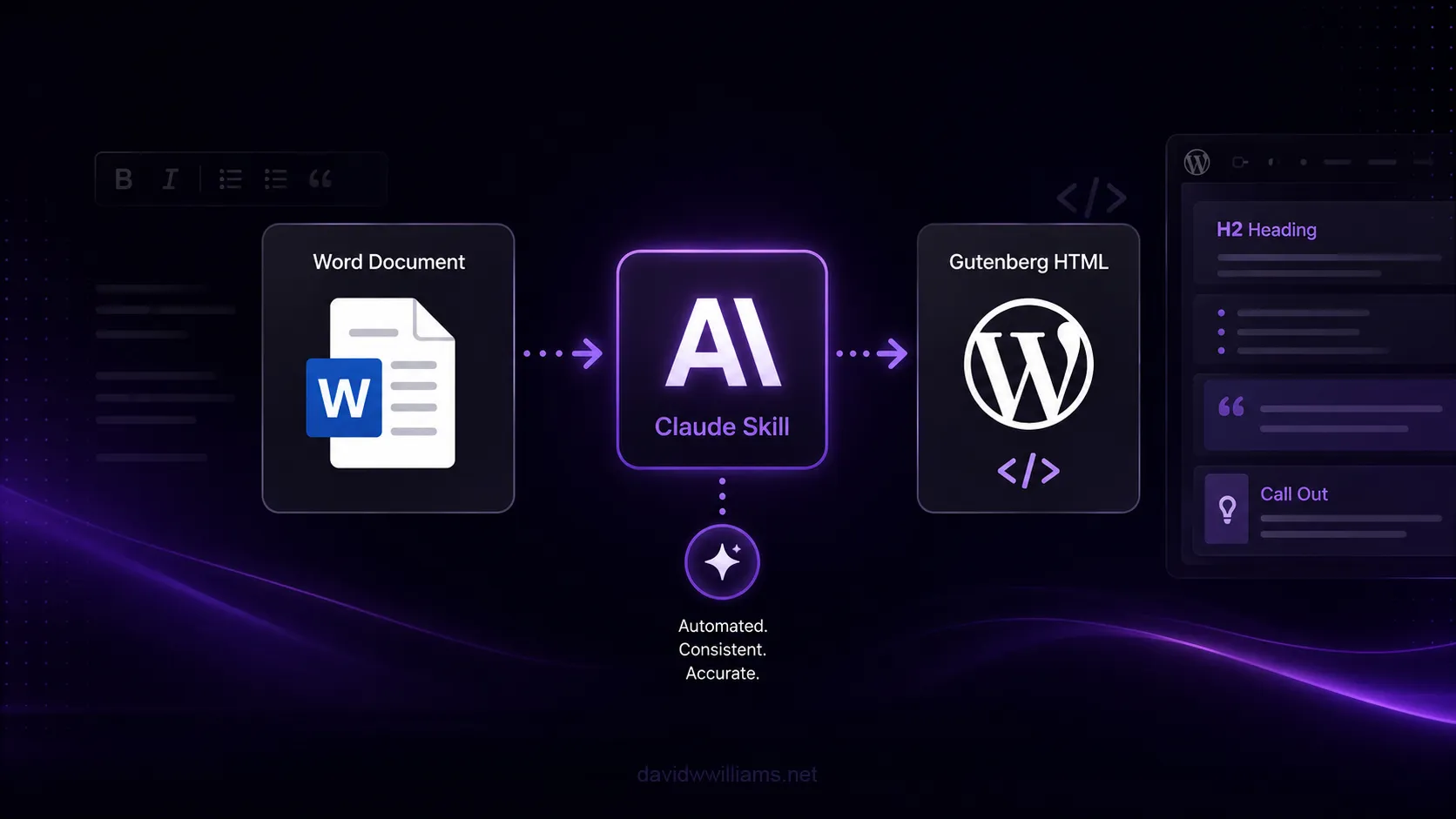
So I built a Claude Skill to do it instead.
The old workflow
Before the skill, publishing an approved blog post to WordPress looked like this:
- Open the Word document
- Copy the full text into a code editor to strip Word’s injected styling and special characters (curly quotes, non-breaking spaces, stray
<span>artifacts) - Copy the cleaned text into the WordPress Gutenberg editor
- Manually convert paragraphs into proper heading levels
- Manually rebuild every list as a proper Gutenberg list block
- Manually check every link: is it internal or external? Does it need
target="_blank"andrel="noopener noreferrer"? - Manually write a heading ID for every H2/H3/H4, hoping it matched our SEO anchor-linking conventions
- Manually decide whether a callout should be a plain paragraph or one of our styled Gutenberg blocks
Depending on the length and complexity of the post, that’s anywhere from 30 minutes to well over an hour of careful, repetitive formatting work for a post whose actual writing was already done and approved.
What a Claude Skill actually is
A Claude Skill is a folder of instructions, a SKILL.md file, plus any reference files it needs, that Claude loads automatically when a task matches. Instead of re-explaining our formatting rules every time I needed a post converted, I could write them once, and Claude would pull them in whenever the task called for it.
That’s a meaningful difference from a one-off prompt. A prompt only works as well as I remember to write it that day. A skill is durable: the same rules, the same edge-case handling, the same output shape, every single time whether I’m the one running it or someone else on the team is.
Building the skill
The skill itself is built around three things:
- A guidelines document: our existing formatting, accessibility, SEO, and linking rules for Gutenberg HTML, written out as an authoritative rule set rather than something I had to re-explain each time.
- A structural reference file: real examples of our custom Gutenberg block patterns (highlighted callouts, quote boxes, standard paragraphs and lists) so the output matches our actual site components instead of generic HTML.
- A hard rule around content preservation: the source copy is final and approved. The skill’s job is structural transformation only: converting Word formatting into valid Gutenberg HTML, never rewriting, paraphrasing, or “improving” a single sentence of already-approved copy.
I tested it against a real, already-published post comparing the skill’s output side-by-side with what we’d manually built and shipped. That process actually caught an inconsistency in our own past work: three identical “Call Out” markers in the same document had been formatted three different ways by hand. The skill surfaced that, we picked one consistent rule, and now every callout in every future post follows it automatically instead of depending on whoever happens to be doing the formatting that day.
The results
Speed. Build time for a typical post dropped by roughly half, and more on longer or more structurally complex posts: the ones with nested lists, multiple callouts, or a mix of internal and external links, which is exactly where manual formatting used to slow down the most.
Accuracy. No more Word-injected special characters slipping through, no more inconsistent heading IDs, no more guessing whether a link is internal or external. The rules are applied the same way every time, which matters more than it sounds like it should: small formatting inconsistencies compound across a large content library.
Consistency at scale. This is the part I didn’t fully appreciate until after building it. The skill doesn’t just save time for me, it encodes the decision-making, not just the mechanics. Anyone on the team running this skill gets the same well-reasoned output I would have produced myself, without needing to memorize every edge case in our formatting rules.
Business value
The obvious win here is time. But the more interesting win is what that time gets reinvested in.
Formatting a blog post for publishing never created much value on its own. Automating that mechanical work gives me more time to focus on what happens after the content is published: analyzing performance, finding opportunities to promote high-value content across the site, improving conversion and engagement, and using those insights to inform what we do next.
It also creates more room for the broader work required to keep an enterprise website performing well: improving Core Web Vitals and page speed, refining the user experience, maintaining accessibility standards, and continuously looking for ways the platform can better support both visitors and the business. Saving 30 minutes on a blog post may sound small in isolation, but multiplied across an ongoing publishing program, that time becomes meaningful capacity for higher-impact work.
There’s another benefit that’s easy to overlook: governance. When formatting rules live in a skill instead of in one person’s head, they survive turnover, onboarding, and busy weeks. A new teammate, or an agency partner, can produce publish-ready HTML that matches our standards on day one, not after months of tribal knowledge transfer.
Where I see this going
Right now this skill handles one well-defined step in our content pipeline. The natural next step is connecting it to the steps on either side of it: pulling approved copy directly from wherever it’s reviewed, and pushing the finished HTML straight into WordPress rather than a copy-paste handoff.
That’s the pattern I keep coming back to with this kind of tooling: the value isn’t in any single automated step, it’s in shrinking the friction between all of them until the person doing the work can focus entirely on judgment calls instead of mechanics.
Final thoughts
I’ve spent a lot of my career thinking about how to make enterprise web platforms faster, more accessible, and easier to maintain. This was a smaller-scope project than a platform migration or a performance overhaul, but it followed the same underlying principle: find the repetitive, error-prone step nobody enjoys, and give it a reliable, well-documented process instead of relying on memory and careful attention every single time.
The blog post gets published either way. The only question is how much of that time goes to formatting versus everything that actually matters.