Modern marketing teams generate enormous amounts of data across websites, email platforms, advertising channels, mobile apps, CRM systems, and social media platforms. The challenge is rarely collecting data — it is turning disconnected metrics into a clear story that leadership can understand and act on.
While working at Sierra-at-Tahoe, I redesigned how digital marketing performance was reported to executives and ownership teams by building a centralized suite of interactive dashboards using Google Data Studio (now Looker Studio).
The goal was not simply to display analytics. It was to create a reporting system that transformed raw marketing data into a decision-making tool — one that provided visibility into revenue performance, campaign effectiveness, customer engagement, and digital growth across the organization.
The result was a multi-dashboard reporting ecosystem covering website analytics, ecommerce revenue, email marketing, advertising performance, SEO/SEM, mobile app engagement, SMS campaigns, social media growth, and PR/media impact.
The Business Problem
Before the dashboard initiative, reporting existed across multiple disconnected platforms:
- Website analytics lived in Google Analytics
- Email performance lived in email marketing tools
- Advertising metrics lived in Google Ads and social platforms
- Ecommerce reporting lived in separate systems
- Mobile app engagement metrics existed elsewhere
- PR/media exposure reporting was isolated from marketing reporting
Generating leadership reports required manual exports, spreadsheets, screenshots, and time-consuming aggregation work.
This created several challenges:
- Reporting cycles were slow
- Cross-channel trends were difficult to identify
- Leadership lacked a unified performance view
- Marketing attribution discussions were fragmented
- Decision-making relied heavily on static monthly reports
The organization needed a centralized, visual, and interactive reporting solution that could surface meaningful insights quickly.
Project Goals
The dashboard initiative focused on several core objectives:
- Create a centralized source of truth for digital marketing performance
- Improve visibility into revenue-driving channels
- Enable faster executive reporting
- Provide interactive filtering and exploration capabilities
- Reduce manual reporting overhead
- Make data easier to understand for non-technical stakeholders
- Support smarter marketing investment decisions
Equally important, the dashboards needed to work well during executive meetings, on laptops, and on mobile devices without requiring technical training.
Dashboard Architecture Overview
The reporting ecosystem was organized into multiple focused dashboards, each targeting a specific business function while maintaining visual consistency across the entire suite.
Dashboard Categories Included
- Website Performance Dashboard
- Ecommerce Revenue Dashboard
- Email Marketing Dashboard
- Online Advertising Dashboard
- Search Engine Marketing (SEM) Dashboard
- Mobile App Analytics Dashboard
- SMS Marketing Dashboard
- Social Media Dashboard
- PR & Media Exposure Dashboard
Each dashboard combined multiple visualization types including:
- Line charts
- Bar charts
- Pie charts
- Data tables
- KPI scorecards
- Trend visualizations
- Device segmentation reports
- Geographic reporting maps
The dashboards were designed to support both high-level executive summaries and deeper operational analysis.
Website Performance Dashboard
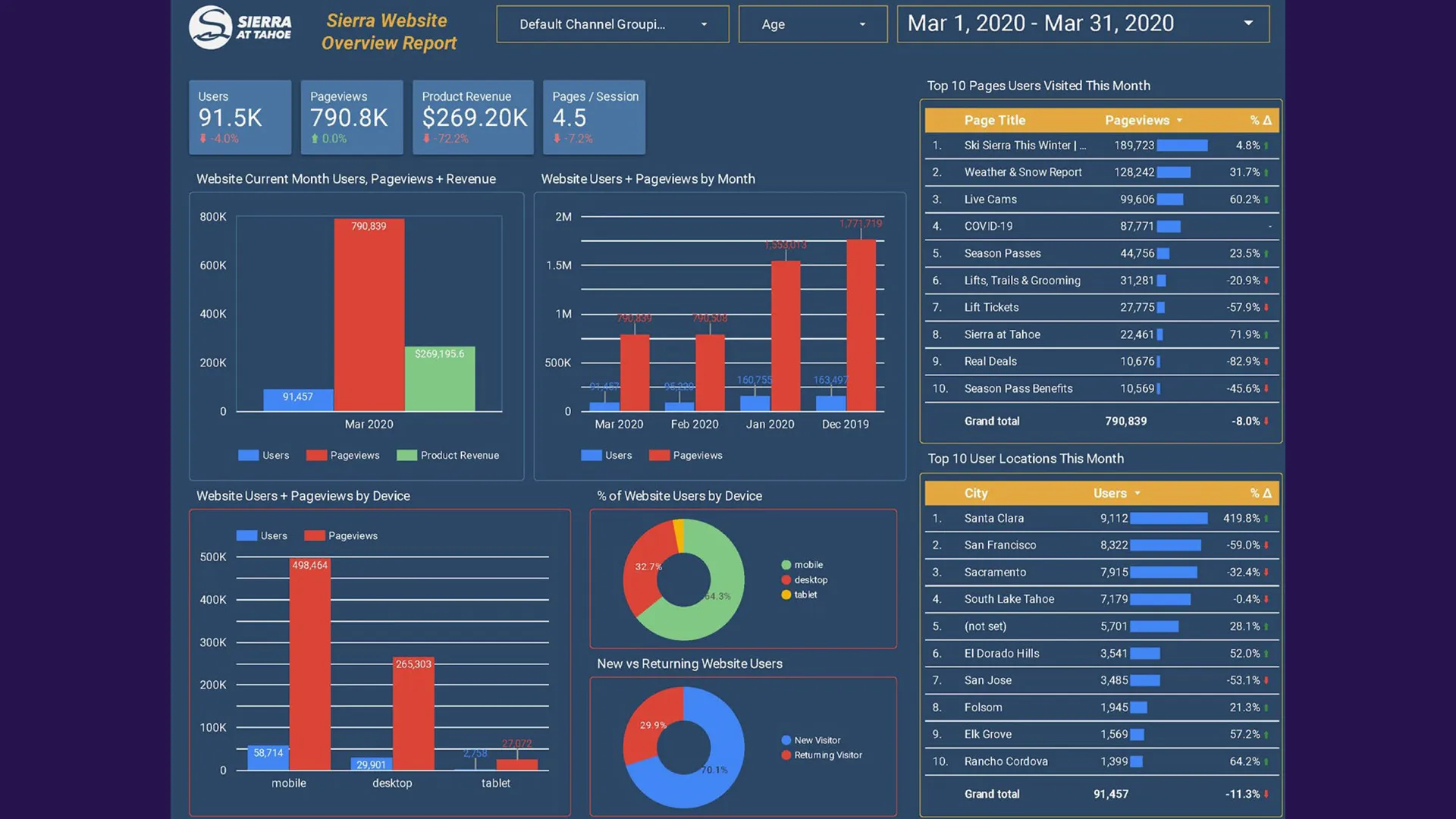
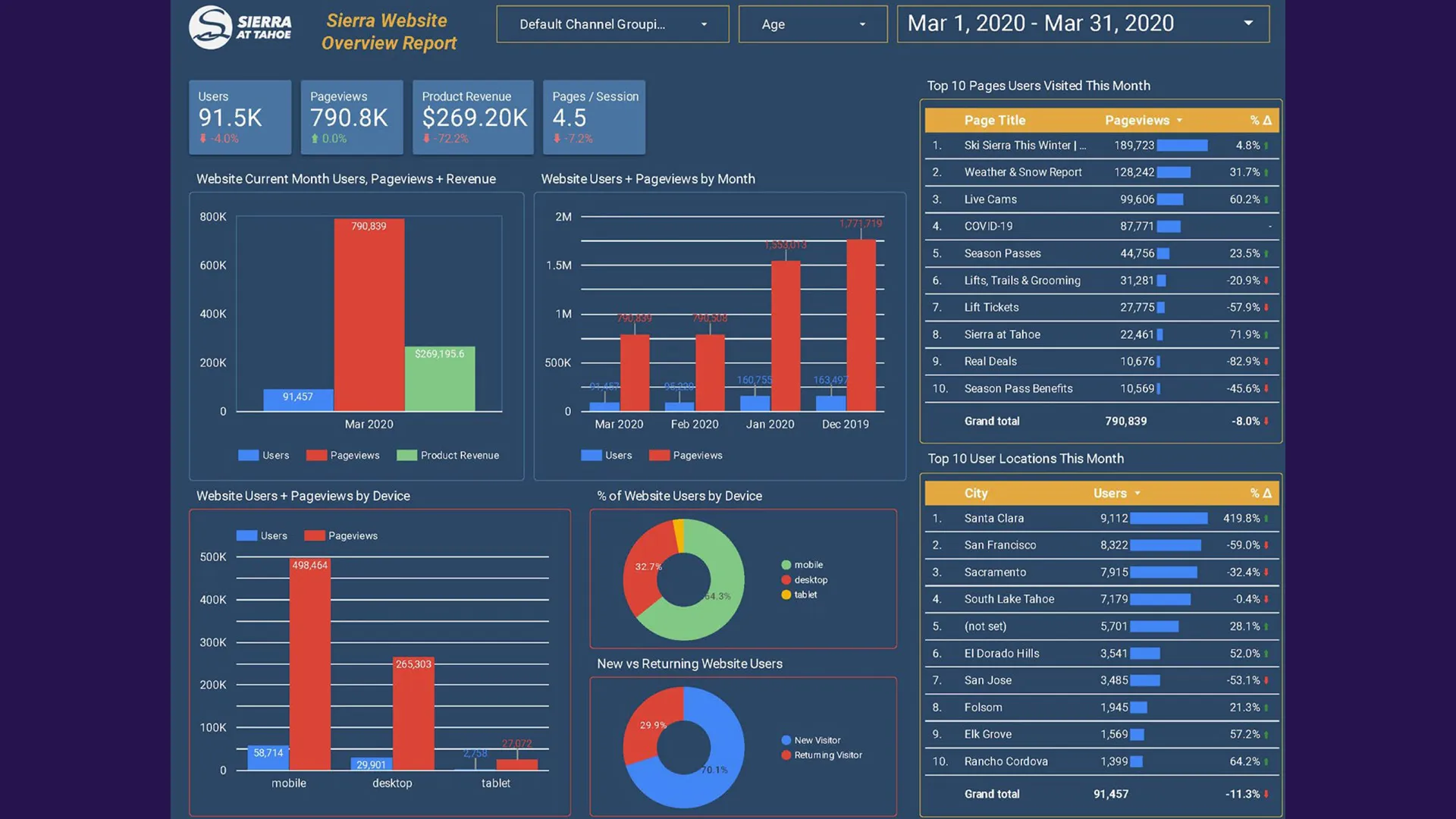
The website overview dashboard provided leadership with a centralized view of overall web engagement and user behavior.
Metrics Included
- Total users
- Total pageviews
- Pages per session
- New vs returning visitors
- Device usage breakdown
- Geographic traffic sources
- Top-performing pages
- Traffic trends over time
Visualization Strategy
Different chart types were intentionally selected based on the type of insight being communicated:
- Line charts illustrated traffic growth trends over time
- Bar charts compared top-performing pages and locations
- Pie charts showed audience segmentation
- Tables enabled detailed performance analysis
This combination allowed executives to quickly identify whether traffic growth was occurring, where users were coming from, and which content was performing best.
Ecommerce Revenue Dashboard
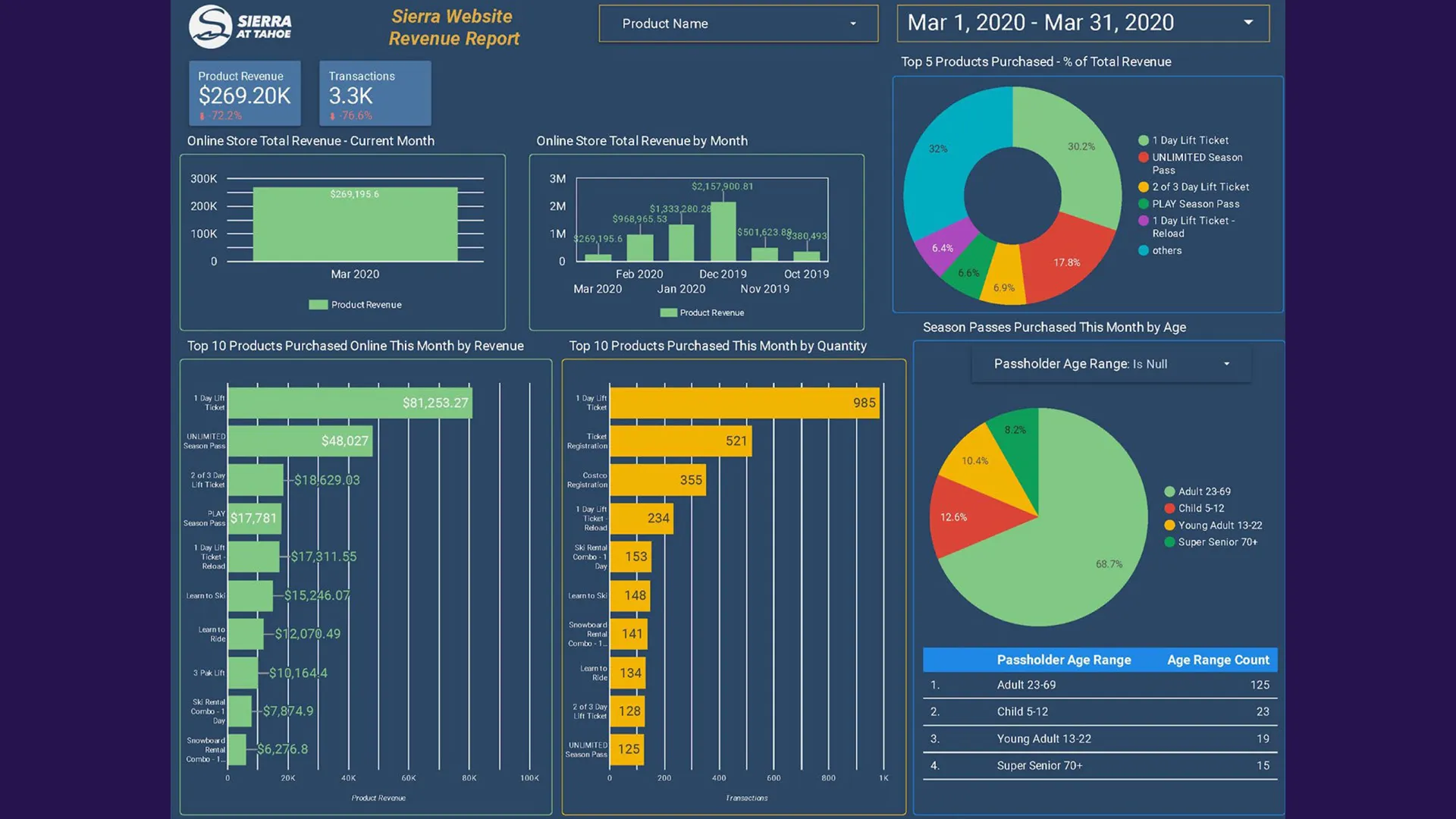
One of the most impactful dashboards focused on online revenue performance.
Metrics Included
- Total ecommerce revenue
- Total transactions
- Revenue trends by month
- Top-selling products
- Revenue by product category
- Quantity sold by product
- Season pass purchases by audience segment
Business Value
This dashboard helped leadership directly connect marketing performance to revenue outcomes.
Instead of discussing engagement metrics in isolation, teams could evaluate:
- Which products generated the most revenue
- Which campaigns influenced purchases
- Seasonal revenue trends
- Customer purchasing behaviors
For a seasonal business like a ski resort, understanding revenue timing patterns was especially valuable for campaign planning and promotional strategy.
Email Marketing Performance Dashboard
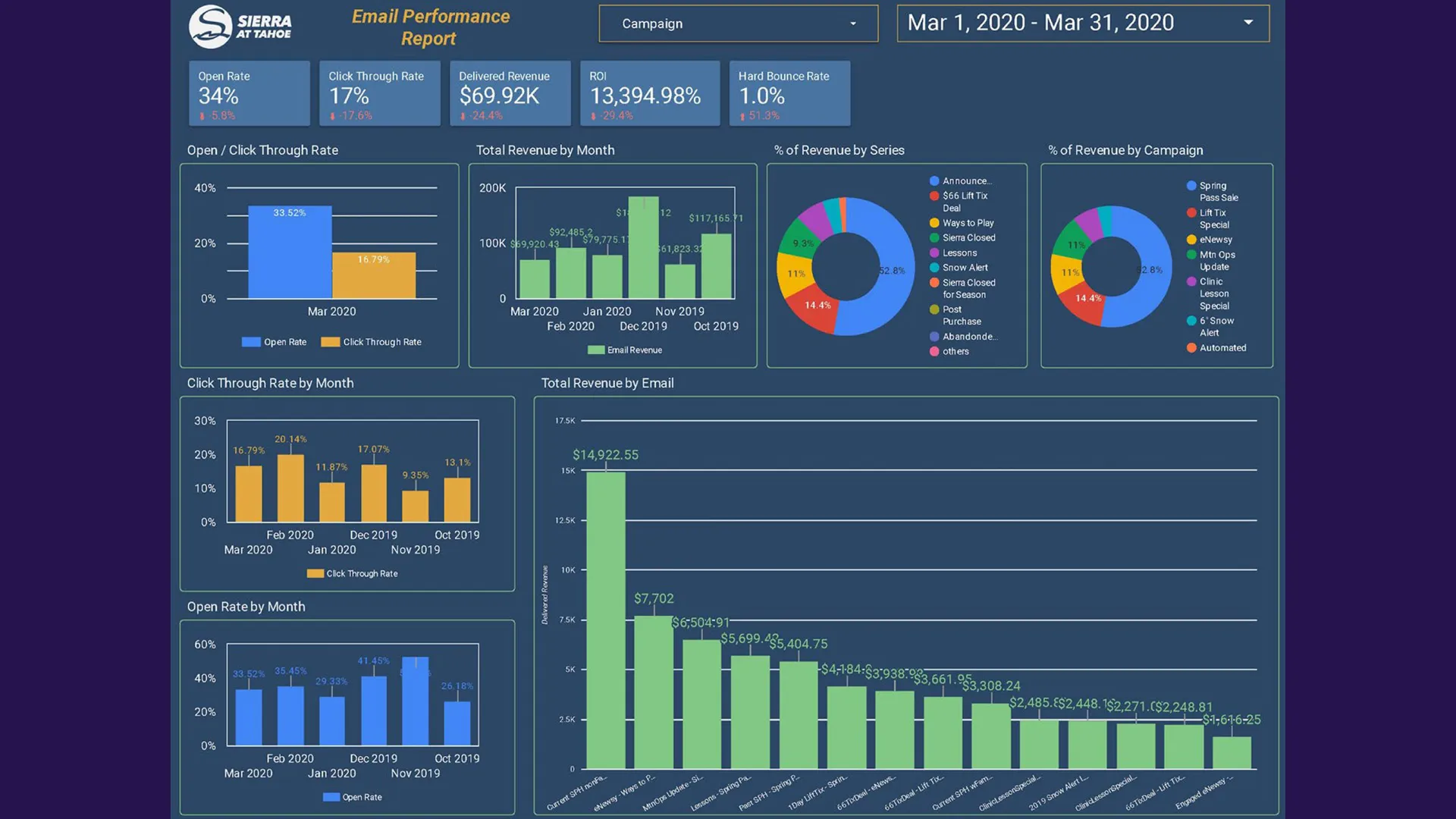
Email marketing remained one of the highest-converting channels, so visibility into campaign effectiveness was critical.
Metrics Included
- Open rates
- Click-through rates (CTR)
- Bounce rates
- Revenue generated from email campaigns
- ROI by campaign
- Revenue by automated email series
- Monthly engagement trends
- Total sends and clicks
Key Technical Focus
The dashboard consolidated performance from multiple email campaigns into a unified reporting experience.
This allowed teams to compare:
- Promotional campaigns
- Automated nurture series
- Seasonal campaigns
- Product launch campaigns
Instead of reviewing isolated reports campaign-by-campaign, leadership could identify broader trends in audience engagement and revenue generation.
Advertising and SEM Dashboards
Paid media reporting was split into two focused dashboard experiences:
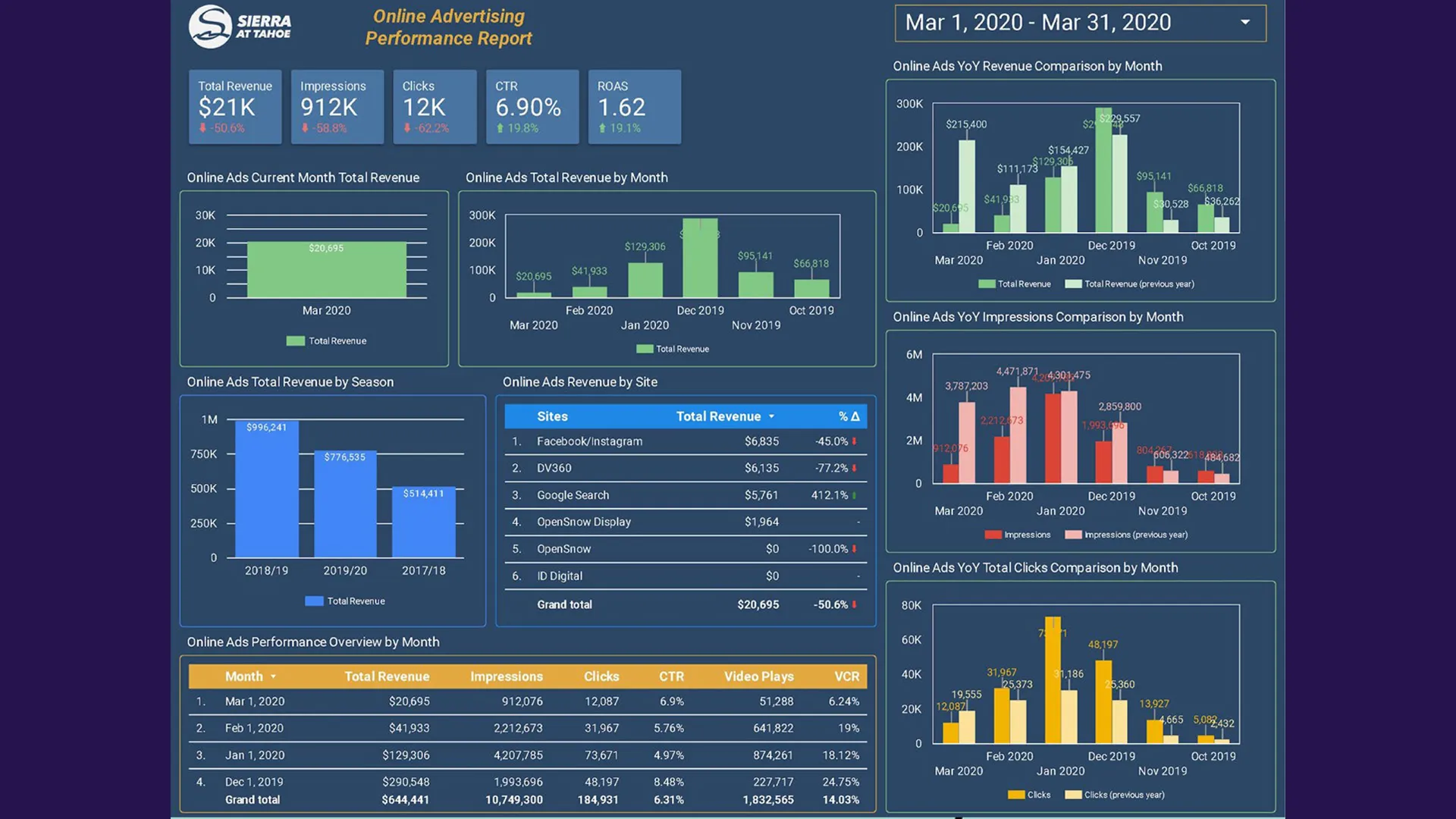
Online Advertising Dashboard
Focused on campaign-level performance metrics including:
- Impressions
- Clicks
- CTR
- Revenue
- Conversions
- Conversion rate
- Top-performing campaigns
SEM Keyword Dashboard
Focused specifically on search keyword performance:
- Keyword impressions
- Clicks
- CTR
- Cost-per-click (CPC)
- Cost-per-conversion
- Top-performing search terms
Separating campaign-level reporting from keyword-level reporting improved readability while still supporting deeper optimization analysis.
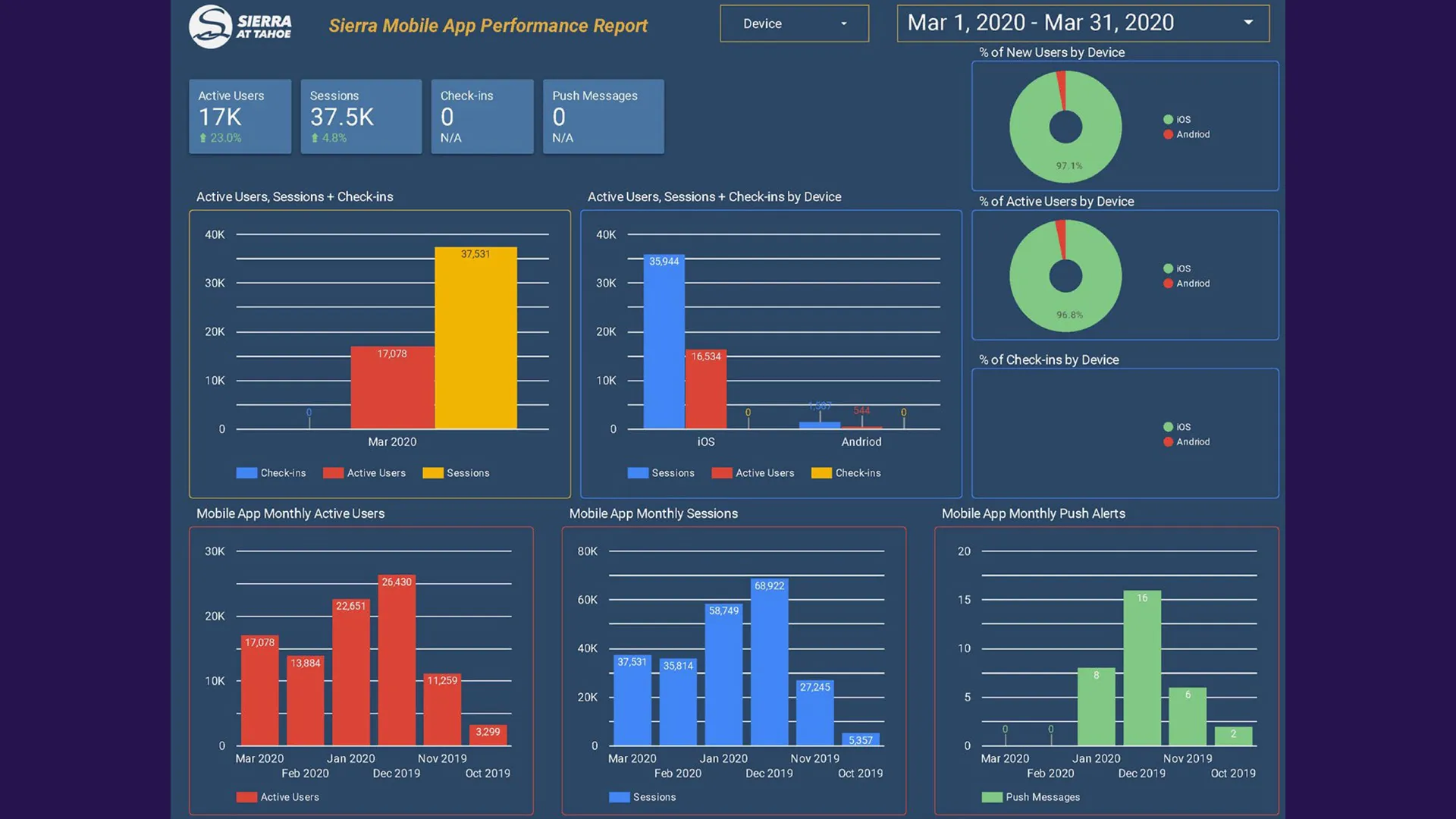
Mobile App Analytics Dashboard
The mobile app dashboard tracked engagement and adoption metrics for the resort’s mobile experience.
Metrics Included
- Active users
- Sessions
- Push notification engagement
- Check-ins
- Device type distribution
- Usage trends over time
This provided insight into how digital experiences extended beyond the website and into on-mountain customer interactions.
SMS and Social Media Dashboards
SMS Dashboard
Focused on subscriber growth and messaging engagement:
- Total messages sent
- Subscriber growth
- Monthly opt-ins
- Campaign performance
Social Media Dashboard
Tracked growth and engagement across multiple social platforms:
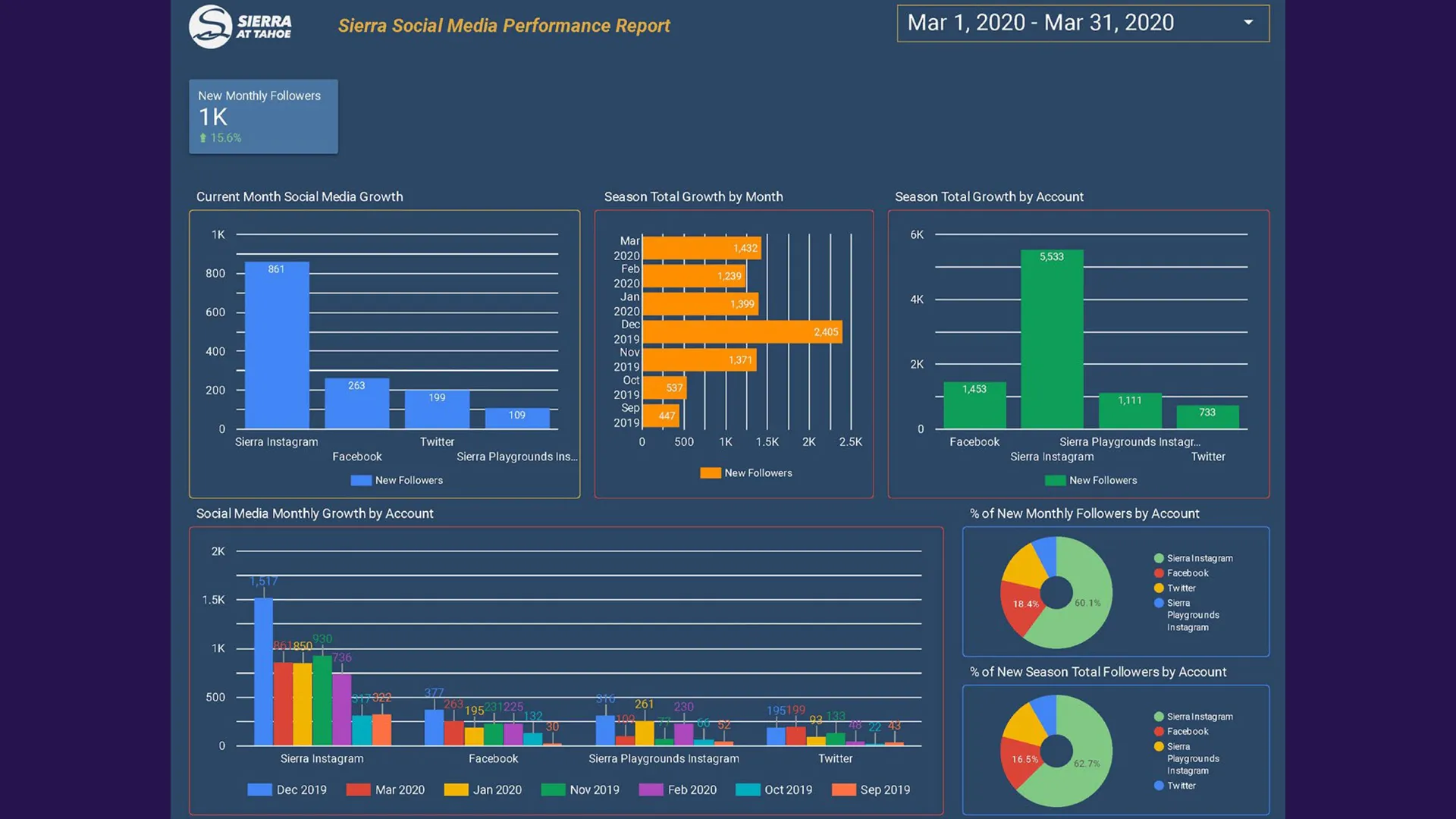
- Monthly follower growth
- Platform audience distribution
- Growth trends over time
- Share of audience by platform
The dashboard combined data from multiple social channels into a unified reporting experience, helping leadership understand overall brand audience growth rather than viewing each platform separately.
PR and Media Reporting Dashboard
One of the more unique dashboards focused on media exposure and public relations performance.
Metrics Included
- Advertising value equivalency
- Share of voice
- Media sentiment
- Media exposure trends
- Top publishers by reach
This dashboard helped connect earned media visibility back to broader marketing performance discussions.
Technical Implementation Details
Why Google Data Studio?
Google Data Studio was selected because it offered several important advantages:
- Cloud-based accessibility
- Interactive dashboards
- Strong Google ecosystem integrations
- Rapid iteration capabilities
- Executive-friendly visualizations
- Low maintenance overhead
Most importantly, it allowed dashboards to remain live and continuously updated instead of becoming static monthly reports.
Designing for Executive Readability
One of the most important lessons from the project was that dashboard usability matters as much as the data itself.
Several design principles guided the implementation:
Consistent Layout Patterns
Every dashboard followed a similar structure:
- High-level KPI summaries at the top
- Trend visualizations in the middle
- Detailed tables and breakdowns lower on the page
This consistency reduced cognitive load and made dashboards easier to navigate during meetings.
Visual Hierarchy
Not every metric deserved equal emphasis.
The dashboards intentionally prioritized:
- Revenue metrics
- Growth trends
- Conversion indicators
- Business-impact KPIs
Supporting metrics remained available without overwhelming primary reporting insights.
Mobile and Device Compatibility
The dashboards were designed to function across:
- Desktop monitors
- Laptops
- Tablets
- Mobile devices
Responsive layout considerations were especially important because stakeholders often reviewed dashboards during meetings or while traveling.
Marketing Impact
The dashboards significantly improved how digital performance was discussed internally.
Key Outcomes Included
- Faster executive reporting workflows
- Improved visibility into marketing ROI
- Better campaign optimization decisions
- More data-informed budget discussions
- Improved cross-department communication
- Reduced manual reporting time
Instead of spending hours compiling reports, teams could focus more energy on analyzing trends and improving performance.
Why This Project Mattered
This project reinforced an important reality about analytics work:
Data becomes valuable when it is understandable.
A technically accurate report that stakeholders cannot interpret has limited business impact. Effective dashboard design requires balancing:
- Technical implementation
- Data modeling
- UX thinking
- Visual communication
- Business strategy
The project was ultimately less about charts and more about enabling smarter organizational decisions.
Lessons Learned
Interactive Reporting Changes Conversations
When stakeholders can filter, explore, and interact with data directly, reporting meetings become more collaborative and strategic.
Centralization Improves Trust
Having a unified reporting ecosystem reduced conflicting interpretations between teams and created greater confidence in the underlying data.
Visualization Choice Matters
Different metrics require different presentation strategies. Choosing the wrong chart type can obscure insights instead of clarifying them.
Executive Dashboards Must Prioritize Clarity
The best dashboards are not necessarily the most complex. Clear, focused reporting often creates more value than overwhelming users with excessive metrics.
Conclusion
The digital marketing dashboard initiative at Sierra-at-Tahoe transformed reporting from a fragmented manual process into an interactive decision-making system.
By consolidating website analytics, ecommerce reporting, email performance, advertising metrics, social growth, app engagement, and PR visibility into a centralized dashboard ecosystem, leadership gained clearer visibility into how digital initiatives influenced business outcomes.
The project demonstrated how thoughtful reporting architecture can improve not only analytics workflows, but also organizational alignment, marketing strategy, and executive decision-making.
At its core, the work was about making complex marketing performance data accessible, actionable, and meaningful for every stakeholder involved.