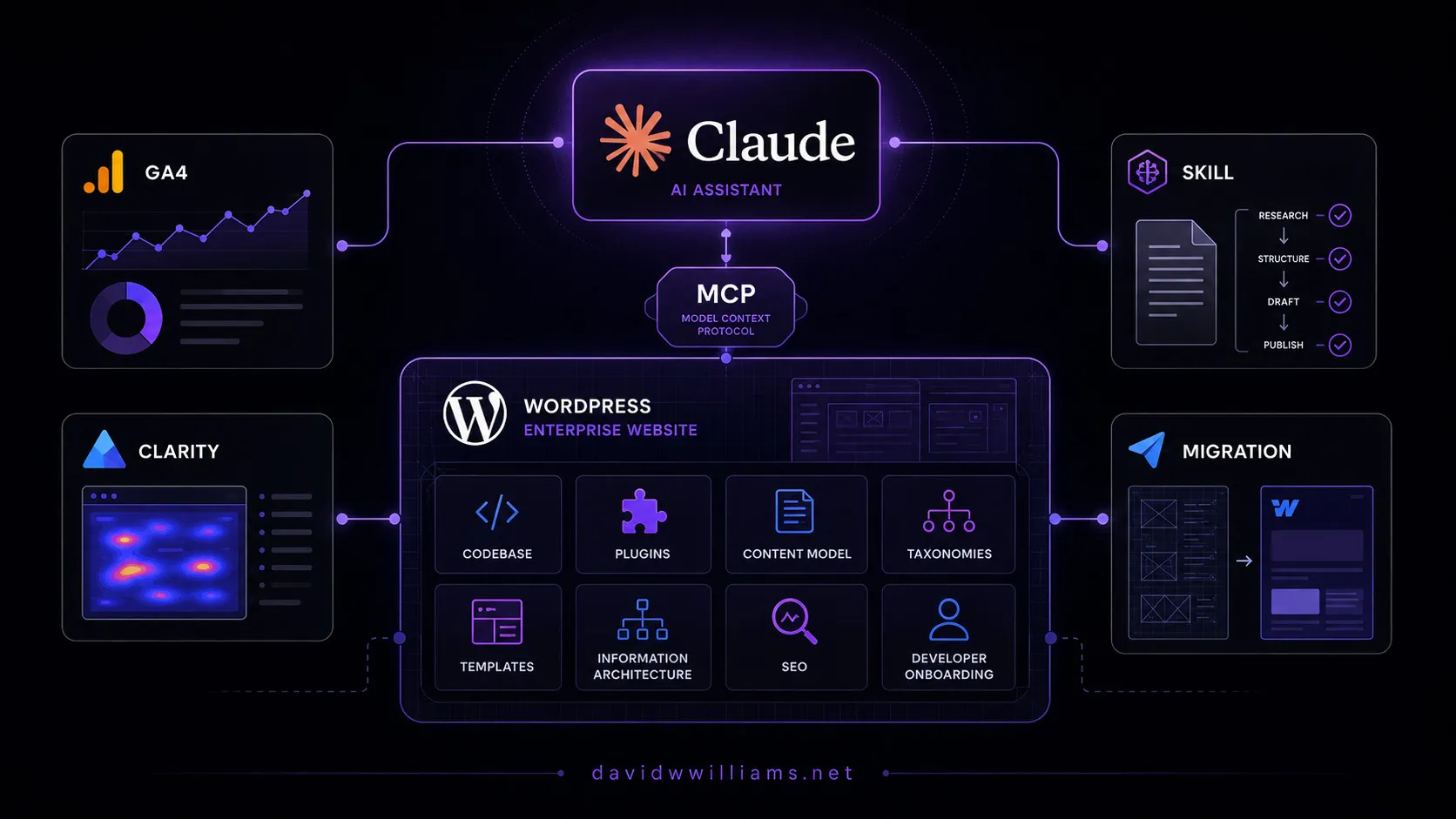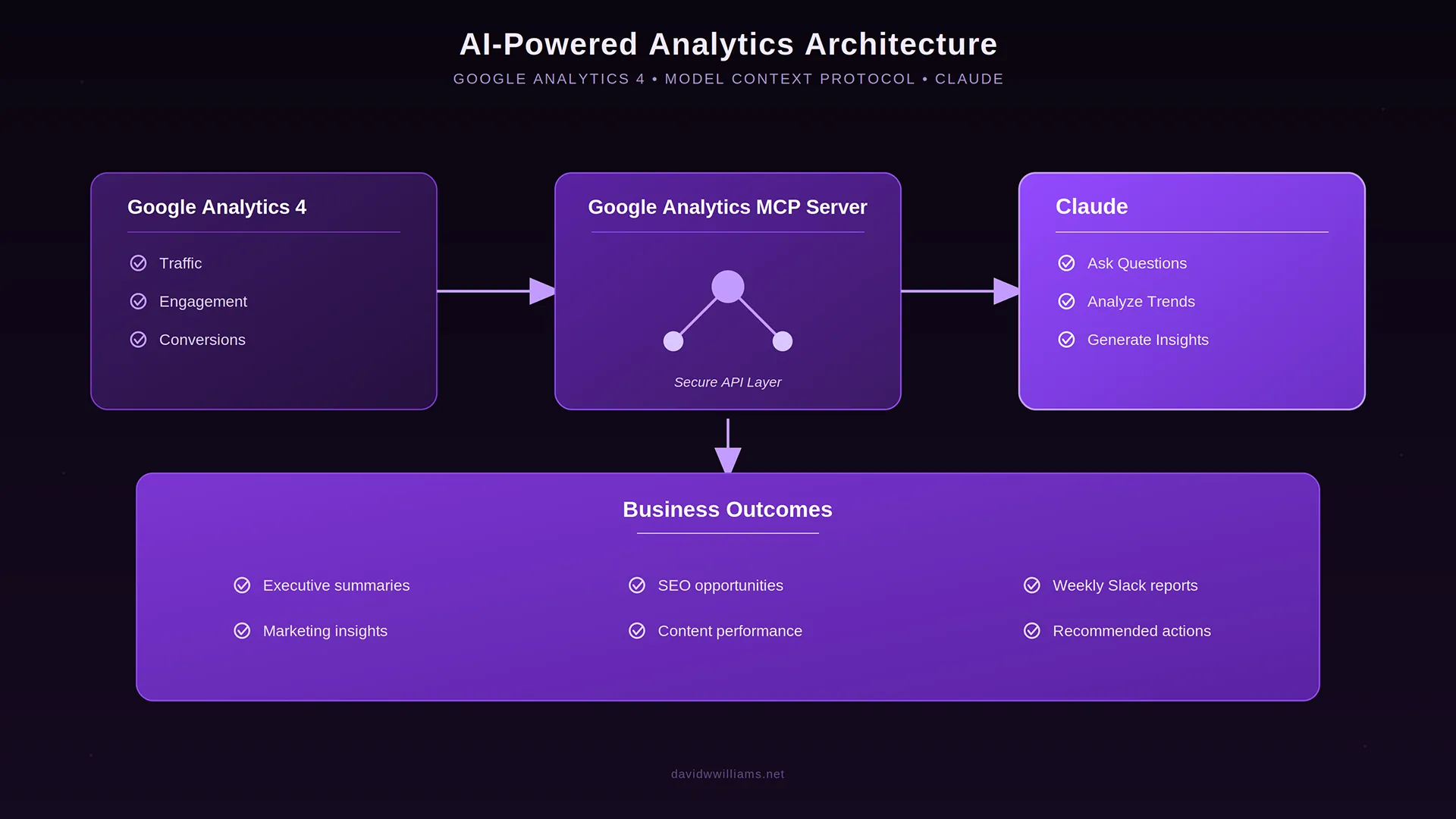
When I first connected Google Analytics 4 to Claude using Google’s official MCP server, my goal was simple: spend less time navigating analytics dashboards and more time understanding website performance.
That integration changed how I interacted with analytics data.
Rather than building reports and manually investigating traffic changes, I could ask Claude questions and retrieve actual GA4 data through Google’s APIs.
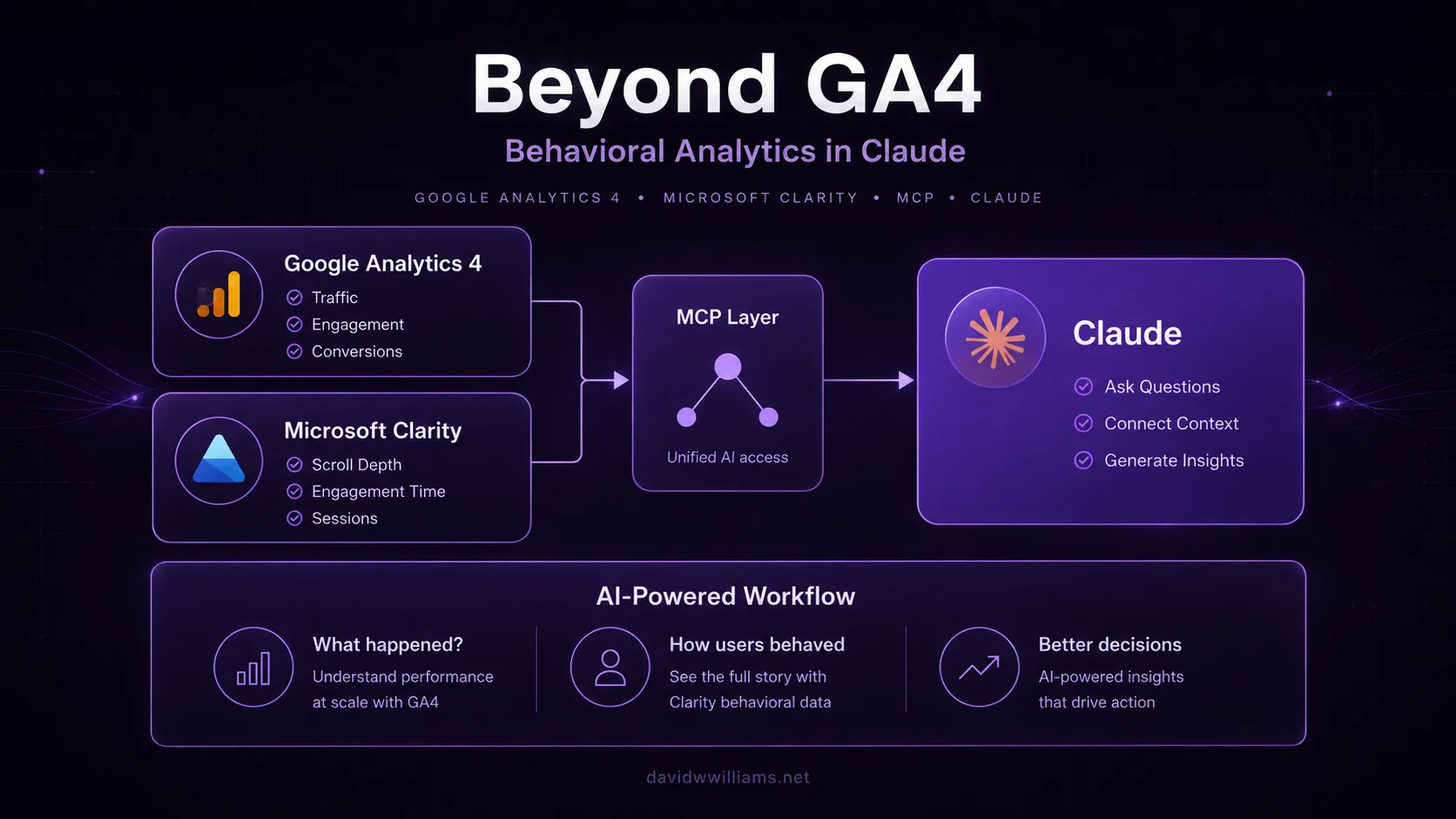
I later added Microsoft Clarity to Claude, bringing behavioral analytics into the same workflow.
GA4 helped me understand what visitors were doing on the website. Clarity added context around how they interacted with the experience.
But another important piece was still missing.
What was happening in Google Search before visitors ever reached the website?
That’s where Google Search Console comes in.
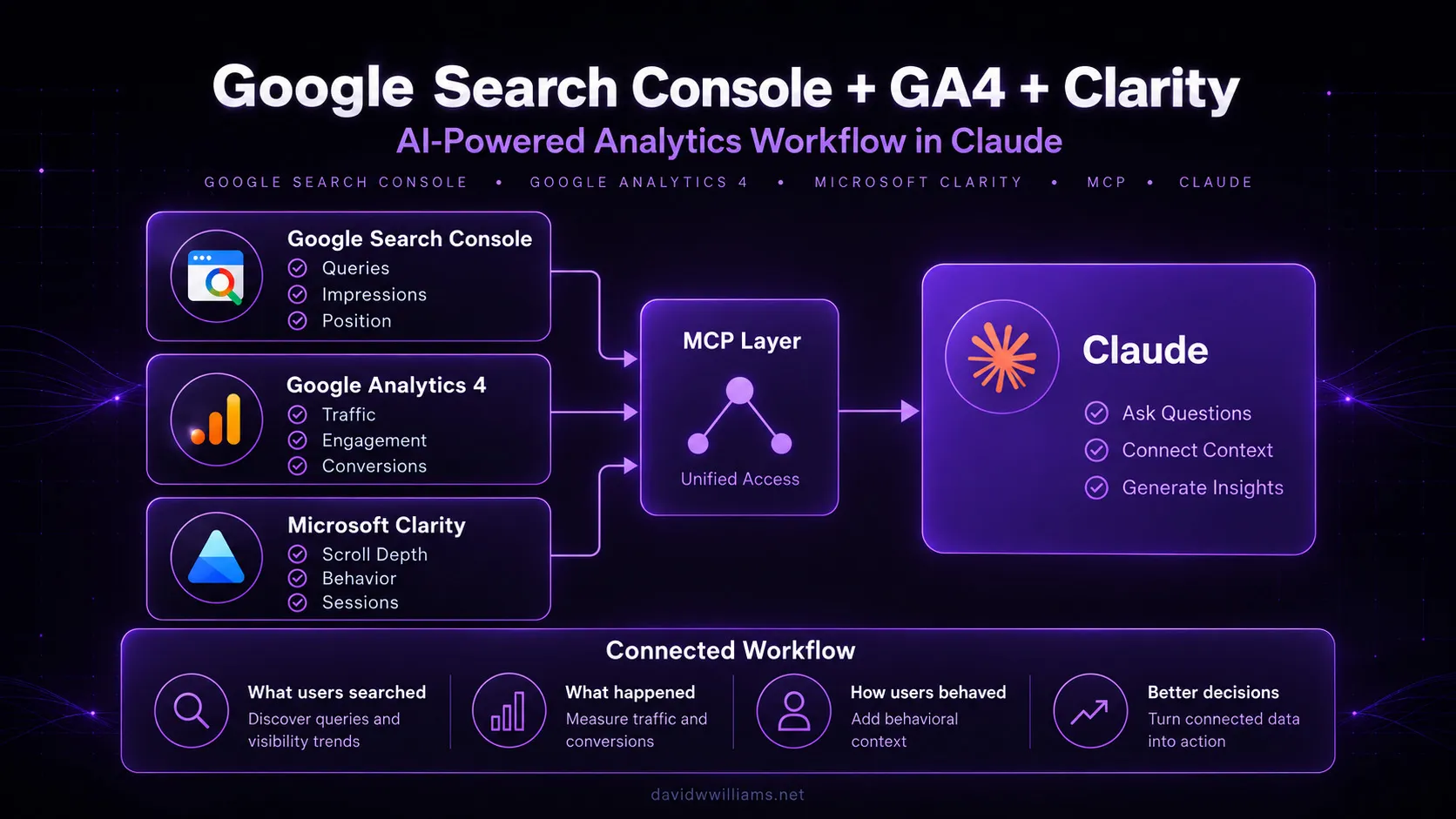
After connecting Google Search Console to Claude through MCP, I now have three complementary analytics platforms accessible through the same AI interface.
And more importantly, each integration remains independently configured, authenticated, and managed.
Why Google Search Console was the next logical step
Google Analytics 4 and Microsoft Clarity provide valuable insights into website performance, but neither offers the same visibility into Google’s organic search results as Google Search Console.
Search Console helps answer questions such as:
- Which search queries generate impressions and clicks?
- Which landing pages are gaining or losing organic search visibility?
- Are rankings improving while click-through rates decline?
- Which pages have opportunities for better organic search performance?
- Are technical indexing issues affecting important pages?
These questions are particularly important when managing enterprise websites where SEO, content performance, and conversion optimization are closely connected.
For example, imagine organic sessions to a product page declined over the last month.
GA4 can identify the traffic decline.
But Search Console can help determine whether that decline corresponds with fewer search impressions, lower rankings, or reduced click-through rates.
Those are very different problems requiring different responses.
Until now, investigating them typically meant moving between GA4 and Search Console, comparing date ranges, and manually connecting the findings.
With both platforms accessible through MCP, Claude can help perform that investigation conversationally.
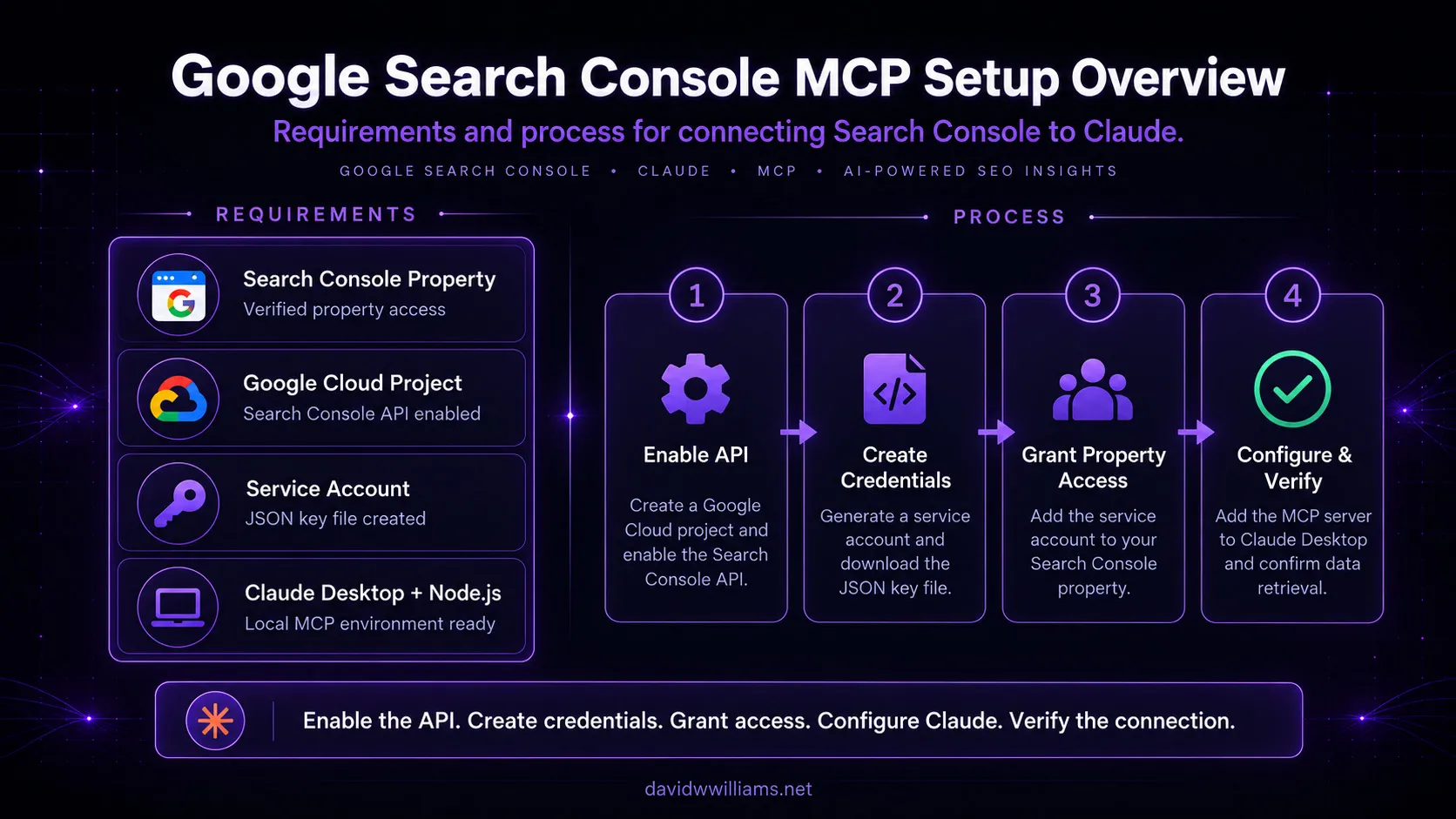
My Google Search Console MCP setup
Unlike my Microsoft Clarity integration, which I installed directly through Claude’s connector interface, Google Search Console required a local MCP server configuration.
That made the process more similar to my original GA4 implementation.
For this setup, I followed Suganthan Mohanadasan’s Google Search Console MCP guide, which documents an open-source MCP server offering tools for analyzing organic search performance.
My environment included:
- Windows development computer
- Claude Desktop
- Node.js and npm
- Google Cloud project with the Search Console API enabled
- Dedicated Google Cloud service account
- Google Search Console property access
- Suganthan’s Google Search Console MCP server
One important decision was keeping this integration completely separate from my existing GA4 MCP server.
My GA4 implementation uses Google’s official Python-based MCP server.
For Search Console, I used Suganthan’s Node.js-based implementation.
Both run locally, but each maintains its own server configuration and Google credentials.
This separation was intentional.
I wanted to expand Claude’s analytics capabilities without introducing unnecessary dependencies between integrations that were already working.
It also provides a cleaner approach to managing permissions, troubleshooting, and future maintenance.
Step 1: Configure Google Cloud and service account access
One lesson from my original GA4 MCP implementation was that authentication deserves careful consideration.
When I connected GA4, I initially used OAuth and Application Default Credentials. Although I eventually got things working, I encountered several authentication and token-related issues along the way.
Switching to a service account proved significantly more reliable for my local environment.
So this time, I started with that approach.
I configured a dedicated Google Cloud project, enabled the Google Search Console API, and created a service account for the GSC integration.
After generating the service account credentials, I granted that account access to the appropriate Search Console property.
This distinction is important.
Just as Google Cloud IAM permissions don’t automatically grant access to a GA4 property, creating a service account doesn’t automatically authorize it to access Search Console data.
The service account must also have the appropriate permissions within Google Search Console.
Once that was configured, I had an independent identity for the GSC MCP server without reusing my GA4 credentials.
Step 2: Add Google Search Console MCP to Claude Desktop
With Google Cloud configured, the next step was registering the new MCP server in Claude Desktop.
Because I already had my GA4 integration running, I didn’t want to replace or modify its configuration.
Instead, I added a second server entry to my existing claude_desktop_config.json file.
The Search Console configuration uses the suganthan-gsc-mcp npm package, along with environment variables that identify the authentication method, service account credentials, and configured Search Console property.
A simplified example looks like this:
{
  "mcpServers": {
    "gsc": {
      "command": "npx",
      "args": ["-y", "suganthan-gsc-mcp"],
      "env": {
        "GSC_AUTH_MODE": "service_account",
        "GSC_KEY_FILE": "C:\\path\\to\\gsc-service-account.json",
        "GSC_SITE_URL": "sc-domain:example.com"
      }
    }
  }
}
This example shows only the new GSC configuration. My existing GA4 server remains a separate entry in the same configuration file.
After saving the changes, I restarted Claude Desktop so it could initialize the new server.
At that point, Claude recognized Google Search Console as an available MCP integration.
The architecture was working.
But I still needed to verify authentication and data retrieval.
Step 3: Troubleshooting a Windows configuration issue
As with my GA4 implementation, I encountered a small configuration issue during the initial verification.
I asked Claude:
“Using only my Google Search Console MCP connection, confirm the configured Search Console property I can access.”
Claude attempted to use the GSC tools but returned an error indicating that the service account JSON key couldn’t be found.
The issue turned out to be straightforward.
The local folder containing my credentials had been named incorrectly, so the path defined in the MCP configuration didn’t match the actual directory.
Once I corrected the folder name to GSC_MCP, the configured credential path resolved correctly.
This reinforced something I learned during my GA4 installation.
When troubleshooting MCP integrations, it’s helpful to validate each layer independently:
- Can Claude discover the MCP server?
- Can the MCP server locate its credentials?
- Can the credentials authenticate with Google’s APIs?
- Does the service account have access to the intended property?
- Can Claude retrieve accurate data?
A successful MCP connection doesn’t necessarily mean the underlying API authentication is working.
Separating these checkpoints makes troubleshooting considerably easier.
Step 4: Verify the integration against Google Search Console
After correcting the credentials path, I ran another test.
This time, I asked Claude:
“Using only my Google Search Console MCP connection, run a site snapshot for my configured property. Do not submit URLs, modify sitemaps, or perform any write operations.”
Claude requested permission to execute the GSC Site Snapshot tool.
After approving the read-only operation, Claude successfully retrieved performance data from my configured Search Console property.
But just like my Microsoft Clarity implementation, I wanted to verify more than connectivity.
I opened Google Search Console directly in my browser and compared the results against the information Claude retrieved through MCP.
The numbers matched.
That confirmed three important things:
- My service account was successfully authenticating.
- The MCP server was accessing the correct Search Console property.
- Claude was retrieving data consistent with the Search Console interface.
For me, that final verification is essential.
AI-generated analysis is only useful if the underlying information is accurate and comes from the intended source.
I also wanted to keep the integration focused on analysis rather than allowing unnecessary write operations.
The GSC MCP server exposes capabilities beyond retrieving performance metrics, including sitemap management and indexing-related actions.
For my workflow, the priority is reading and interpreting data—not modifying Search Console settings or submitting URLs.
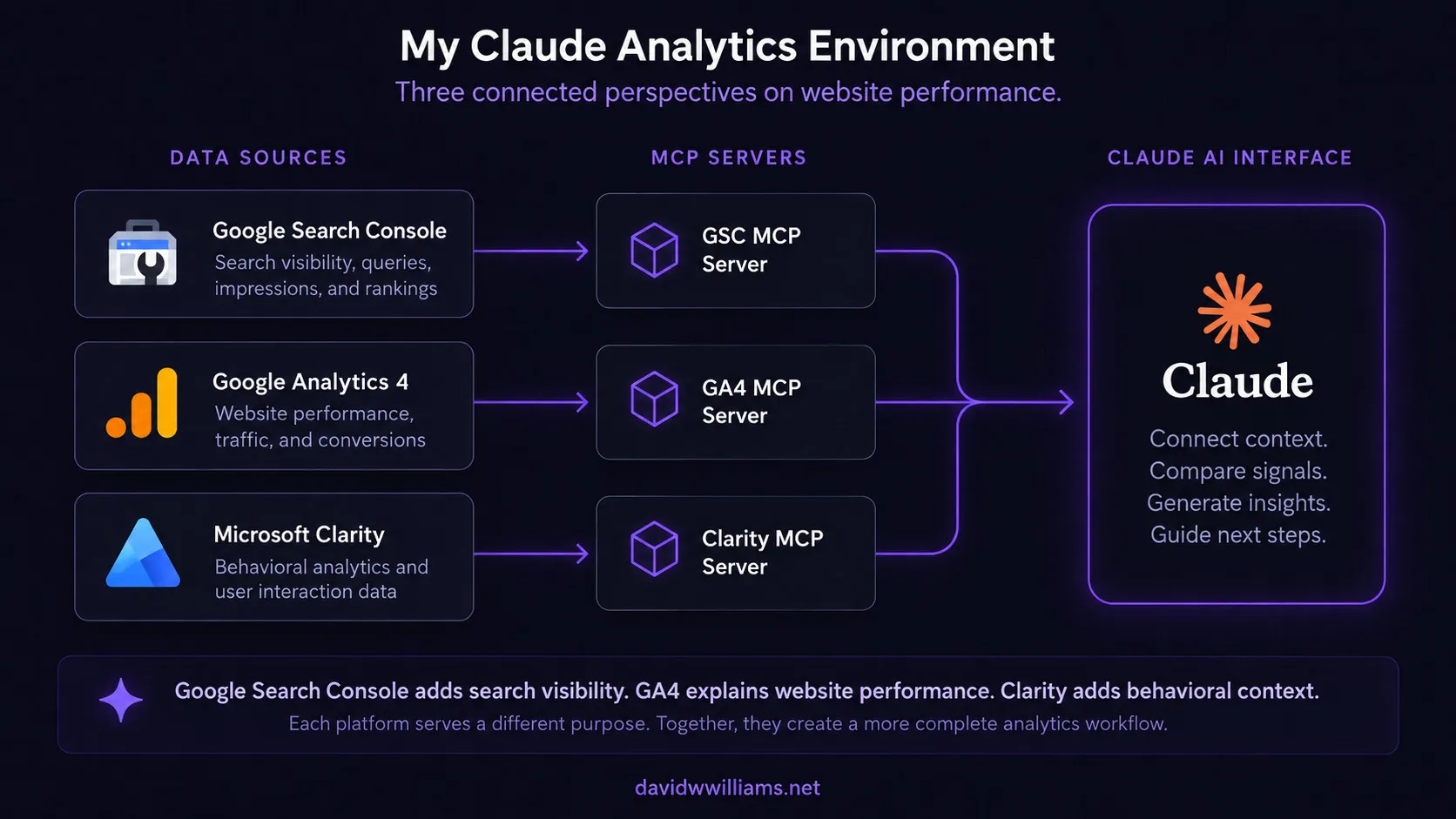
What Google Search Console adds to my AI analytics workflow
With Google Search Console connected, Claude can now work with three different perspectives on website performance.
Google Search Console — Search visibility
- Organic search impressions
- Search queries
- Click-through rates
- Average search positions
- Landing page search performance
Google Analytics 4 — Website performance
- Traffic acquisition
- Sessions and engagement
- Landing page performance
- Key events and conversions
- Traffic source attribution
Microsoft Clarity — User behavior
- Scroll depth
- Engagement patterns
- Device and browser differences
- Behavioral signals that help explain user interactions
Each platform serves a different purpose.
And none should be treated as a replacement for the others.
Search Console provides visibility into how a website performs within Google Search.
GA4 helps explain what happens after visitors arrive.
Clarity adds behavioral context to how people interact with the experience.
Together, they provide a much broader picture of the digital customer journey.
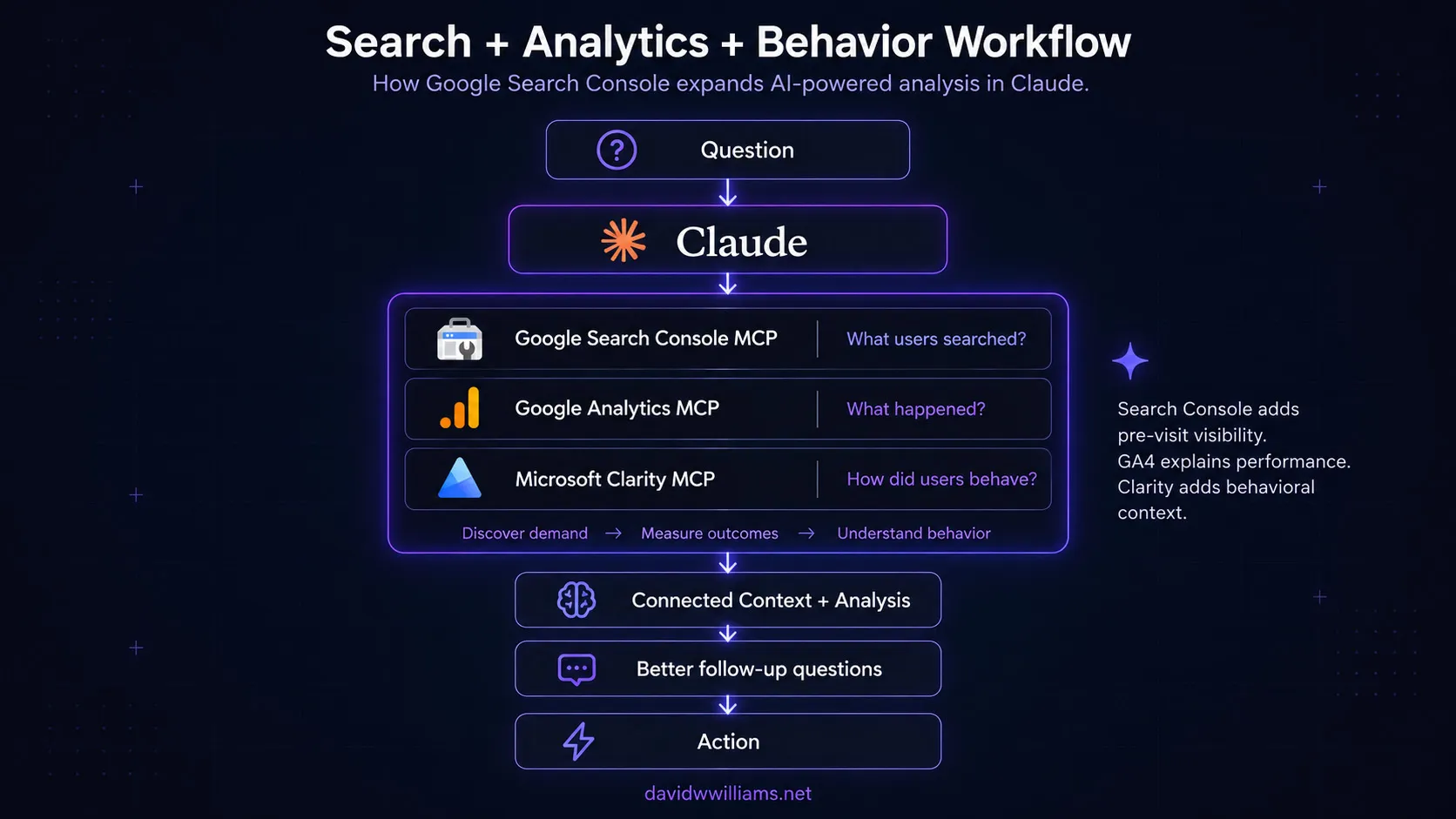
From disconnected reports to a connected investigation
This is where I think the real value of MCP becomes apparent.
Imagine starting with a question like:
“Which of our product pages experienced the largest decline in organic search traffic over the last 28 days?”
Claude can query Google Search Console to identify pages that lost clicks and examine whether impressions, rankings, or click-through rates changed.
The next question could be:
“Compare those pages against GA4 organic sessions, engagement, and conversions during the same period.”
Now the investigation moves beyond search visibility and into actual website performance.
Perhaps one page experienced a decline in organic clicks but maintained its conversion rate.
Another might have stable search visibility but noticeably lower engagement after visitors arrived.
Those differences matter.
The next step could involve Microsoft Clarity:
“For the affected landing pages, are there any behavioral differences between desktop and mobile visitors that deserve further investigation?”
At this point, Claude isn’t simply retrieving reports from three different platforms.
It’s helping connect evidence across systems.
One source identifies a change in search performance.
Another helps determine whether the change affected engagement or business outcomes.
A third provides additional behavioral context.
That is much closer to how I want enterprise digital analytics to work.
There are still important considerations.
Google Search Console clicks and GA4 sessions aren’t interchangeable metrics. They use different collection methods, processing rules, attribution models, and reporting windows.
Clarity also has its own API limitations and data availability constraints.
AI doesn’t eliminate those differences.
It simply provides a more efficient interface for investigating them, provided the underlying analysis accounts for each platform’s methodology.
MCP is becoming part of my digital experience architecture
One thing I’ve noticed throughout these integrations is how my perspective on MCP continues to evolve.
Initially, I viewed MCP as a practical way to connect Claude to individual applications.
With GA4, that meant conversational analytics.
With Microsoft Clarity, it meant adding behavioral context.
Now, with Google Search Console, I’m expanding that approach to organic search visibility.
But the bigger opportunity isn’t simply connecting more applications.
It’s creating a common interface that can help investigate digital experiences across independently managed systems.
For enterprise organizations, that distinction matters.
Marketing, SEO, web development, and analytics teams often work across different platforms, each with its own data model, permissions, and reporting interface.
The challenge isn’t necessarily a lack of information.
It’s connecting that information in a way that helps teams make decisions.
MCP offers an interesting architectural approach to this problem.
The individual platforms remain responsible for collecting and managing their data.
Their APIs and permission models continue to control access.
Claude provides a conversational layer capable of retrieving and analyzing information across those systems.
Instead of asking which platform contains the answer, the starting point can become the business question itself.
That doesn’t replace data governance, dashboards, or human analysis.
But it can significantly reduce the effort required to move from identifying a problem to understanding where to investigate next.
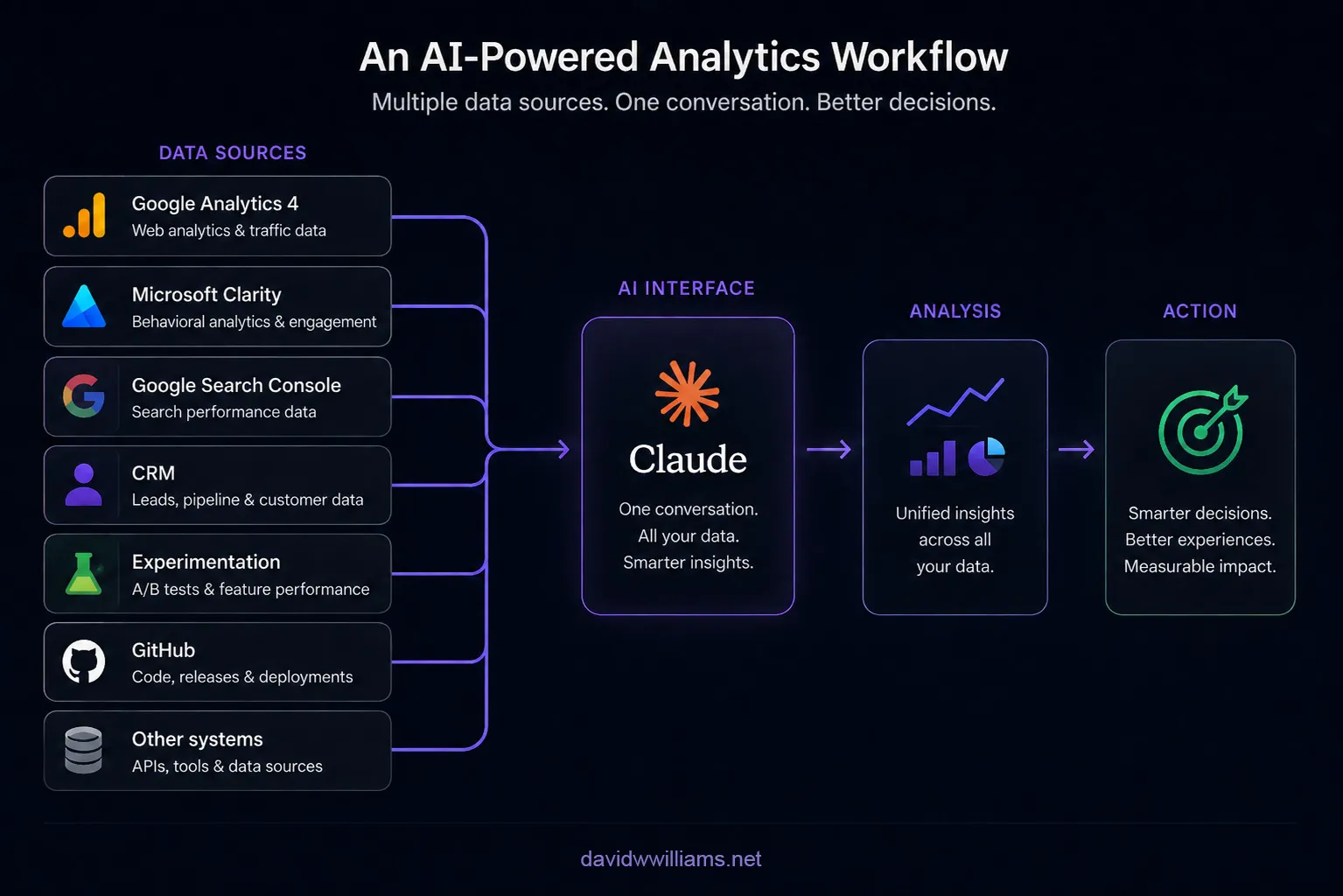
Where I see this going
In my original GA4 MCP article, I wrote about the potential of combining Google Analytics, Search Console, advertising platforms, CRM data, and other systems into a single AI-driven analytics workflow.
At the time, Search Console was simply one of the integrations I wanted to explore.
Now it’s connected and verified.
And with Microsoft Clarity also available, I’m getting closer to the broader architecture I originally envisioned.
The next opportunity is developing more structured, repeatable workflows around questions like:
- Which organic landing pages are losing visibility, and what changed?
- Which high-impression search queries represent opportunities for content optimization?
- Are improvements in organic search visibility translating into meaningful engagement and conversions?
- Which pages should the web and content teams prioritize based on both search performance and business impact?
- How can we turn multi-platform findings into actionable recommendations for stakeholders?
Over time, I also see opportunities to connect this analysis with website deployments, experimentation results, and CRM outcomes.
The goal isn’t to have AI generate more reports.
It’s to use AI to help connect technical performance, visitor behavior, and business results.
Final thoughts
Over the years, I’ve spent a significant amount of time implementing analytics platforms, optimizing enterprise websites, investigating SEO performance, and helping marketing teams understand how their digital experiences are performing.
One of the most persistent challenges has been connecting information across systems.
Google Search Console, Google Analytics 4, and Microsoft Clarity are each valuable platforms.
But their value becomes more interesting when their insights can inform the same investigation.
Connecting Google Search Console to Claude is another practical step toward that workflow.
It also reinforces an approach I’m becoming increasingly intentional about: keeping integrations independently configured and securely managed while making their insights accessible through a common interface.
GA4 tells me what happened on the website.
Microsoft Clarity helps me understand how visitors interacted.
Google Search Console adds visibility into how those visitors discovered the website through organic search.
Claude helps bring those perspectives together.
For me, that’s the real opportunity behind MCP.
Not simply connecting AI to another tool, but building a more connected, efficient, and informed approach to managing digital experiences.